Whop Financial ReportsWhat Whop's New Ledger Reports Show Ecommerce Brands, and What They Miss

By Santosh Kumar, Founder of Shopiator

Whop's financial reports show fees, refunds, disputes, card and ad spend. What the API contains, what ecom brands gain, and what it misses.
On September 18, 2026, Whop announced financial reports: a transparent view of every dollar that moves through your business, covering payment acceptance, card spend, ad spend, granular fees, transfers, and refunds and disputed charges. For an ecommerce brand, the useful question is whether this lets you see true profit per order in one place, since ad spend, refunds, chargebacks, and fees usually sit in four different tools. Whop's tweet is short, so we read its API documentation to see what the reports actually contain.
What the Reports Cover
Whop's announcement lists six areas. Our reading of the API shows how they are built.
- ▶Payment acceptance: sales that run through Whop checkout.
- ▶Card spend: spend on Whop Cards, including authorizations and refunds.
- ▶Ad spend: charges and budgets from Whop Ads.
- ▶Extremely granular fees: the ledger separates fees into many line types, not one blended number.
- ▶Transfers: movements between balances, bank transfers, and withdrawals.
- ▶Refunds and disputed charges: shown as their own categories, with dispute fees separated out.
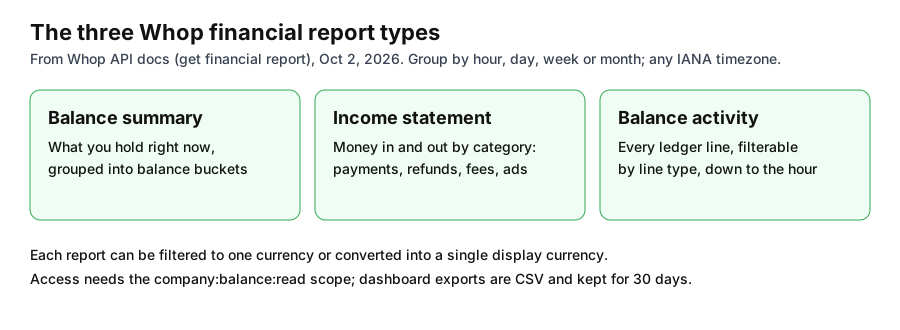
The Three Report Types
| Report | What it answers | Best for |
|---|---|---|
| Balance summary | What you hold, grouped into balance buckets | A quick position check |
| Income statement | Money in and out by category: payments, refunds, fees, advertising, transfers, withdrawals | Monthly profit and loss for your Whop revenue |
| Balance activity | Every ledger line, filterable by line type, down to the hour | Reconciliation with your accountant |
Source: Whop API documentation for get financial report, October 2, 2026.
You can group rows by hour, day, week, or month, and bucket periods in an IANA timezone such as America/New_York. Reports can be filtered to one currency or converted into a single display currency. Hourly grouping works only for account-level balance activity reports. The endpoint needs the company:balance:read permission, and Whop's dashboard can also export tables such as payments, disputes, and ads as CSV files that are kept for 30 days.
Where Fees Appear
The fee detail is the part ecommerce brands will notice. Whop's ledger names fee types separately instead of netting them into a single processing fee. The list includes a buyer fee, billing percentage fee, cross-border percentage fee, FX percentage fee, card interchange, dispute alert fee, dispute representment fee, fraud prevention fee, high-risk merchant fee, affiliate fee, and ad spend charge.
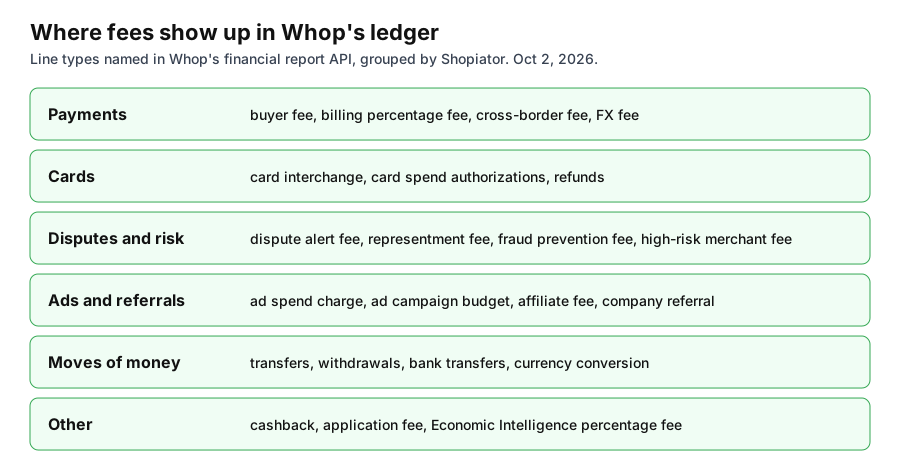
One line type is worth noting: the ledger includes an Economic Intelligence percentage fee. Whop's announcement of Economic Intelligence does not state a price, so ask what you will be charged before accepting its recommended actions.
What It Means for an Ecommerce Brand
- ▶One place for revenue, fees, refunds, and ad spend, if you run checkout and ads through Whop. Normally those sit in your store platform, processor, and ad accounts.
- ▶Dispute cost visibility: representment and alert fees appear on their own, which helps you see the true cost of chargebacks beyond the refunded amount.
- ▶Cross-border and FX costs: international stores can see what currency conversion and cross-border fees take.
- ▶Accountant-friendly exports: balance activity maps to a ledger, and CSV exports are available.
- ▶Margin per period: the income statement gives revenue, refunds, fees, and ad spend by period, so you can compute contribution margin once you add product cost.
What It Does Not Do
- ▶No COGS or shipping: Whop cannot see your product cost, freight, or 3PL fees, so profit per order still needs your own numbers.
- ▶Whop revenue only: sales through Shopify, Amazon, or other checkouts are not in the ledger.
- ▶Ads only if you buy them there: ad spend appears only for Whop Ads. Spend on your own Meta or Google accounts will not.
- ▶Beta API: Whop labels the endpoint as beta, so fields may change.
To judge whether the full stack suits a store, see Whop for Ecommerce Brands, ecom payment processing on Whop, and Whop ecommerce stores vs Shopify. For the ad side, pair the ledger with a platform ROAS view, because spend in the ledger is not the same as attributed revenue.
How to Use It: A Simple Monthly Review
- ▶Pull the income statement by month and note revenue, refunds, fees, and ad spend.
- ▶Pull balance activity filtered to dispute and fee line types and divide by order count to get fee cost per order.
- ▶Subtract product cost and shipping from your own records to get contribution margin.
- ▶Compare ad spend in the ledger with revenue by campaign in your ad platform to check ROAS.
- ▶Export the CSV for your accountant and keep it past the 30-day retention window.
New to Whop or still deciding? Start with why Whop: what it does, what it costs, and who should skip it.
Start a Whop and see the financial reports for yourself.
Try WhopFrequently Asked Questions
What are Whop financial reports?
Ledger-based reports in the Whop dashboard and API that show payments, card spend, ad spend, fees, transfers, refunds, and disputes in one view.
What report types does Whop offer?
The API offers a balance summary, an income statement, and balance activity, grouped by hour, day, week, or month, in one currency or converted to a single currency.
Do Whop financial reports show profit?
Not fully. They show revenue, fees, refunds, disputes, and Whop ad spend, but not product cost, shipping, or sales on other platforms, so you must add those.
Can I export Whop financial data for my accountant?
Whop's dashboard can export tables as CSV files kept for 30 days, and balance activity reports are available through the API.
P.S. The Operator Audit is a full manual review of your account: 10 recommendation sets, a live findings call and a prioritized action plan. The $1,299 comes off your first month if you hire us within 30 days. Get the Operator Audit
Disclosure: Shopiator has an affiliate link for Whop and may earn a commission if you sign up through it, at no extra cost to you. We do not operate, control or guarantee any provider or tool mentioned here, so do your own due diligence.
Keep reading
Whop for Ecommerce Brands: Run Your Store End to End
Whop says it can run a business from LLC to ads to payouts. We checked each step for ecommerce brands, with costs, gaps, and a test plan.
ReadGuideWhop Neobank Blueprint: Launch Your Own Neobank in 15 Minutes
Whop's Neobank blueprint gives platforms branded balances, virtual cards, and payouts. What it includes, how it earns, and what to verify.
ReadGuideWhop Economic Intelligence: What It Does and What the Data Shows
Whop's Economic Intelligence recommends your next best action and runs it. What it does, the 31.8% sales growth claim, and how to test it.
Read