Ecommerce Purchase FlowsTest Your Store Like a Customer

By Santosh Kumar, Founder of Shopiator
Ecommerce purchase flows every founder should test on their own store: the 10 steps from ad click to second order, how to run a real test order on your phone, a pass/fail scorecard, and the 7 email flows that fire around them.
Ecommerce purchase flows are where the money you spent on ads either turns into a customer or quietly leaks out. You paid for the click and the first order. Whether that customer orders again depends on what happens next, and most of it never shows up in a dashboard.
The fastest audit costs one order. Buy something from your own store on your phone, then try to fix the address, track the parcel, start a return and see what brings you back. Every time you would have given up or emailed support, a real customer did.
This guide lists the 10 purchase flows to test, in the order a customer meets them, with what to try and what passing looks like. It also covers the email flows that fire around each step, and the gaps that cost you on Google Shopping too.
What counts as an ecommerce purchase flow
Search for purchase flows and most answers list email automations. Those matter, but they are only half of it. The other half is what the customer actually does on your store and in their inbox, step by step, from the first click to the second order.
- ▶Customer-facing flows: the pages and actions a shopper goes through, like checkout, the thank-you page, the order status page, the returns portal and support.
- ▶Automated flows: the emails and texts your platform sends around those steps, like order confirmation, shipping updates, abandoned cart, post-purchase and win-back.
- ▶Behind-the-scenes flows: payment capture, fulfillment, the carrier handoff and reverse logistics. The customer never sees them, but they feel every delay.
Onward's Josh Payne made the case on X on October 31, 2026: place an order on your own store, try to change the address, track it, start a return, and fix every step where you wanted to give up. Operators replying to the thread added the part most founders skip: do it on your phone, on cellular, logged out, because that is how most shoppers see the store.
I'M BEGGING ECOMMERCE FOUNDERS:
- Josh Payne (@jnpayne) October 31, 2026
> place an order on your own store
> try to change the address after you pay
> track it the way a customer would
> start a return
> see if anything brings you back to buy again
> fix every step where you wanted to give up
How to run a test order on your own store
A test order only works if it looks like a real customer's. The admin view, your desktop and your saved login all hide the problems a first-time buyer hits.
- 1.Use your phone on cellular data, not office wifi. Slow pages and buttons hidden below the fold only show up here.
- 2.Log out and use a fresh email that is not on your list, so you get the first-time customer experience and every email a new buyer gets.
- 3.Start from an ad or a Google Shopping listing, not your homepage. That is where paid traffic lands.
- 4.Pay with a real card for a real product. Test gateways skip the declines, 3D Secure checks and wallet buttons real buyers see.
- 5.Screen record the whole thing and note the time at each step. You will want the recording when you brief your developer or app support.
- 6.Write down every moment you would have emailed support. Each one is a ticket, and often the end of the customer relationship.
- 7.Refund the order when you are done. It will count once as a conversion; that is small noise you can ignore or retract in Google Ads.
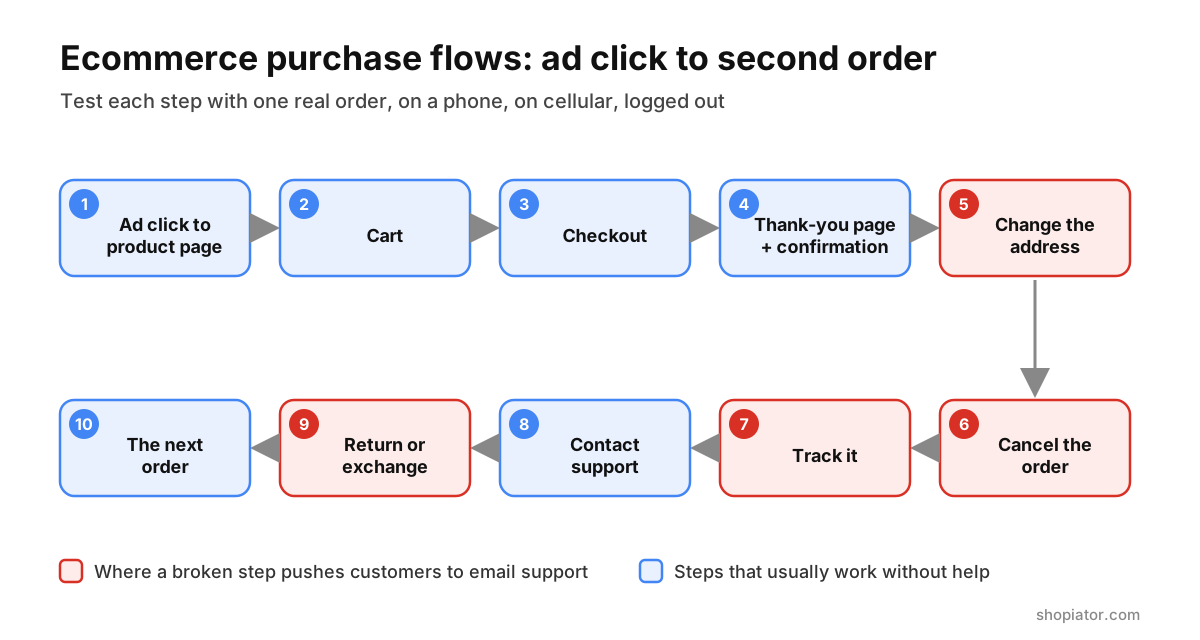
The 10 ecommerce purchase flows to test, in order
1. Ad click to product page
Click your own Shopping ad or search ad on your phone. Check that the page loads fast on cellular, that the price and stock match the ad, and that the add to cart button is visible without scrolling. A price or availability mismatch between your product feed and the page can also get products disapproved in Google Merchant Center.
Pass if: the page loads in a few seconds, the price matches the ad, and you can add to cart without hunting for the button.
2. Cart
Open the cart and look for the total. Baymard's checkout research found that extra costs being too high is the top reason shoppers abandon (40%), and 12% leave because they cannot see or calculate the total cost up front. Shipping that only appears at the last step is the classic leak.
Pass if: you can see shipping, or at least a clear shipping rule, before checkout.
3. Checkout
Go through checkout as a guest. Baymard lists forced account creation (18%), a long or complicated checkout (17%) and not enough payment methods (9%) among the main reasons people abandon. Check that express wallets show on mobile, that address autocomplete works, and that a discount code from your own emails actually applies.
Pass if: you can pay as a guest with a wallet in under a minute, and the total matches what the cart told you.
4. Thank-you page and confirmation email
Every buyer sees this page, and most stores waste it. Check that the confirmation email arrives within minutes, that the thank-you page tells the customer what happens next, and that it offers something useful: a way to fix the address, a matching product, or a switch to a subscription. A cleanser buyer offered the matching moisturizer right here is a far better second-order prompt than a generic 10% code.
While you are here, check your tracking. Your Google Ads purchase conversion should record once for this order, with the right value. If it records twice or not at all, every bidding decision Google makes on your account is working from bad data. Our Klaviyo over-reporting guide covers the email-side version of the same problem.
Pass if: the email lands within minutes, the page has a clear next step, and exactly one conversion records with the right value.
5. Change the address or quantity
Pretend you typed the wrong apartment number. Can you fix it yourself, or does the store tell you to email support? Shopify lets merchants edit an order in the admin before it ships, but a customer fixing their own address or quantity usually needs an order editing app on the thank-you or order status page. Being told to email support an hour after paying is exactly where a first order becomes a one-time order.
Pass if: you can change the address yourself before it ships, or support fixes it the same day without back and forth.
6. Cancel the order
Try to cancel within the first hour. A customer who cannot cancel tends to file a chargeback instead, which costs you the order, a fee and a mark against your payment account. Shopify customer accounts can let shoppers request cancellations and returns themselves, but only if you turn it on.
Pass if: there is a visible way to cancel or request a cancellation before fulfillment.
7. Track it
Wait for the shipping email and track the parcel the way a customer would, without asking your team. Can you tell where the order is from the emails alone? If not, expect "where is my order" tickets. A branded tracking page keeps the customer on your site instead of the carrier's; see our order tracking apps for Shopify for the options.
Pass if: every shipping update arrives on time, links to a tracking page on your domain, and gives a realistic delivery date.
8. Contact support
Send a real question through every channel you list: email, chat, the contact form, a reply to the order email. Time the first reply. Check that the reply comes from a person who can see the order, not a bot that loops you back to the FAQ.
Pass if: you get a useful answer within one business day on every channel you advertise.
9. Return or exchange it
Start a return on your phone. Does the flow offer an exchange or a swap first, and is there a reason to take it, such as instant store credit or a free label? Returns are where most stores lose the second order. Swapping the product first keeps the sale; a full refund with a small gift still leaves the door open.
Check that the policy you see matches the one in Google Merchant Center. Google can show your return policy on ads and listings, asks that it is consistent across Merchant Center and your website, and lists undisclosed refund restrictions and return shipping costs under its misrepresentation policy. Our Merchant Center misrepresentation guide walks through the fixes.
Pass if: you can start a return without emailing anyone, an exchange is offered first, and the terms match your Merchant Center return policy.
10. The next order
Keep the test inbox open for a few weeks. Watch what arrives after the purchase: a how-to for the product, a review request, a reminder of any credit you earned, a cross-sell that matches what you bought. If nothing gives you a reason to come back, you are paying full acquisition cost for every order.
Pass if: the post-purchase emails help you use the product first and sell second, and any credit you were given gets a reminder before it expires.
70.22%
Average online shopping cart abandonment rate across 50 studies. Extra costs are the top reason shoppers leave checkout.
Source: Baymard Institute
Purchase flow test scorecard
Copy this into a doc, run the test order and mark each row. Anything that fails goes on this week's fix list, ahead of new ad creative.
| Purchase flow | What to try | Pass if |
|---|---|---|
| Ad click to product page | Tap your own Shopping ad on cellular | Fast load, price and stock match the ad |
| Cart | Open the cart before checkout | Shipping cost or rule is visible |
| Checkout | Pay as a guest with a wallet | Under a minute, total matches the cart |
| Thank-you page | Read it and wait for the email | Clear next step, email within minutes, one conversion |
| Address change | Fix the address after paying | Self-serve, or fixed same day |
| Cancel | Cancel within the first hour | A visible way to cancel before it ships |
| Tracking | Track from the emails only | Updates on time, tracking page on your domain |
| Support | Ask a real question on every channel | Useful human reply within one business day |
| Return or exchange | Start a return on your phone | No email needed, exchange offered first |
| Next order | Watch the inbox for three weeks | Helpful emails, credit reminders, matching offer |
The email flows that fire around your purchase flows
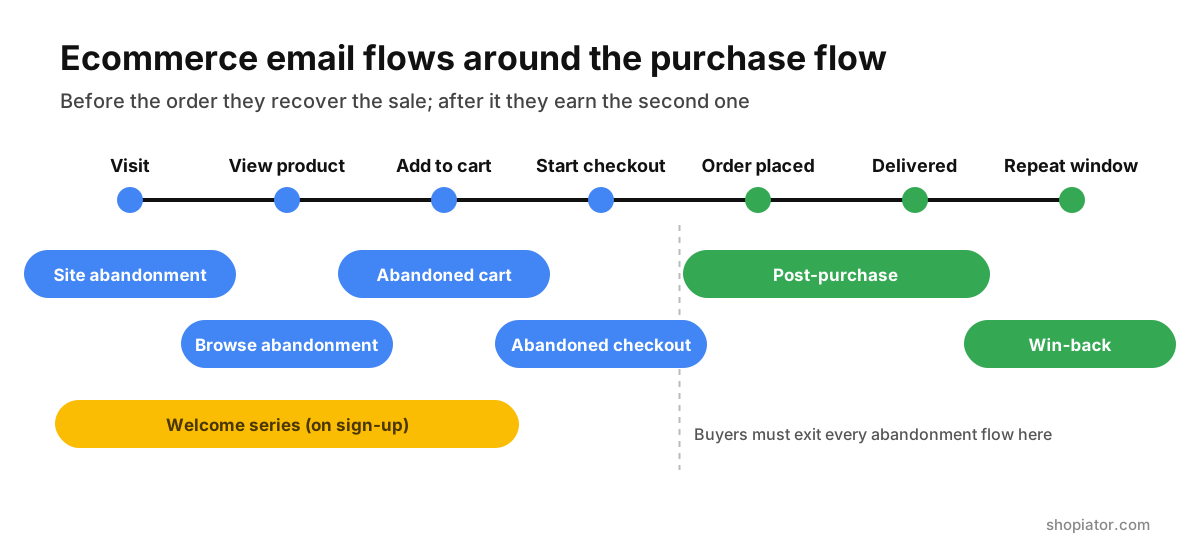
Your test order should also trigger the automated flows. Use a second fresh email to test the ones that fire when someone does not buy. These are the seven most stores run:
| Email flow | Trigger | What to check on your test |
|---|---|---|
| Site abandonment | A known visitor leaves without viewing a product | It fires once and stops when they come back |
| Browse abandonment | Views a product, no add to cart | It shows the product they viewed, not a best-seller |
| Abandoned cart | Adds to cart, leaves before checkout | The link restores the cart on mobile |
| Abandoned checkout | Starts checkout, does not pay | It stops the moment the order is placed |
| Welcome series | Joins the email list | Any sign-up code works at checkout |
| Post-purchase | Places an order | Buyers leave the abandonment flows straight away |
| Win-back | No repeat order within the usual window | The window matches how often people reorder |
The most common failure is overlap: a customer pays, then gets an abandoned checkout email an hour later. Our abandoned cart flows guide covers the timing and the suppression rules.
Why broken purchase flows cost you on Google too
A broken purchase flow does not just lose the second order. On Google it compounds:
- ▶Merchant Center: a price that differs between feed and page, hidden shipping costs or unclear refund terms can lead to disapprovals or a misrepresentation suspension.
- ▶Store ratings: unhappy buyers leave the reviews Google can show next to your Shopping ads. See how to get Google Shopping rating reviews.
- ▶Bidding: if the purchase conversion records twice or with the wrong value, Smart Bidding optimizes toward the wrong orders.
- ▶Cost per customer: every customer who never comes back means paying full acquisition cost again for the next order.
How often to retest your purchase flows
- ▶After every change: a new theme, checkout app, returns app or shipping rule.
- ▶Before every big sale: Black Friday, Cyber Monday and any launch you are putting ad budget behind.
- ▶Monthly, on a phone: apps update on their own, so a flow that worked last month can break with nobody touching the store.
Put it in the calendar like a finance review. One order, one hour, and the fix list it produces is usually worth more than the next round of creative.
Frequently Asked Questions
What are ecommerce purchase flows?
They are the steps a customer goes through to buy and buy again: landing from an ad, the cart, checkout, the thank-you page and confirmation email, changing or cancelling the order, tracking it, contacting support, returning or exchanging it, and the emails that bring them back for a second order.
Which purchase flow should I test first?
Start with checkout and the thank-you page, because a break there loses the sale you already paid for. Then test the address change and the return, the two moments where customers most often end up emailing support.
How do I test my store without messing up my data?
Place one real order with a real card on your phone, using an email that is not on your list, then refund it. It will record one conversion in Google Ads and your email platform. That is small noise, and you can retract the Google Ads conversion with a conversion adjustment if you want clean numbers.
Can customers change their shipping address after ordering on Shopify?
Shopify lets merchants edit an order in the admin before it is fulfilled. A customer fixing their own address or quantity after checkout usually needs an order editing app on the thank-you or order status page; otherwise they have to contact support.
What is the difference between purchase flows and email flows?
Purchase flows are what the customer does on your store. Email flows are the automated messages that fire around those steps: site, browse, cart and checkout abandonment, welcome, post-purchase and win-back. Test both on the same test order.
Do return and shipping policies affect Google Shopping?
Yes. Google can show your return policy on ads and listings, asks that it is consistent across Merchant Center and your website, and its misrepresentation policy covers undisclosed shipping costs and refund restrictions, which can lead to account suspension.
How often should I retest my purchase flows?
After every theme, app or checkout change, before every big sale like Black Friday, and at least once a month on a phone. Apps update on their own, so a flow that worked last month can break without anyone touching the store.
Want the operator to check this on your account?
The Operator Audit is a full manual review of your account: 10 recommendation sets, a live findings call and a prioritized action plan. The $1,299 comes off your first month if you hire us within 30 days.
Keep reading
How to Get Google Shopping Rating Reviews
How to get Google Shopping rating reviews in 2026: the 50-review rule, the Product Ratings interest form, Judge.me and XML feed setup, the 2 to 4 week onboarding, policies that get reviews rejected, and fixes when stars don't show.
ReadGuideAd Hooks: 50 to Test on Meta and Google Ads This BFCM
Ad hooks for BFCM 2026: 50 fill-in-the-blank openers for Meta Reels, Facebook feed, YouTube and Demand Gen, grouped by angle, plus how to test them before Black Friday on November 27.
ReadRankingPrime Circle Agency Review: Pricing, Trustpilot and Alternatives
Prime Circle Agency review for 2026: its BM 8000+ Meta agency ad accounts, six spend tiers from $199 to $1,599 a month plus 3.5% above $40,000, the SHOPIATOR code for 10% off, a 4.4 Trustpilot score from 21 reviews, and how it compares to ExiScale and UpROAS.
Read