How to Get Google Shopping Rating Reviews

By Santosh Kumar, Founder of Shopiator
How to get Google Shopping rating reviews in 2026: the 50-review rule, the Product Ratings interest form, Judge.me and XML feed setup, the 2 to 4 week onboarding, policies that get reviews rejected, and fixes when stars don't show.
How to get Google Shopping rating reviews comes down to three things: 50 real product reviews, product identifiers that match your Merchant Center feed, and a reviews feed that Google accepts. Get those right and the gold stars show under your products in Shopping ads and free listings.
Most guides stop at "get 50 reviews and fill out a form". That skips the parts that actually block ecom brands: which reviews count, why GTINs decide whether a review attaches to a product, which policies get a feed rejected, and why stars can show on organic listings weeks before they show on ads.
This guide covers the full setup, from Google's own requirements to the Judge.me route most Shopify stores use, the manual XML route, and how to fix stars that never appear. We run Google Shopping for ecom brands, so it is written from the Merchant Center side.
What Google Shopping rating reviews are
Google Shopping rating reviews, officially called Product Ratings, are the 1 to 5 star rating and review count shown on a product in Shopping ads and free listings. Google builds that rating from several sources: merchants, review aggregators, review sites and Google users. That means one product can show reviews from other stores selling the same GTIN.
They are not the same as store ratings, which rate your whole business, or the review snippets your own site earns in organic search through structured data. Each comes from a different program with different rules.
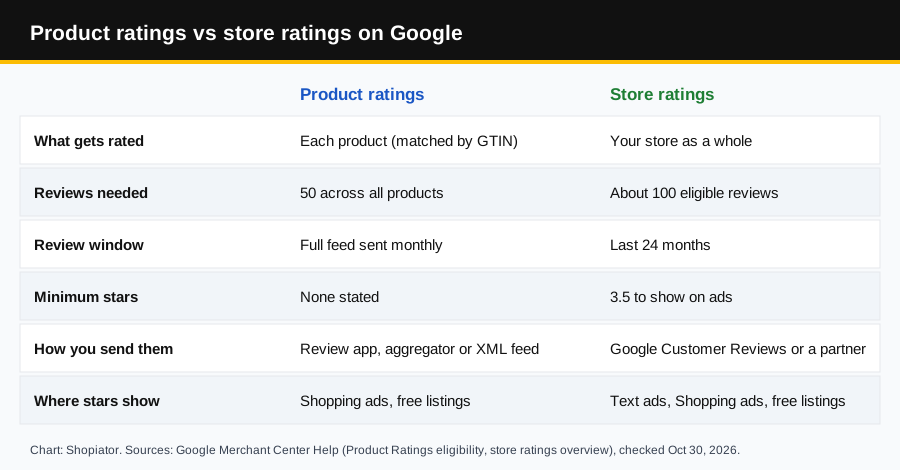
| Rating type | Product ratings | Store ratings |
|---|---|---|
| Rates | One product | Your whole store |
| Reviews needed | 50 across all products | About 100 eligible reviews |
| Freshness | Full feed at least monthly | Last 24 months |
| Minimum average | Not stated | 3.5 stars for ads |
| Sent through | Review app, aggregator or XML feed | Google Customer Reviews or a review partner |
| Shows on | Shopping ads, free listings | Text ads, Shopping ads, free listings |
Want both? You can. Product ratings make the product look proven, store ratings make the store look safe to buy from. This guide focuses on product ratings, with store ratings covered near the end.
Google Shopping rating reviews requirements
Google's Product Ratings eligibility page lists the rules for merchants who submit reviews. Check every one before you start, because a single gap (usually identifiers) is why most feeds never go live.
- ▶50 reviews minimum across all of your products. Below 50, ratings won't show on Google Shopping or Google Ads.
- ▶An approved Merchant Center product feed. Reviews attach to products already in your feed, so the products must be live first.
- ▶Product identifiers: GTIN gives the best match rate. Google falls back to SKU, brand + MPN and product URL, which match fewer reviews.
- ▶Domain match: the domain in each review's product_url must match the website registered in Merchant Center.
- ▶A standalone account or sub-account with admin access, not a Multi-Client Account (MCA).
- ▶Monthly updates: send the full reviews feed at least once a month or it is deemed stale and loses eligibility.
- ▶Policy compliance: reviews must follow the Product Ratings policies (covered below).
- ▶A supported country: Product Ratings runs wherever Shopping ads and free listings are available.
50 reviews
The minimum Google sets across all your products before Product Ratings can show on Google Shopping or Google Ads.
Source: Google Merchant Center Help: Product Ratings eligibility
Three ways to send your reviews to Google
| Route | Best for | Interest form | Effort |
|---|---|---|---|
| Review app (Judge.me, others) | Shopify stores | Handled by the app | Low |
| Supported review aggregator | Brands already on one | Handled by the aggregator | Low |
| Your own XML feed | Custom or non-Shopify stores | Required | High |
Pick the route that matches where your reviews already live. Switching review apps later means migrating reviews, and Google only accepts reviews you collected yourself, so starting on the right app saves months.
How to get Google Shopping rating reviews with Judge.me
Our pick for Shopify stores: Judge.me
- ▶Why: 5.0 stars from 49,351 reviews, unlimited reviews on the free plan, and the simplest route to Google Shopping stars.
- ▶Google Shopping feed: on the $15 a month Awesome plan, sent through Google's API, so no interest form or XML file.
- ▶Try it: the Awesome plan has a 15-day free trial. Install Judge.me on Shopify.
Judge.me is the review app we put most Shopify clients on. It has a 5.0 rating from 49,351 reviews on the Shopify App Store, a free plan with unlimited reviews, and its $15 a month Awesome plan sends your reviews to Google Shopping for you. Since April 7, 2025 it uses Google's API instead of a file you upload yourself.
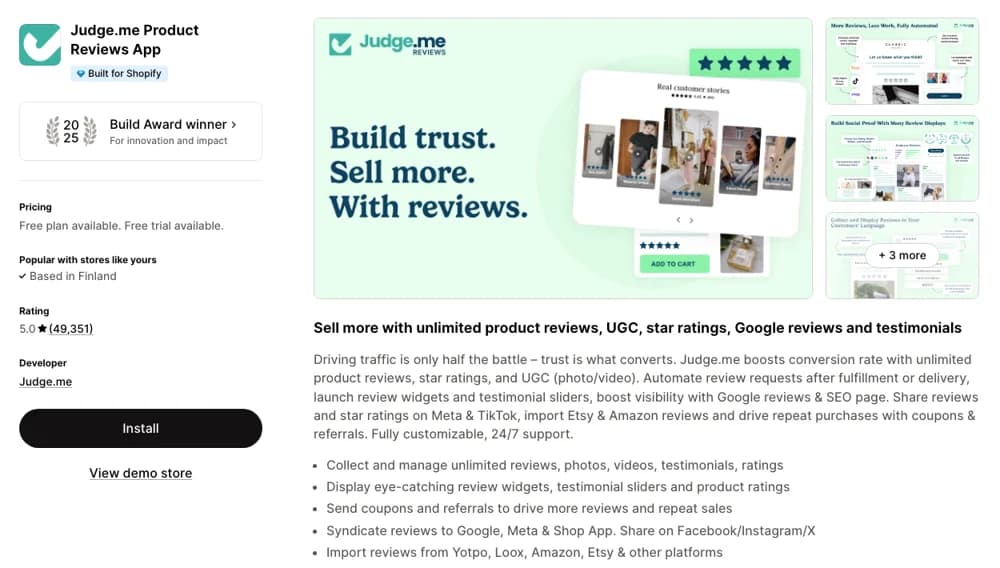
Free plan for reviews, Google Shopping stars on the $15 Awesome plan with a 15-day trial.
Install Judge.me on Shopify- 1.Get your products into Merchant Center first. Judge.me does not do this. Use Google & YouTube or a feed app, and allow about 10 business days for product approval.
- 2.Collect 50 eligible reviews. Turn on Judge.me's automatic review request emails, including requests to past orders.
- 3.Install Judge.me and start the Awesome plan. Install Judge.me on Shopify, then start the 15-day free trial of the Awesome plan.
- 4.Open Settings > Google, SEO and AI > Google Shopping in Judge.me and click Set up your feed. Confirm you have submitted your product feed.
- 5.Check the Review eligibility summary. It shows your eligible review count and refreshes weekly, on Mondays.
- 6.Click Edit your feed and turn on GTIN and MPN so the identifiers match your product feed. Set the reviewer name format and the profanity filter here too.
- 7.Click Submit feed and confirm.
- 8.Wait about 10 days, then check a recently reviewed product on shopping.google.com from the country you sell in.
What Judge.me sends to Google, and what it doesn't
- ▶Sent: reviews from request emails (including past orders), the on-site widget, QR codes, Klaviyo requests, Shop App sync, and verified Loox, Yotpo or Stamped migrations.
- ▶Not sent: Amazon, Etsy, AliExpress and spreadsheet imports, unverified migrations, manual request emails, review links and webhook submissions.
- ▶Written reviews only: star-only ratings are left out, and reviews caught by the spam filter are excluded.
- ▶Hidden reviews still go: on the API feed, review status (published, hidden, pending, archived) does not decide what is sent.
Know this before you switch it on
- ▶Reviews sent through the API feed can't be removed from Google later, even if you hide or delete them in Judge.me.
- ▶The API feed goes to a Merchant Center account Judge.me manages, so you won't see the reviews in your own Merchant Center. You check them on live listings.
- ▶Judge.me's older XML feed ends on January 15, 2027. Stores still on it see a yellow "Upgrade your Google Shopping" banner.
- ▶Judge.me does not send store ratings (seller ratings) to Google yet.
Other review apps such as Yotpo, Okendo, Loox and Stamped also offer Google Shopping review feeds. Check which plan includes it before you commit: in our best Shopify apps review, Yotpo's $15 Starter plan included Google Shopping reviews.
How to get Google Shopping rating reviews with your own XML feed
If your store is not on Shopify, or your review tool cannot send reviews to Google, you can send them yourself. This route needs Google's approval first and a developer, or a tool that builds the file for you.
- 1.Fill out the Product Ratings interest form. Use Google's form and have your Merchant Center ID ready. A Google agent reviews it before your account is enabled.
- 2.Build a product reviews XML file in Google's Product Review Feeds schema. Each review needs a reviewer, a rating, review text, a timestamp, the product_url and at least one identifier (GTIN, or brand + MPN, or SKU).
- 3.In Merchant Center, go to Products & Store > Reviews > Product reviews, then Manage product review sources > Add product reviews.
- 4.Choose a file source. Google recommends a scheduled fetch from a URL you host (http, https or sftp). You can also use SFTP, Google Cloud Storage, a one-off upload or the API.
- 5.Wait out onboarding. The source shows as inactive at first, which is normal. Google's data quality and policy review takes about 2 to 4 weeks.
- 6.Keep it fresh. Schedule the fetch at least monthly. Reviews missing from a new upload are removed, so always send the full set.
Each data source must be under 4 GB, and you can compress up to 5,000 XML files into one .zip. Most stores never get near that, but it matters for large catalogs with years of reviews.
How long Google Shopping stars take to show
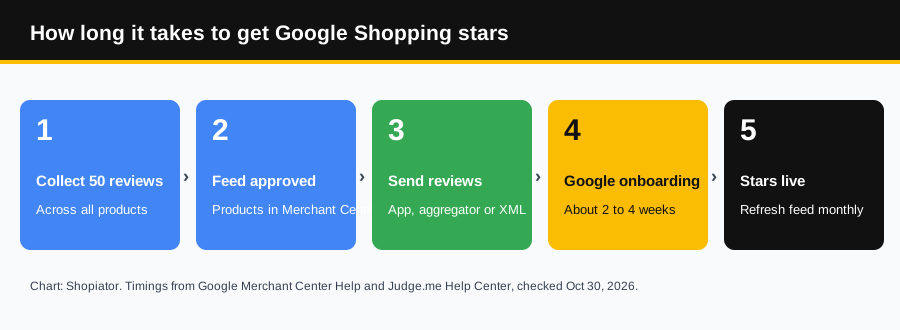
- ▶Product feed approval: about 10 business days if your products are new to Merchant Center.
- ▶Onboarding review: 2 to 4 weeks after the first submission. During the first 3 to 4 days the source shows inactive while it syncs.
- ▶New reviews after onboarding: up to 7 to 10 days to sync.
- ▶Ads vs free listings: stars often appear on free listings first. Whether a sponsored Shopping ad shows stars is Google's call in each auction.
Plan for six weeks from "we have 50 reviews" to stars on ads. If BFCM or a launch is coming, start well before it.
Collect your first 50 reviews and send them to Google Shopping from one app.
Start Judge.me's free trialHow to collect your first 50 reviews
Fifty sounds small, but only reviews you collected from real buyers count, so imported marketplace reviews won't get you there. These are the fastest honest routes.
- ▶Email past customers. Most review apps can send requests to orders placed before you installed them. This is usually the biggest single jump.
- ▶Time the request to delivery, not the order date. A request that arrives before the parcel gets ignored.
- ▶Ask for photos. Photo reviews convert better on your site, and Google accepts customer-taken photos that follow its image rules.
- ▶Add a QR code insert in the box that links straight to the review form.
- ▶Offer an incentive only if it doesn't depend on sentiment. Google allows incentivized reviews if the reward is not tied to a positive review and the review is marked as incentivized in the feed.
- ▶Follow up once. One reminder a week after the first request is normal. More than that annoys customers.
Google Shopping review policies that get feeds rejected
Google runs a policy review on every feed before it goes live, and repeat violations can lead to account suspension. These are the rules that catch ecom brands most often.
| Policy | What it means for you |
|---|---|
| Share all reviews | Send low-star reviews too. You may not delete old reviews from the feed. |
| Only real buyers | Reviews must be honestly solicited from customers who made a purchase. |
| You must own them | Reviews syndicated from other sources, like marketplace imports, are not accepted. |
| No AI-written reviews | Reviews primarily generated by an automated program are not allowed. |
| Fair incentives | Rewards can't depend on sentiment and must be disclosed in the feed. |
| Clean content | No phone numbers, emails, links, personal data or offensive language in the text. |
| On-topic | Reviews mainly about shipping or the store experience may be removed. |
| Original language | Don't translate reviews. Submit them as written. |
| Real 5-point scales | You can't turn a yes/no question or a smaller scale into 5 stars. |
The off-topic rule catches more stores than people expect. "Fast shipping, great seller" is a store review, not a product review. Judge.me's feed settings let you filter store-experience keywords out of the product feed for that reason.
Why your Google Shopping reviews are not showing
| Symptom | Likely cause | Fix |
|---|---|---|
| "Missing or invalid product_id" or STRONG_IDS_NOT_PRESENT | No GTIN, MPN or brand in one of the feeds | Add matching GTIN, MPN and brand to both the product feed and the reviews feed |
| Feed stuck on inactive | Onboarding still running | Normal for the first days. Allow 2 to 4 weeks |
| Stars on free listings but not ads | Ad auction decides when stars show | Nothing to fix. Keep reviews flowing |
| Fewer reviews on Google than on your site | Imports, star-only or off-topic reviews filtered | Collect more first-party written reviews |
| Reviews from other stores on your product | Shared GTIN, Google aggregates by product | Expected for branded products sold by many stores |
| Ratings disappeared | Feed not refreshed in over a month | Schedule a monthly or daily fetch |
| Duplicate reviews | Old XML source and new API feed both live | Delete the old source in Merchant Center data sources |
Check from the right country. Product ratings show per market, so a US store checking from Thailand may see nothing. Search the product on shopping.google.com with a VPN or set the country, and add your store name to the search.
Missing GTINs hurt more than reviews. They also limit how well your Shopping products match search queries. Our best Shopify apps for Google Merchant Center post covers the feed apps that fill them in.
How to get store ratings on Google too
Store ratings are the separate star rating for your whole business. They show on text ads, Shopping ads and free listings, and Google says store ratings on text ads drive a 2% improvement in click-through rate on the Search Network on average.
- ▶Collect about 100 eligible post-purchase reviews from the last 24 months, per country.
- ▶Keep your average at 3.5 or higher. Below that, star ratings stop showing on ads until it improves.
- ▶Use Google Customer Reviews (free, inside Merchant Center) or one of Google's supported review partners such as Trustpilot or Yotpo.
- ▶Check your rating at google.com/storepages?q=yourstore.com. The page only loads once you meet the thresholds.
2% higher CTR
Google's average click-through-rate improvement from store ratings on text ads on the Search Network.
Do Google Shopping rating reviews actually help?
Stars do two jobs in a Shopping grid where every product photo looks alike: they stop the eye, and they answer "is this any good?" before the click. That tends to lift click-through rate and filter in buyers who already trust the product. Google does not publish a lift figure for product ratings, so treat any "stars boost CTR by X%" claim without a source with caution.
What we see in client accounts is simpler: on products with stars, low-rated items stand out as fast as good ones. If a product sits under 4 stars, fix the product, the listing or the expectations before you spend more on it. For the campaign side, see our Google Shopping feeder and converter architecture.
Other review apps mentioned
Sources
Requirements, policies, timelines and Merchant Center paths: Google Merchant Center Help (Product Ratings eligibility, Product Ratings basics, Product Ratings policies, Upload a product reviews data source, Google store ratings overview) and Google Ads Help (About store ratings), checked October 30, 2026. Judge.me setup, plan and feed rules: Judge.me Help Center and the Judge.me Shopify App Store listing, checked the same day. Recommendations: Shopiator.
Frequently Asked Questions
How many reviews do you need for Google Shopping star ratings?
At least 50 product reviews across all of your products, not 50 per product. Google's Product Ratings eligibility page says ratings won't show on Google Shopping or Google Ads below that. Each product still needs its own reviews to show stars.
How long does it take for reviews to show on Google Shopping?
Google says reviews usually go live 2 to 4 weeks after the first submission, once your review feed passes its data quality and policy review. Newly uploaded reviews then take up to 7 to 10 days to sync. Judge.me says to allow about 10 days after you submit its feed.
Do I need to fill out the Product Ratings interest form?
Only if you send the reviews feed yourself through Merchant Center. If a supported review aggregator or your review app submits reviews to Google for you, it handles onboarding. Judge.me's API feed, for example, sends reviews through a Merchant Center account Judge.me manages.
Can I get Google Shopping stars with Judge.me's free plan?
No. Judge.me's free plan covers unlimited reviews and Google rich snippets, but the Google Shopping product ratings feed is on the Awesome plan at $15 a month, which has a 15-day free trial.
What is the difference between product ratings and store ratings?
Product ratings are stars for a specific product, matched mostly by GTIN, and need 50 reviews across your catalog. Store ratings (formerly seller ratings) rate your whole store, usually need about 100 eligible reviews from the last 24 months, and need an average of 3.5 or higher to show on ads.
Why are my reviews not showing on Google Shopping?
The usual causes are missing or mismatched GTINs between your product feed and review feed, fewer than 50 eligible reviews, a feed not refreshed in the last month, reviews that break Google's policies, or simply that ad auctions don't always show stars. Organic listings often show ratings before sponsored ads do.
Can I delete bad reviews from my Google Shopping feed?
Google's Product Ratings policies require you to share all reviews, including low-star ones, and say you may not delete old reviews from the feed. Judge.me also notes that reviews sent through its API feed cannot be removed from Google afterwards.
Are imported reviews from Amazon or AliExpress allowed?
Google requires that you collect and own the reviews you send, and it does not accept reviews syndicated from other sources. Judge.me's API feed excludes Amazon, Etsy, AliExpress and spreadsheet imports for that reason.
Want the operator to check this on your account?
The Operator Audit is a full manual review of your account: 10 recommendation sets, a live findings call and a prioritized action plan. The $1,299 comes off your first month if you hire us within 30 days.
Disclosure: Some links on this page are referral links, including Judge.me, and we may earn a commission if you sign up through them, at no extra cost to you. We do not operate, control or guarantee any app or service mentioned here, so do your own due diligence.
Keep reading
Ad Hooks: 50 to Test on Meta and Google Ads This BFCM
Ad hooks for BFCM 2026: 50 fill-in-the-blank openers for Meta Reels, Facebook feed, YouTube and Demand Gen, grouped by angle, plus how to test them before Black Friday on November 27.
ReadGuideHire a Video Editor or Make AI UGC Yourself?
Should you hire a video editor for your ecom ads or make AI UGC videos yourself? Real 2026 costs from Upwork ($10-$60/hr editors, $15-$50/hr AI specialists), what DIY AI UGC costs, and when each one wins.
ReadGuideAI UGC Course: Why Ecom Teams Should Make Their Own UGC Ads
The AI UGC course we tell our ecom clients to put their whole team through: what The AI UGC System by Marketing Mafia teaches, what it costs, what buyers say, and why your own team beats an outside creative strategist.
Read