Last updated: September 29, 2026
8 Best Shopify Apps for Google Merchant Center (2026)Tested and Ranked by Shopiator
The best Shopify apps for syncing products to Google Merchant Center, ranked by a Google Ads agency that runs Shopping and Performance Max for Shopify brands. Live App Store ratings, 1-star review share, cost at 1,000 to 10,000 products, and the two-feed-app mistake that doubles your catalog.
In Google Shopping and Performance Max, your product feed is your targeting. There are no keywords to bid on. Google reads your titles, product types, and attributes and decides which searches your products deserve to show for.
That makes the app that sends your Shopify catalog to Google Merchant Center one of the most important apps in your store, and one of the easiest to get wrong. Shopiator is a Google Ads agency for ecom brands; we run Shopping and PMax for Shopify stores, and we use Google & YouTube and Simprosys across 10-15 Shopify client stores.
Those two are tested by us. The other six are ranked on signals from merchants and ecom communities: live App Store ratings and review volume, share of 1-star reviews, the newest complaints, and pricing at real catalog sizes, all pulled on September 29, 2026.
Quick Comparison: Every Merchant Center App at a Glance
| App | Rating (reviews) | 1-star | Free plan | Paid from | Best for |
|---|---|---|---|---|---|
| 1. Google & YouTube (Tested) | 4.5 (5,501) | 12% | Free, full catalog | Free | Simple catalogs, one country |
| 2. Simprosys (Tested) | 4.9 (4,898) | 1% | 21-day trial | $4.99 (500 products) | Custom labels, multi-channel feeds |
| 3. Multifeed | 4.9 (1,108) | 1% | 10 products | $5.95 (1,000 products) | Metafields, multi-language feeds |
| 4. Ced Google Shopping Feed | 4.6 (552) | 4% | 50 SKUs | $13 (100,000 SKUs) | Large catalogs, low cost |
| 5. Nabu (AdNabu) | 4.7 (538) | 4% | 100 products, 10 orders | $39.90 (unlimited) | AI optimization, error fixing |
| 6. AR: Google Shopping Feed Pro | 5.0 (258) | 0% | 14-day trial | $7 ($1 per 1,000 products) | Cheapest paid per product |
| 7. FeedHub | 4.9 (441) | 1% | 50 variants | $9.90 (500 variants) | Small catalogs, multiple feeds |
| 8. SPD: Google Feed & Ads Doctor | 4.8 (45) | 4% | Free | 10% of ad spend | Error review plus managed ads |
(Tested) = used by Shopiator across 10-15 Shopify client stores. Others ranked on merchant and ecom community signals. Data: Shopify App Store listings, Sep 29, 2026.
What These Apps Cost at Your Catalog Size
| App | 1,000 products | 5,000 products | 10,000 products |
|---|---|---|---|
| Google & YouTube | Free | Free | Free |
| AR: Google Shopping Feed Pro | $7 | $7 | $10 |
| Ced Google Shopping Feed | $13 | $13 | $13 |
| Simprosys | $8.99 | $13.99 | Higher tier (see pricing page) |
| Multifeed | $5.95 | $25.95 | $25.95 |
| FeedHub (per variant) | $29.90 | $29.90 | $49.90 |
| Nabu (AdNabu) | $39.90 | $39.90 | $39.90 |
Cheapest listed monthly plan that covers each catalog size, Shopify App Store pricing Sep 29, 2026. FeedHub counts variants, not products, so real cost depends on variants per product. Simprosys adds usage fees for XML feeds and extra market feeds.
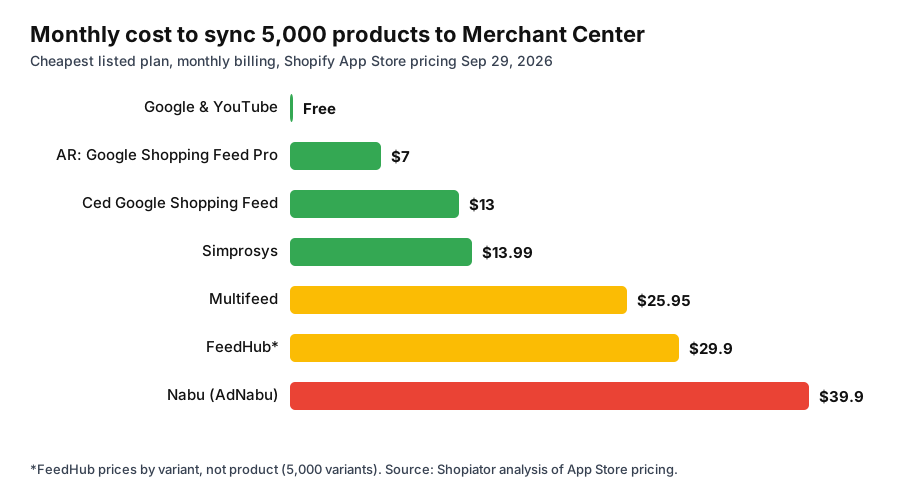
Price barely matters here. The cheapest and most expensive paid apps are about $33 a month apart, which is less than most stores spend on one day of Shopping ads. Choose on feed control, sync reliability, and support.
1. Google & YouTube: Best Free Starting Point (Tested)
Google & YouTube is Google's own Shopify app, on the App Store since November 2017 with 5,501 reviews at 4.5 stars. It connects your store to Merchant Center, Google Ads, Google Analytics, and YouTube, syncs your full catalog automatically, and is free (you only pay for ad spend, billed by Google Ads).
**How we use it:** it's our default for new stores and simple catalogs selling in one country. The sync is dependable when products are clean, and there's no feed tool to maintain. We manage the campaigns themselves in Google Ads, not inside the app.
**Where it falls short:** you can't set custom labels per product in bulk, rewrite titles for search without editing the Shopify product itself, or run rules per market. And 12% of its reviews are 1-star, the highest share in this list, mostly from merchants whose products disappeared from Merchant Center and who couldn't get a timely fix.
“The connection to Google Merchant Center and product sync went well. All the products I sent are approved and no problems are reported.”
Chat Cocoon, Canada (translated from French)
“Don't expect to get real help when all your items go invisible.”
Gems by Gigi, United States
2. Simprosys Google Shopping Feed: Best Overall Feed App (Tested)
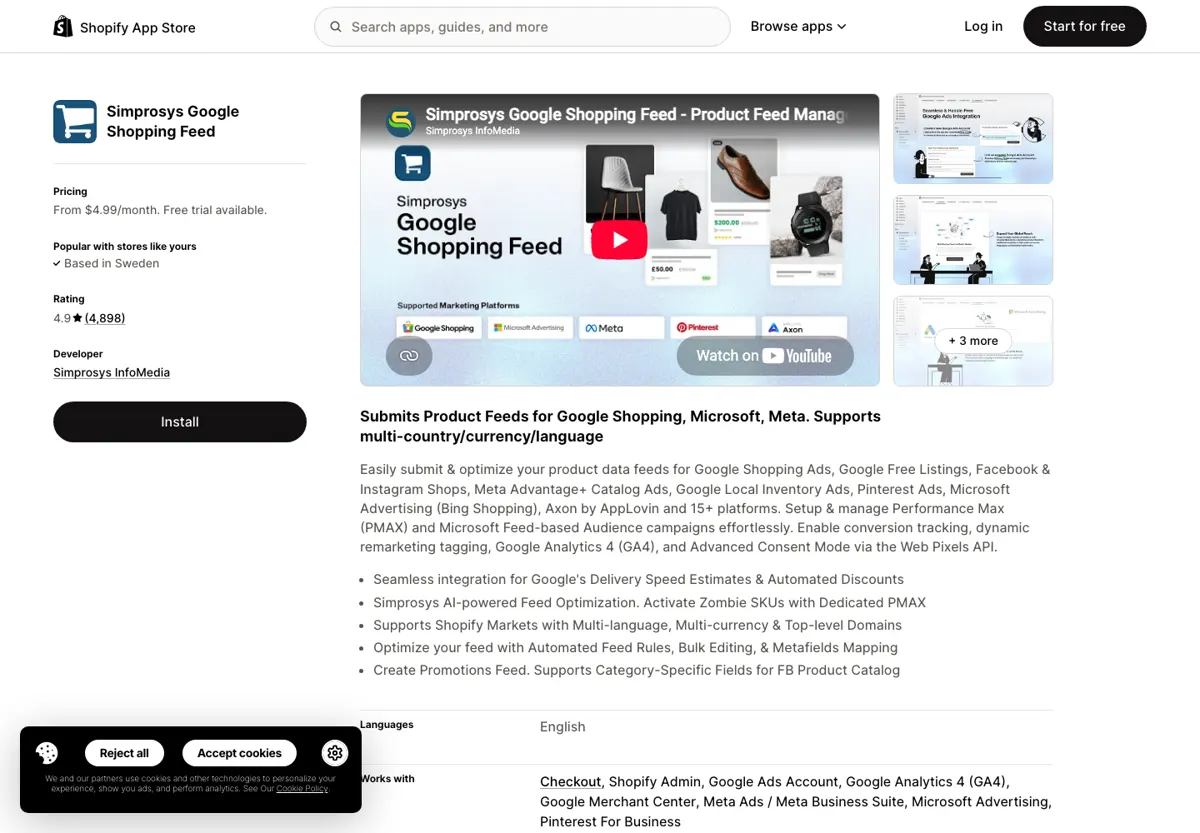
Simprosys has been on the App Store since August 2017 and holds 4.9 stars across 4,898 reviews with 1% at 1 star. It submits feeds to Google Shopping, free listings, Local Inventory Ads, Microsoft Advertising, Meta, Pinterest, and 15+ other channels from one app.
- ▶**Pricing by catalog size:** $4.99/month up to 500 products, $8.99 up to 1,000, $13.99 up to 5,000, with a 21-day free trial. AI feed optimization is a one-time $1 per 25 products; XML feeds and more than 3 market feeds carry small usage fees.
- ▶**Every plan includes** Meta, Pinterest, and Bing feeds, tracking tags with Consent Mode V2, Performance Max campaign management, 3 multi-currency, language, or country feeds, and server-side GA4 via GTM.
- ▶**Feed control:** feed rules, bulk editing, and metafield mapping, so titles, product types, and custom labels can be set without touching your Shopify product pages.
**How we use it:** Simprosys is what we move a store to once the feed needs to do real work. Custom labels let us split Shopping and PMax by brand vs non-brand, margin, or bestsellers, and feed-level titles let us put the search term customers actually use at the front of the title without rewriting the product page.
**The catch, and it's a big one:** the newest 1-star reviews all describe the same failure. A store installs Simprosys while another app is still submitting products, the catalog doubles in Merchant Center, and the account gets flagged. That's a setup mistake, not a Simprosys bug, but it's expensive. See the section below on running two feed apps.
“Great help by the team! They are very responsive and helpful with creating possibilities to use symprosis and grow my business.”
Cercii, Netherlands
“We went from 20,000 listings to double that and the instructions they gave to fix it removed our original feed and now our whole account is flagged for misrepresentation”
1-star review, May 23, 2026
3. Multifeed: Best for Metafield-Heavy and Multi-Language Stores
Multifeed (by WoolyTech, 4.9 stars, 1,108 reviews, 1% 1-star) is built for stores whose product data lives in metafields and metaobjects. Even the free plan includes unlimited metafields and metaobjects, expression-based attributes, the Merchant API plus XML, TSV, and CSV outputs, foreign currency and language feeds, and GA4 plus two tracking tags, but only for 10 products.
Paid plans are cheap: $5.95 for 1,000 products and 2 feeds, $15.95 for 3,000 products and 4 feeds, $25.95 for 10,000 products and 6 feeds with personal setup help. A strong alternative to Simprosys if you don't need Meta or Pinterest feeds from the same app.
4. Ced Google Shopping Feed & Ads: Best for Large Catalogs on a Budget
CedCommerce's app (4.6 stars, 552 reviews, 4% 1-star) has the best price-to-catalog ratio here: the $13 Growth plan covers up to 100,000 SKUs with real-time sync, multiple language and country profiles, and unlimited PMax campaigns and conversion actions. Accelerate at $49 removes the SKU cap and adds WhatsApp and Slack support.
**The catch:** support is the recurring complaint, including one merchant who upgraded for help getting local inventory ads working and says support stopped responding after payment. Great value if your team can run the feed itself.
5. Nabu for Google Shopping Feed: Best AI Optimization
Nabu by AdNabu (4.7 stars, 538 reviews, 4% 1-star) leans on AI: title and description optimization, Google keyword suggestions, product approval sync, and Merchant Center analytics. Grow is $39.90/month for unlimited products, orders, and countries; Advanced at $99.90 adds hourly sync, feed rules, product review integration, and XML feeds for more marketplaces.
One recent reviewer switched from Google & YouTube and runs 50 shopping feeds with over 19,000 products each through it. The downside is the free plan, which is capped at 10 orders a month, an unusual limit for a feed app that merchants call out in 1-star reviews.
6. AR: Google Shopping Feed Pro: Cheapest Paid Option per Product
Apps Robots' feed app (5.0 stars, 258 reviews, 0% 1-star) charges $1 per 1,000 products per month with a $7 minimum, and variants are free. That makes it the cheapest paid app for almost any catalog size. It includes multi-currency and multi-language feeds, data from metafields and metaobjects, and custom label optimizers.
7. FeedHub: Best for Small Catalogs With Several Feeds
FeedHub by OneCommerce (4.9 stars, 441 reviews, 1% 1-star) prices by variant: free for 50, $9.90 for 500 variants and 2 feeds, $29.90 for 5,000 and 5 feeds, $49.90 for 10,000 and 8 feeds. Good for small catalogs that need separate feeds, but stores with many sizes and colors per product will outgrow it quickly.
8. SPD: Google Feed & Ads Doctor: Free Error Review
SPD by Tapita (4.8 stars, 45 reviews, launched January 2025) is free for Merchant Center integration and error review. Its Pro plan charges 10% of your ad spend for AI-built campaigns and expert review. We'd use the free tier to spot errors and keep campaign management separate, because a fee tied to spend grows every time you scale.
The Mistake That Doubles Your Catalog: Running Two Feed Apps
Every app in this list sends products to Merchant Center under its own item IDs. Install a second one while the first is still syncing, and Google receives two copies of every product with two sets of IDs, sometimes with different prices or titles. The newest 1-star reviews of Simprosys describe catalogs of 20,000 products doubling overnight and accounts being flagged as a result.
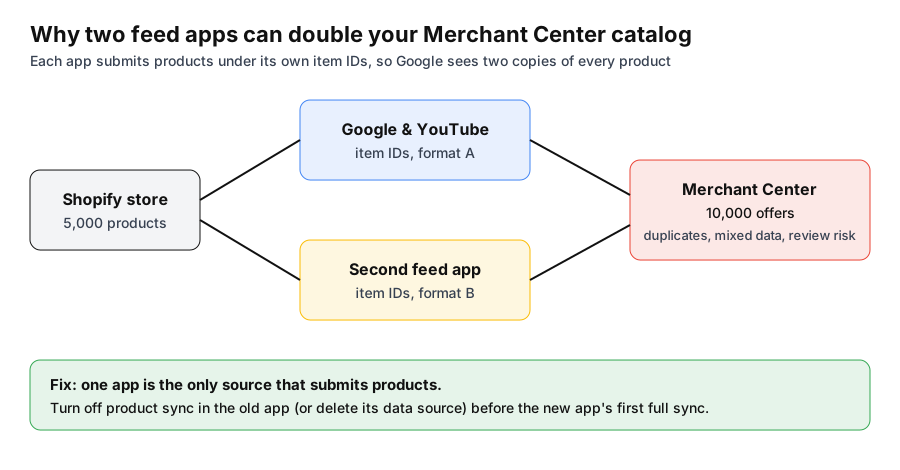
- 1.**Decide which app will be the only product source.** The other can stay installed for its non-feed features (like tracking tags), but not submit products.
- 2.**Check the item ID format before switching.** If the new app can match the old ID format, your products keep their performance history in Google Ads. If not, expect a short relearning period.
- 3.**Turn off product sync in the old app, or delete its data source in Merchant Center,** before the new app's first full sync.
- 4.**Watch Merchant Center diagnostics for 72 hours** after switching. Product counts should stay flat, not double.
- 5.**Don't switch on the day before a sale or a holiday weekend.** If something goes wrong, you want time to fix it.
If the account has already been flagged, start with our Merchant Center misrepresentation fix guide and the misrepresentation checklist.
What a Merchant Center App Should Let You Control
- ▶**Titles.** The title is the strongest matching signal in Shopping. Lead with what the product is and the term people actually search, then brand, key attribute, and size or color.
- ▶**Custom labels.** custom_label_0 to 4 let you split campaigns by brand vs non-brand, margin, price band, or bestsellers. Without them, Shopping and PMax bid on everything as one pool.
- ▶**Google product category and product type.** Accurate categories keep you out of irrelevant auctions.
- ▶**GTIN, MPN, and brand.** Missing identifiers limit where branded products can serve.
- ▶**Sync frequency.** Price and availability must match the site, or you risk disapprovals and misrepresentation reviews. Look for real-time or hourly sync on fast-moving stock.
- ▶**Market feeds.** Separate currency and language per country when you sell internationally.
For how a well-built feed plugs into campaign structure, see our guide to feeder and converter Google Shopping architecture. For platform-agnostic feed software beyond Shopify apps, such as Feedonomics and DataFeedWatch, see our feed optimization tools ranking, and for the rest of the Shopify stack, our best Shopify apps for 2026.
How We Built This Ranking
Google & YouTube and Simprosys (marked Tested) are the two Merchant Center apps Shopiator uses across 10-15 Shopify client stores while running their Shopping and Performance Max campaigns. The other six are ranked on signals from merchants and ecom communities: App Store review volume, 1-star share, recurring themes in the newest reviews, and pricing at 1,000 to 10,000 products. All figures were pulled from the live Shopify App Store on September 29, 2026. Shopiator has no affiliate relationship with any app listed.
Apps Mentioned in This Post
Data Source
Ratings, review counts, 1-star shares, and prices come from public Shopify App Store listings captured September 29, 2026. Prices change often; confirm on the listing before installing. No app developer reviewed or paid for this post.
Frequently Asked Questions
What is the best Shopify app for Google Merchant Center?
Start with Google & YouTube, which is free and built by Google. Move to Simprosys Google Shopping Feed once you need custom labels, feed rules, multiple Shopify Markets, or feeds for Meta, Pinterest, and Microsoft. Simprosys has 4.9 stars across 4,898 reviews and costs $13.99/month for up to 5,000 products. Shopiator uses both across 10-15 Shopify client stores.
Is the Google & YouTube app enough for Google Shopping?
For a simple catalog in one country, yes. It's free, syncs products to Merchant Center automatically, and connects Google Ads and YouTube. It falls short when you need to rewrite titles for search, set custom labels to split Shopping or Performance Max campaigns, or run separate feeds per market. 12% of its 5,501 App Store reviews are 1-star, most about products disappearing and slow fixes.
Can I use Google & YouTube and Simprosys at the same time?
Not both submitting products. Each app sends products to Merchant Center under its own item IDs, so running both can give Google two copies of every product. Several 1-star Simprosys reviews describe a catalog doubling after install and the account then getting flagged. Pick one app as the only product source and turn off product sync in the other before the new app's first full sync.
What is the cheapest Google Shopping feed app for Shopify?
Google & YouTube is free. Among paid apps, AR: Google Shopping Feed Pro costs $1 per 1,000 products with a $7 minimum (variants free), Multifeed starts at $5.95/month for 1,000 products, and Simprosys starts at $4.99/month for 500 products. Ced Google Shopping Feed's $13 Growth plan covers up to 100,000 SKUs.
Which feed app is best for multiple countries and currencies?
Simprosys (3 market feeds included, then $0.50 to $1.40 per extra feed), Multifeed (built around metafields and foreign currency and language feeds), and Nabu's Grow plan (unlimited countries at $39.90/month) all handle Shopify Markets well. Google & YouTube supports markets but with far less control per feed.
Can a feed app get my Merchant Center account suspended?
A feed app can create the conditions for one. The common causes are duplicate products from two apps, prices or availability drifting out of sync with the site, and feed rules that rewrite titles into promotional or misleading text. Our Merchant Center misrepresentation checklist covers what reviewers check.
Do I need a feed app for Performance Max?
Performance Max for ecommerce runs on your Merchant Center feed, so the feed decides which searches and placements your products can match. Custom labels in the feed are also how you split PMax and Shopping campaigns by margin, brand, or bestsellers, which the native app can't set per product without extra work.
Suspended right now?
The exact 29-point process behind every misrepresentation suspension we've gotten lifted, with the appeal template we file.
Keep reading
Don't Buy an Aged Google Merchant Center Account, It Will Get Suspended the Moment You Change the Domain
Buying an aged Google Merchant Center account and switching the domain to your store is not the same trick as an aged Meta ad account. Here's why Google catches it fast, a real $4,000 case we fixed, and what to do instead.
ReadGMCInside Our Free GMC Misrepresentation Checklist
We turned our internal 29-point GMC misrepresentation appeal process into a free checklist. Here's what's actually inside it, why we give it away, and when a checklist alone won't get you reinstated.
ReadRankingBest Shopify Apps for 2026: 32 Apps Tested and Ranked by Shopiator
32 of the best Shopify apps for ecommerce brands in 2026, tested and ranked by Shopiator, a Google Ads agency for ecom brands. Six are apps we use and vouch for across 10-15 Shopify client stores, and every app is checked against live App Store ratings, 1-star review share, and current pricing, plus three ready-made app stacks with real monthly costs and the apps that quietly hurt your Google Ads.
Read