Black Friday Cyber Monday (BFCM) Google Ads Playbook for Ecom BrandsAdd to What Is Running, Don't Rebuild It

By Santosh Kumar, Founder of Shopiator
How to run Black Friday and Cyber Monday on Google Ads without building new campaigns: promotion assets, Merchant Center promotions, BFCM creative in PMax, Demand Gen and Display, and Search ads on existing ad groups.
Most Black Friday advice is written for Meta: new creatives, a new offer, a new budget curve, a new campaign. On Google Ads, the better move is usually the opposite. Your campaigns already hold the conversion history and learning that took months to build, and Black Friday is the worst week to throw that away and start fresh.
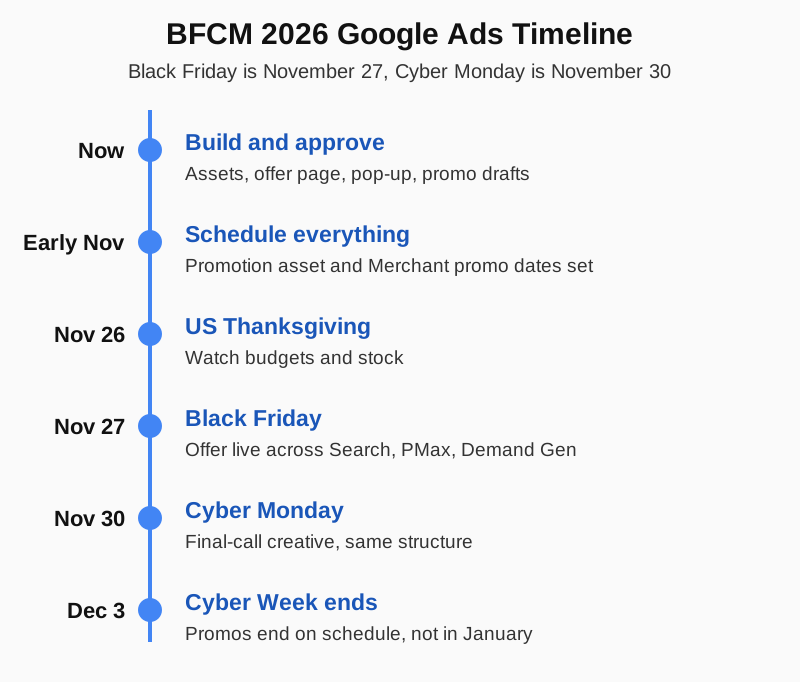
This playbook is the Google Ads side of BFCM: what to add to the campaigns you already run, what to schedule so nothing starts late or finishes late, and what to fix off-platform before the traffic arrives. Black Friday is Friday, November 27, 2026 and Cyber Monday is Monday, November 30, so the build window is now.
Rule One: Do Not Create New Campaigns for Black Friday
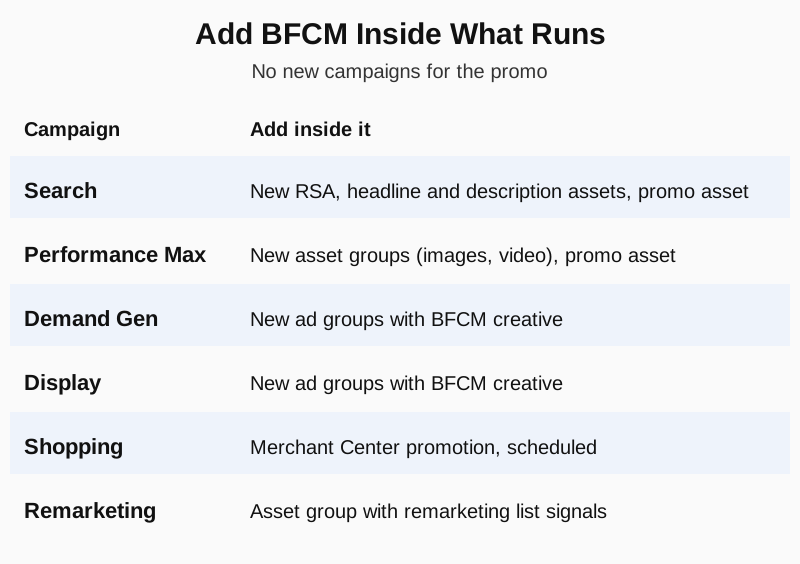
A brand-new campaign has no history, no learning and no conversion data, and Black Friday is when auction costs are highest. Every BFCM asset in this playbook goes inside a campaign you already run. The offer changes, the campaign structure does not.
That also keeps reporting clean. When the promotion ends, you take down the assets and the campaign carries on with its full history intact, instead of leaving a one-off Black Friday campaign to pause, forget or accidentally keep spending.
Step 1: Add a Promotion Asset in Google Ads
Add a promotion asset, formerly the promotion extension, to show your sale as an offer label under your ad. Per Google's documentation, promotion assets work with Search ads, YouTube Shorts, in-stream video ads and Performance Max, and they are free to create. You are charged only for clicks, at the same rate as headline clicks.
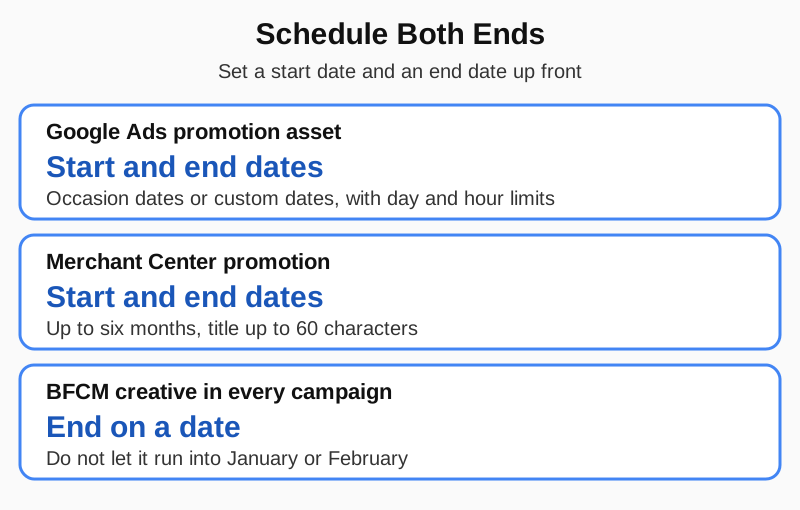
Google provides built-in occasions including Black Friday and Cyber Monday with preset date ranges, and you can override them with your own start and end dates or narrow serving to specific days and hours. Occasion-specific assets must be created or edited within six months of their start date to serve.
Step 2: Add a Merchant Center Promotion
In Google Merchant Center, add a promotion so the offer shows on your product listings. Google's requirements include a promotion ID of up to 50 characters, a title of up to 60 characters, the products it applies to, whether a coupon is required, and start and end dates of up to six months. Destinations include Shopping ads and free listings.
- ▶Shipping promotions need a valid redemption code, otherwise Google treats the shipping as standard service.
- ▶Promotions are reviewed against Google's policies before they publish, so build and submit them early rather than on launch morning.
- ▶Promotions are supported in specific countries, including the US, UK, Canada, Australia, Germany, France, Italy, Spain, the Netherlands, Japan, India, Brazil and South Korea.
- ▶The offer in Merchant Center has to match what shoppers see on your site.
If your feed is already healthy, a promotion is a low-risk addition. If your Merchant Center account has issues, fix them first. See our guides on Merchant Center suspensions and the misrepresentation checklist.
Step 3: Schedule Both, Start and End, So You Neither Miss Nor Overshoot
Set the start and the end date for the Google Ads promotion asset and the Merchant Center promotion on the same day you create them. Missing the start costs you the busiest days of the year. Missing the end leaves a dead offer in front of shoppers, and it is more common than people think.
The overshoot problem
In our audits we have seen several Google Ads accounts still running Black Friday and Cyber Monday promotions well into January and February. Nobody switched them off, and the ad no longer matched the offer on the site. Put the end dates in the account and in the calendar on day one.
Step 4: Static Images in Performance Max, Demand Gen and Display
For BFCM static images, do not build campaigns. Set up new asset groups in Performance Max with your BFCM images, and create new ad groups in Demand Gen and Display carrying the same creative. The existing campaigns keep their learning, and the new asset groups and ad groups give Google fresh Black Friday creative to test and serve.
Pair the new creative with the promotion asset so the offer is stated in the creative and the label. For how Performance Max should be structured around the rest of your account, see our guide to PMax architecture for DTC brands.
Step 5: Video, Seasonal Audiences and Remarketing
For BFCM video, apply the same principle with more audience work:
- 1.Set up new asset groups in Performance Max with your BFCM videos.
- 2.Use the in-market audience segments specific to BFCM, which Google provides under Seasonal Shopping, including a Black Friday option.
- 3.Run remarketing separately, either as its own campaign or as an asset group, with your remarketing lists as audience signals. Where you can, make it an asset group, in line with rule one.
- 4.Create new ad groups in Demand Gen and Display for the BFCM video and audience combinations.
Keep remarketing separate from prospecting creative so you can read the two on their own. Black Friday remarketing converts differently from cold traffic, and blended reporting hides that.
Step 6: Search Ads on Existing Campaigns and Ad Groups
Search follows the same rule: no new campaigns. Add the BFCM message to the campaigns and ad groups you already run:
- ▶Add headline and description assets to your existing responsive search ads, and run them alongside the promotion asset.
- ▶If you have an offer-specific landing page, create another ad pointing to it inside the existing campaign and ad group, and let Google choose which ad to serve.
- ▶Keep your existing keywords, match types and bidding. The offer is new, the structure is not.
Do not pause the evergreen ad when you add the offer ad. Letting Google choose means each search gets the version most likely to convert, and when the promotion ends, the evergreen ad is already live and still has its history.
Fix These Off-Platform Before the Traffic Arrives
Google Ads can only send people to your offer. Four things on your site decide whether that traffic converts, and all four are cheap to fix now:
- ▶Pop-up and banners: update the pop-up the day the offer changes. If the site says 20% off and the pop-up says subscribe for 10%, nobody signs up.
- ▶Offer on every page: put the offer in the top bar and the header image, as one operator's Black Friday blueprint recommends, so the ad and the page say the same thing.
- ▶Offer-specific landing pages: one SEO-minded approach is a permanent Black Friday product deals page without the year in the URL, which you can reuse each year and point your offer ad at.
- ▶Allowable CAC: AOV sets what you can pay for a customer. One offer and AOV playbook argues for post-purchase upsells first and a free-shipping threshold around 1.4x current AOV, but judge any change by contribution margin, not AOV alone.
How to Read Performance During BFCM
Judge Black Friday by ROAS by conversion time, not by click date, because Black Friday clicks convert over the following days and you do not want to cut something that is about to pay back. Check the 7-day, 14-day and 30-day trends before moving a bid or budget, and increase budgets in steps rather than jumps when targets are being hit across those windows.
Keep brand search on manual or capped bidding and do not let any campaign run past its target ROAS on spend alone just because it is a big sales week. For wasted spend you should check beforehand, see our Google Ads audit checklist, and for PMax and brand overlap, see PMax cannibalizing brand traffic.
After Cyber Monday: Switch It Off on Purpose
When your offer ends, the scheduled promotion asset and Merchant Center promotion end with it, and you pause the BFCM-specific asset groups and ads. If you are moving into a December gifting offer, add that as a fresh set of assets the same way, with its own start and end dates. The structure of the account stays the same all the way through.
Our full approach to Google Ads for ecommerce is on the Shopiator homepage, and this playbook is the one we use with the brands we run. This post is general guidance, so check each Google policy and requirement in the account before launch, because Google changes them often.
Frequently Asked Questions
Should I create new campaigns for Black Friday on Google Ads?
No. Add the Black Friday offer inside the campaigns that are already running: new RSAs and assets in Search, new asset groups in Performance Max, and new ad groups in Demand Gen and Display. That keeps the history and learning your existing campaigns have built up instead of starting new campaigns from zero at the most expensive time of year.
How do I set up a Black Friday promotion in Google Ads?
Add a promotion asset (formerly the promotion extension) and pick the Black Friday or Cyber Monday occasion, or set your own start and end dates. Google's [promotion asset documentation](https://support.google.com/google-ads/answer/7367521) says occasion-specific assets must be created or edited within six months of their start date to serve, and you can narrow serving to specific days and hours.
What is a Merchant Center promotion and do I need one?
It is a Google Merchant Center promotion that shows your offer on your product listings. Per [Google's Merchant Center documentation](https://support.google.com/merchants/answer/2906014), it needs a promotion ID, a title of up to 60 characters, start and end dates of up to six months, and the products it applies to. It can show on Shopping ads and free listings, and Google reviews it before it goes live, so submit it early.
When should I end my Black Friday promotions?
Schedule the end date when you schedule the start date, so the promotion switches off on its own. In our audits we have seen several accounts still running Black Friday and Cyber Monday promotions in January and February, which is both a mismatch with the site and wasted attention on a deal that has expired.
Can I use headline and description assets alongside a promotion asset?
Yes. On Search, add Black Friday headlines and descriptions to your existing responsive search ads and run the promotion asset alongside them. The promotion asset adds the offer label, and the headline and description assets carry the message in the ad itself.
Should I send Black Friday ads to a separate landing page?
If you have an offer-specific landing page, add a second ad that points to it inside the existing campaign and ad group and let Google choose which ad to serve. If you do not have one, keep the standard page and make sure it shows the offer clearly.
Which audiences should I use for Black Friday video and Demand Gen?
Use Google's in-market audience segments specific to Black Friday and Cyber Monday, found under Seasonal Shopping in the in-market audience list, and pair them with your own remarketing lists as audience signals in a dedicated asset group or remarketing campaign.
Want the operator to check this on your account?
The Operator Audit is a full manual review of your account: 10 recommendation sets, a live findings call and a prioritized action plan. The $1,299 comes off your first month if you hire us within 30 days.
Keep reading
PMax Architecture for DTC Brands: Feed-Only vs Full-Build
Feed-only PMax and full-build PMax are different products with different risk profiles. Here's how to pick the right one for a DTC ecommerce account.
ReadGoogle AdsIncrementality Testing for Google Ads: How to Actually Measure It
Platform-reported ROAS overstates real impact. Here's how to run a real incrementality test on Google Ads and read the results without fooling yourself.
ReadGoogle Merchant CenterGoogle Merchant Center Suspended: Every Reason and How to Fix It
Google Merchant Center account suspended? The common suspension reasons, warning vs immediate suspension, cool down periods, and how to request a review that works.
Read