Google Ads Seasonality AdjustmentsShould Your Store Use Them?

By Santosh Kumar, Founder of Shopiator
Should your store use Google Ads seasonality adjustments for Black Friday? What they do, what three years of BFCM data show, and when to skip them.
If you run a store and plan to spend more on Google this Q4, you will come across a setting called seasonality adjustments. It sounds like the right move for Black Friday, and the data says it often costs stores profit.
This post explains what the setting does in plain terms, which campaigns support it, what three years of BFCM data show, and when a store should use it. Google's help pages are linked throughout, and the numbers below are checked against them.
10% to 17%
drop in ROAS for accounts that set seasonality adjustments during BFCM in each of 2022, 2023 and 2024, while accounts without them moved between -2% and +5.7%. This is vendor data, not a randomized trial.
What is a Google Ads seasonality adjustment?
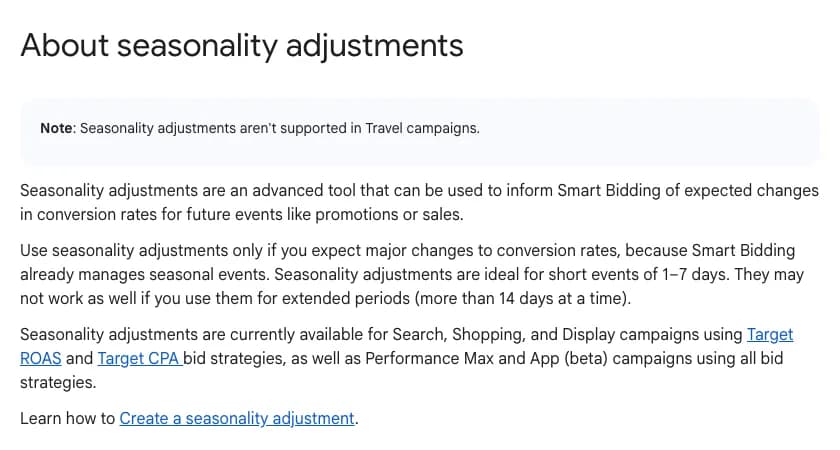
Per Google's help page, a seasonality adjustment schedules an increase or decrease in your conversion rate for a future event like a promotion or sale. Smart Bidding then optimizes bids for the event and returns to its normal behavior when the event ends. Google's example is a 3-day sale where you expect conversion rates to rise by 50%, so you enter an increase of up to 50% for those 3 days.
Two details matter. It adjusts the conversion rate estimate, not your Target ROAS, so the target stays where you set it. And Google says no negative adjustment is needed when the promotion is over.
Which campaigns support seasonality adjustments?
- ▶Search, Shopping and Display campaigns that use Target ROAS or Target CPA.
- ▶Performance Max and App (beta) campaigns, on any bid strategy.
- ▶Not supported: Travel campaigns.
- ▶In practice, a Search campaign on Maximize Clicks or manual CPC sits outside that list, so it is unaffected.
How did seasonality adjustments change BFCM results?
Optmyzr compared advertisers who set a bid adjustment during BFCM with those who did not, across 4,292 accounts in 2022, 5,114 in 2023 and 5,886 in 2024. The BFCM window ran from the Wednesday before Black Friday to the Wednesday after Cyber Monday.
| Year | CPC change | ROAS change | Conversion value growth |
|---|---|---|---|
| 2022 | +17% / +36.7% | -2% / -17% | +25.0% / +50.5% |
| 2023 | +16% / +32% | -1.5% / -10% | +30.3% / +52.8% |
| 2024 | +17% / +34% | +5.7% / -15.7% | +33.8% / +39.9% |
Each cell shows no adjustment, then adjusted. Source: Optmyzr three-year BFCM study, vendor data from a subset of its customers, not a randomized trial.
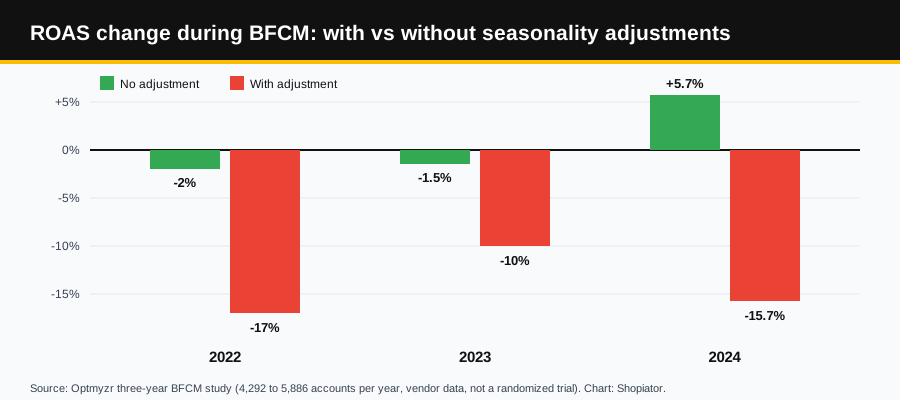
Read this fairly. Accounts with adjustments grew conversion value faster in every year, so the adjustment bought volume, at a clearly worse cost. The data also shows why the feature is easy to overshoot: conversion rate in the accounts without adjustments rose only 17.5%, 11.9% and 7.5% in those three years, far below the 50% in Google's own example. The caveats are real too. Optmyzr is a PPC tool vendor, the sample is a subset of its customers, and advertisers who chose adjustments may differ from those who did not.
When should your store use a seasonality adjustment?
| Situation | Use one? | Why |
|---|---|---|
| Black Friday, Cyber Monday or Christmas on a normal account | Skip | Google says Smart Bidding already manages seasonal events, and the Optmyzr data shows efficiency losses. |
| A one-off flash sale or a first-time promotion | Yes | Google has no history for it, so the conversion rate jump is a surprise to the model. |
| A clearance where volume matters more than margin | Yes, knowingly | You are trading efficiency for volume, which is what the BFCM data shows adjustments do. |
| A promotion longer than 14 days | No | Google says it may not work as well. Change budgets, targets or structure instead. |
| Brand search on Maximize Clicks or manual CPC | Not applicable | These bid strategies are outside the supported list. |
| Tracking broke for a few days | No | That is a data problem. Google offers data exclusions for it, which is a different tool. |
How do you set the conversion rate modifier?
The math is simple: expected event conversion rate minus normal conversion rate, divided by normal conversion rate. A move from 2.0% to 3.0% is a 50% lift. The harder part is the estimate, and a wrong estimate costs money.
- ▶Use your own last comparable event, not an industry number, and measure purchases rather than leads or add-to-carts.
- ▶Remember the Optmyzr lifts: 17.5%, 11.9% and 7.5% is what unadjusted accounts saw at BFCM. A 50% guess is probably too high for a sale Google already expects.
- ▶Several practitioners enter less than their estimate because overshooting inflates CPCs. That is advice, not Google guidance, and it matches our read.
- ▶Scope the adjustment to the campaigns running the promotion, not the whole account.
- ▶The Google Ads API takes the modifier as a multiplier between 0.1 and 10.0, where 1.0 means no change. Each adjustment can cover up to 2,000 campaigns.
How do you create a seasonality adjustment?
- 1.In Google Ads, go to Tools, then Budgets and bidding, then Adjustments.
- 2.Open the Seasonal tab and click the blue plus button.
- 3.Choose Conversion rate as the adjustment type.
- 4.Enter a name, the start and end dates, and the scope: campaign types or specific campaigns.
- 5.Enter the conversion rate change and click Create seasonality adjustment.
Can you raise the budget for a sale with a seasonal budget adjustment?
Yes, on Search and Shopping campaigns. Google's seasonal budget adjustment raises the average daily budget by a set amount on the start date and restores the old value on the end date. It lasts 3 to 14 days. In Google's example, a $100 daily budget with a $50 adjustment becomes $150 for the window.
- ▶Not eligible: campaigns on shared budgets, drafts, dayparting or flighted campaigns, and campaigns that already have a current or future budget adjustment.
- ▶If you change the budget manually during an adjustment, it may revert to a value that reflects your change instead of the original amount.
- ▶A second adjustment on the same campaign does not take effect until 7 days after the previous one ends.
What about Google's new Promotion Mode?
Promotion Mode is a separate beta setting that loosens your ROAS target for a scheduled window instead of changing the conversion rate estimate. Google's own Q&A frames the difference this way: with Promotion Mode, Smart Bidding actively aims for a lowered ROAS target during the window, while seasonality adjustments account for conversion rate changes and keep your current ROAS target. Google's Smart Bidding Exploration FAQ says Exploration, which Promotion Mode is powered by, is compatible with seasonality adjustments. Promotion Mode is set inside each campaign, while seasonality adjustments are set under Tools with a wider scope, so they work at different layers. Our setup guide is the Google Ads Promotion Mode playbook for ecom brands, and the full comparison is in Promotion Mode vs seasonality adjustments.
What should you ask whoever runs your Google Ads?
- ▶Did we turn on a seasonality adjustment for Black Friday, and why?
- ▶What is our break-even ROAS at sale prices, and is our target above it?
- ▶Which campaigns carry the sale, and when do the promotion and any budget boost start and end?
- ▶How will we judge the sale: against the same days last year, on CPC, conversion value and ROAS?
What mistakes should you avoid?
- ▶Switching one on for Black Friday by default.
- ▶Entering the full lift you hope for instead of a conservative estimate.
- ▶Applying it account-wide when only some campaigns run the promotion.
- ▶Leaving a promotion running past its end date. Pair this with our BFCM Google Ads playbook, which covers scheduling the start and the end.
- ▶Judging the result only on ROAS. Compare CPC, conversion value and ROAS against the same days last year.
Frequently Asked Questions
What is a seasonality adjustment in Google Ads?
An advanced Smart Bidding control that tells Google to expect a temporary change in your conversion rate during a future event such as a sale. You enter the dates, the scope and the expected percentage change, and bids are optimized for the event and return to normal afterward.
How long can a seasonality adjustment run?
Google says they are ideal for short events of 1 to 7 days and may not work as well for extended periods of more than 14 days at a time.
Should I use a seasonality adjustment for Black Friday?
Usually not. Google says Smart Bidding already manages seasonal events and to use adjustments only if you expect major conversion rate changes. Optmyzr's 2022 to 2024 BFCM data found accounts that set adjustments saw CPC rise 32% to 37% and ROAS fall 10% to 17%, while accounts without them held steady.
Which campaigns support seasonality adjustments?
Search, Shopping and Display campaigns using Target ROAS or Target CPA, plus Performance Max and App (beta) campaigns on any bid strategy. Travel campaigns are not supported.
Do I need to remove a seasonality adjustment after the event?
No. Google says campaigns return to their pre-adjustment performance after the event and no negative adjustment is needed. Check your CPC and ROAS afterward anyway.
Can I raise my budget for a sale with a seasonal adjustment?
Yes, with a seasonal budget adjustment on eligible Search and Shopping campaigns. It adds a set amount to the average daily budget for 3 to 14 days and then restores the old budget.
Want the operator to check this on your account?
The Operator Audit is a full manual review of your account: 10 recommendation sets, a live findings call and a prioritized action plan. The $1,299 comes off your first month if you hire us within 30 days.
Keep reading
Google Ads Promotion Mode (Beta) vs Seasonality Adjustments for Q4
Planning a Q4 sale? Promotion Mode lowers your ROAS target for a few days and seasonality adjustments do not. Which to use, and how to stay profitable.
ReadGoogle AdsBlack Friday Cyber Monday (BFCM) Google Ads Playbook for Ecom Brands
How to run Black Friday and Cyber Monday on Google Ads without building new campaigns: promotion assets, Merchant Center promotions, BFCM creative in PMax, Demand Gen and Display, and Search ads on existing ad groups.
ReadGuideNRF vs Shoptalk vs eTail: Which Ecom Event Is a Must-Attend?
NRF, Shoptalk Spring, eTail Palm Springs and Affiliate World Asia compared on size, price and format, with a blunt pick for ecommerce and DTC brands.
Read