Google Ads Promotion Mode for Ecom Brands in Q4A Playbook

By Santosh Kumar, Founder of Shopiator
A Q4 playbook for ecommerce stores on Google Ads Promotion Mode: how to get it, set it up, time it around Black Friday and keep the sale profitable.
Google Ads has a new beta setting built for sales, and it is called Promotion Mode. If you run an ecommerce store and plan to spend more on Google this Q4, it lets you tell Google to go after more sales for a few days at a lower return, then go back to normal on its own.
This playbook explains what it does in plain terms, how to get it, how to set it up, and how to time it and keep a Black Friday sale profitable. The sources are Google's official announcement, the Ads Liaison's post on X and Ginny Marvin's Community Q&A on bidding and budgets. It is a beta, so what you see in your account may differ.
What does Promotion Mode do for an ecommerce store?
Normally, a Target ROAS campaign skips auctions it does not expect to meet your target. Google notes that changing your target limits or increases the number of auctions your ads are eligible to enter. In the middle of a sale, a tight target can mean you miss sales you would happily take.
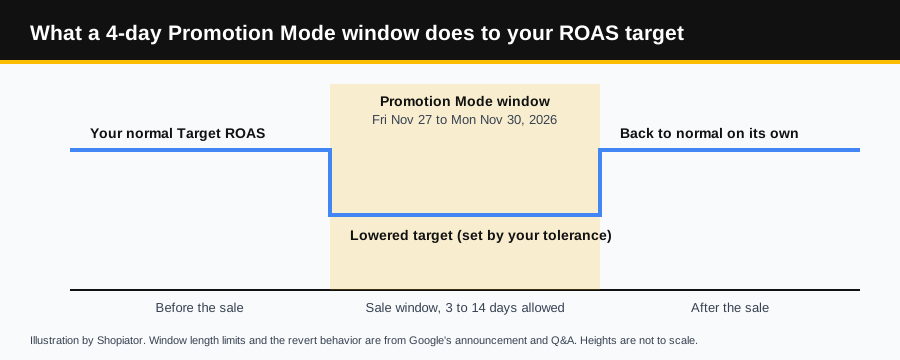
Promotion Mode changes that for a set window. Per Google's Q&A, Smart Bidding actively aims to achieve your lowered ROAS target for those dates, so it bids more aggressively. You can also add extra daily budget. This is our plain-English reading of Google's description, not a quote.
Who can use Promotion Mode, and how do you get it?
- ▶Campaigns: Google lists Search and Performance Max only. Shopping campaigns are not included.
- ▶Level: it is a campaign setting, so you turn it on for each campaign you want in the sale. Seasonality adjustments, by contrast, are set under Tools and can cover campaign types or whole accounts.
- ▶Bid strategy: Promotion Mode is powered by Smart Bidding Exploration, which Google says is available when you use Target ROAS.
- ▶Access: it is a beta. Google says to reach out to your account team to get it.
- ▶Dates: the promotion dates should fall within the campaign's own start and end dates.
- ▶Budget: it works with daily budgets, and the ROAS tolerance change can be combined with a campaign total budget.
- ▶Caveat (unverified): trade reports say the baseline ROAS target cannot be changed while a promotion is active, and we found no Google page saying so. Context: Promotion Mode is powered by Smart Bidding Exploration, and Google's Exploration best practices say not to adjust your Target ROAS after opting in.
How do you set up Promotion Mode?
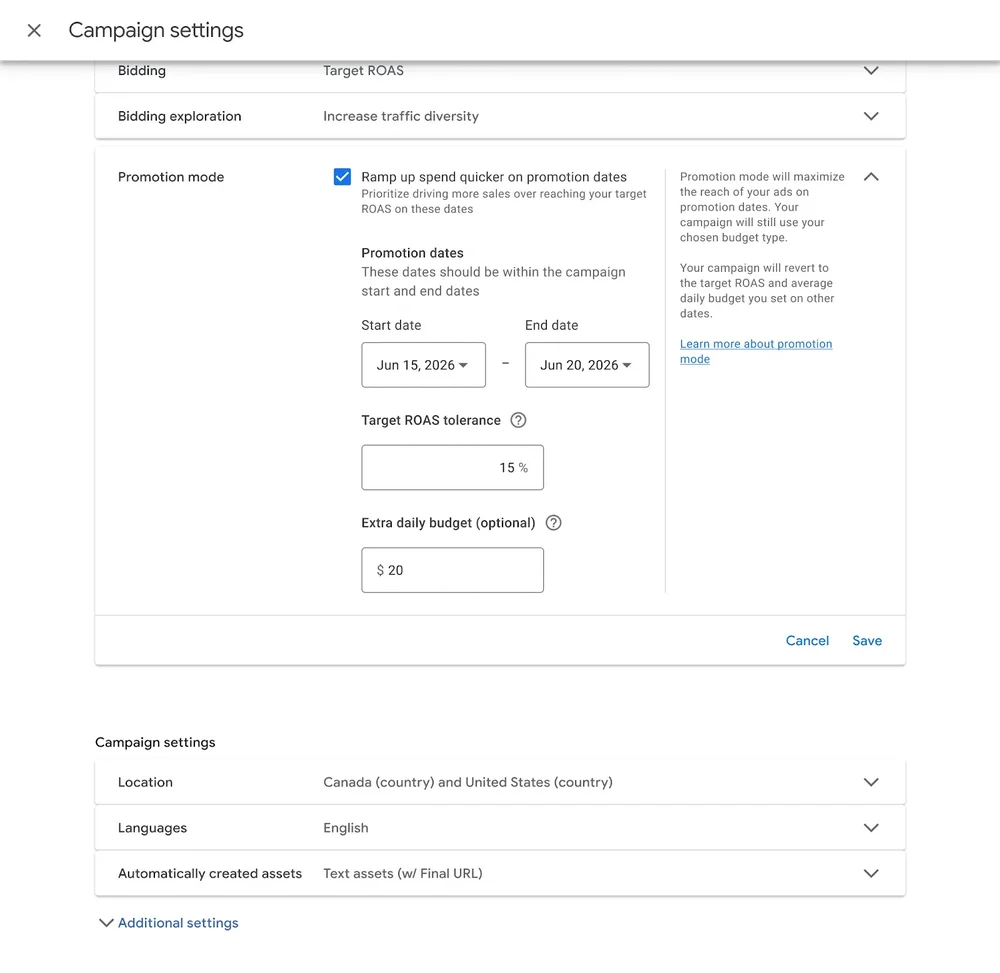
Google's screenshot shows the setting inside the campaign settings, under the bidding options. Your account may label things slightly differently while it is in beta.
- 1.Open the campaign's settings and find Promotion mode.
- 2.Tick "Ramp up spend quicker on promotion dates".
- 3.Set the start and end dates, 3 to 14 days, inside the campaign's own dates.
- 4.Enter your Target ROAS tolerance as a percentage.
- 5.Optionally enter extra daily budget.
- 6.Save. Google's side panel says the campaign reverts to your normal target ROAS and average daily budget on other dates.
How should you set the dates and tolerance for Black Friday?
Start with profit, not the setting. Break-even ROAS is your price divided by what is left after product cost, before other costs. Illustration: a $100 product that costs $65 breaks even at about 2.9. At 20% off the price is $80, the cost is still $65, and break-even jumps to about 5.3.
If break-even at your sale price is above your normal target, a lower target means you are buying those customers at a loss on the first order. That can still be fine if you count repeat purchases, but decide that on purpose.
- ▶Dates: Black Friday 2026 is November 27 and Cyber Monday is November 30. A 4-day window from Friday to Monday fits inside the 3 to 14 day limit, and so does a 12-day run from November 20 to December 1.
- ▶Tolerance: Google's Q&A allows 5% to 90% for Promotion Mode, and its screenshot shows 15% as an example. Google's Smart Bidding Exploration help, the feature Promotion Mode is built on, gives the arithmetic: a 200% target with a 10% tolerance becomes an effective 180%. We found no Promotion Mode page repeating it, so check your account's preview. Our read is to test a modest value first and widen only if the results beat break-even.
- ▶Extra budget: it is optional. Add it only if your campaign is budget-limited during the window.
- ▶Decide first: settle your normal ROAS target and budget before the start date, so you know exactly what the window changes.
What is the Promotion Mode playbook for Q4?
- 1.Now to early November: confirm your account has Promotion Mode by asking your Google account team, and list the Search and Performance Max campaigns on Target ROAS that will carry the sale.
- 2.By mid November: work out break-even ROAS at your sale prices, then decide the tolerance and any extra daily budget. Settle your normal targets first so you know exactly what the window changes.
- 3.Before the window: build the offer itself with promotion assets and a Merchant Center promotion, as in our BFCM Google Ads playbook, and check that no expired offer is on your site, because Google's Automated promotions setting can read offers from it.
- 4.Match the window to your best offer. One operator's Q4 playbook on X (Shaun Eng, October 2026) ramps from 20% to 25% to 30% off through BFCM. Our read: the window that lowers your target should line up with your best offer, not your first discount.
- 5.Schedule the start and end together, for example November 27 to 30, or November 20 to December 1.
- 6.During the window, watch daily spend and ROAS against the lowered target. Afterward, compare with the same days last year and with break-even.
How do you know if Promotion Mode worked?
- ▶Compare the window with the same days last year: sales, conversion value, ROAS and cost per click.
- ▶Compare achieved ROAS with the lowered target, not your normal one. Google says to judge Smart Bidding against the strategy's average target.
- ▶Do not judge a 4-day window on a weekly average. It is too short for one.
- ▶Check profit after discounts and shipping, not just ROAS.
What mistakes should you avoid with Promotion Mode?
- ▶Setting a tolerance before you know break-even at sale prices.
- ▶Running it on a campaign that is limited by budget. Google says Smart Bidding Exploration, which Promotion Mode is powered by, will not be effective if a campaign is limited by budget, and its mechanism is disabled when the budget is constrained. We found no Google statement on how that works with Promotion Mode's optional extra daily budget, so check before the sale.
- ▶Ignoring Google's own warning. On its Performance Max travel setup page, the only help page we found that mentions Promotion mode, Google says your return on ad spend may be impacted as your campaign rapidly increases spend to take advantage of your promotion period.
- ▶Running it past 14 days or outside the campaign's own dates.
- ▶Forgetting that the offer on your site and ads still has to match. Pair it with the setup in our BFCM Google Ads playbook.
- ▶Treating it as a replacement for seasonality adjustments. They do different jobs, covered in Promotion Mode vs seasonality adjustments.
What should you ask whoever runs your Google Ads?
- ▶Does our account have Promotion Mode, and have we asked our Google account team for the beta?
- ▶What is our break-even ROAS at sale prices, and how low can the lowered target go?
- ▶Which campaigns carry the sale, and for how many days?
- ▶How will we compare the sale with the same days last year?
Related reading: seasonality adjustments for Black Friday.
Frequently Asked Questions
What is Google Ads Promotion Mode?
A beta campaign setting for sales. You pick start and end dates (3 to 14 days), set a ROAS tolerance so Smart Bidding aims for a lower target ROAS during the window, and can add extra daily budget. When the window ends, the campaign returns to your normal target and budget.
Can every store use Promotion Mode?
Not yet. It is a beta for Search and Performance Max campaigns, and Google says to reach out to your account team to get it. If you work with an agency or freelancer, ask them to request it.
How long can a Promotion Mode window run?
Google's Ads Liaison says between 3 and 14 days. Promotion dates should also sit inside the campaign's own start and end dates.
How low can I set the ROAS tolerance?
Google says the tolerance can be set between 5% and 90%. Its own screenshot uses 15% as an example, and for Smart Bidding Exploration, which Promotion Mode is built on, Google's example is a 200% target with a 10% tolerance giving an effective 180%. Pick a value so your lowered target still clears break-even at sale prices.
Is Promotion Mode the same as a seasonality adjustment?
No. Promotion Mode makes Smart Bidding aim for a lowered ROAS target during the window. A seasonality adjustment accounts for expected conversion rate changes and keeps your current ROAS target.
Will Promotion Mode make my Black Friday sale unprofitable?
It can if you set the tolerance without checking break-even. A discount raises break-even ROAS, so a lower target that looks fine at full price can lose money at 20% off. Work out break-even at sale prices first.
Want the operator to check this on your account?
The Operator Audit is a full manual review of your account: 10 recommendation sets, a live findings call and a prioritized action plan. The $1,299 comes off your first month if you hire us within 30 days.
Keep reading
Google Ads Seasonality Adjustments: Should Your Store Use Them?
Should your store use Google Ads seasonality adjustments for Black Friday? What they do, what three years of BFCM data show, and when to skip them.
ReadGoogle AdsGoogle Ads Promotion Mode (Beta) vs Seasonality Adjustments for Q4
Planning a Q4 sale? Promotion Mode lowers your ROAS target for a few days and seasonality adjustments do not. Which to use, and how to stay profitable.
ReadGuideNRF vs Shoptalk vs eTail: Which Ecom Event Is a Must-Attend?
NRF, Shoptalk Spring, eTail Palm Springs and Affiliate World Asia compared on size, price and format, with a blunt pick for ecommerce and DTC brands.
Read