Google Ads Promotion Mode (Beta) vs Seasonality AdjustmentsWhich One Fits Your Q4 Sale?

By Santosh Kumar, Founder of Shopiator
Planning a Q4 sale? Promotion Mode lowers your ROAS target for a few days and seasonality adjustments do not. Which to use, and how to stay profitable.
If you plan a Black Friday or Q4 sale, Google now offers three ways to tell its bidding that a sale is coming: seasonality adjustments, seasonal budget adjustments and a new beta called Promotion Mode. They look similar and do different things, and the wrong one can cost you margin.
A note on sourcing. Google's help documentation for seasonality adjustments is linked below. For Promotion Mode we rely on Google only: Google's official announcement, the Ads Liaison's post on X from June 17, 2026, Ginny Marvin's Community Q&A on bidding and budgets from July 22, 2026, which gives the 3 to 14 day window and the 5% to 90% tolerance range, and Marvin's LinkedIn comment that the window turns itself off. Google has no dedicated help page for it yet, so we also read its Smart Bidding Exploration help pages, because Promotion Mode is powered by that feature. We could not open Search Engine Land (it sits behind a bot check) or sign in to read the rest of Marvin's LinkedIn thread. Anything we could not confirm from Google is marked Unverified. It is a beta, so check what your account shows.
What is Promotion Mode in Google Ads?
Google Ads Liaison announced the beta on June 17, 2026, in a post that also covered the wider rollout of Smart Bidding Exploration. Google calls it ideal for seasonal events, flash sales and product launches. New to it? Start with our Google Ads Promotion Mode playbook for ecom brands. In campaign settings it appears as a new option powered by Smart Bidding Exploration. You set start and end dates for the promotion, adjust your Target ROAS tolerance, and optionally assign extra daily budget. When the window ends, the campaign returns to its original Target ROAS and budget.
- ▶Window: 3 to 14 days, set at the first prompt.
- ▶Campaigns: beta for Search and Performance Max. Google says to reach out to your account team to get it.
- ▶Budget: works with daily budgets, and the ROAS tolerance change can be combined with campaign total budgets. Google's bidding and budgets deep dive says total budgets run 3 to 90 days for most campaign types, cannot be switched to another budget type after launch, and may fail to spend in full if a tight target limits the campaign.
- ▶No manual shutoff: the end date is built in, so there is nothing to remember to turn off.
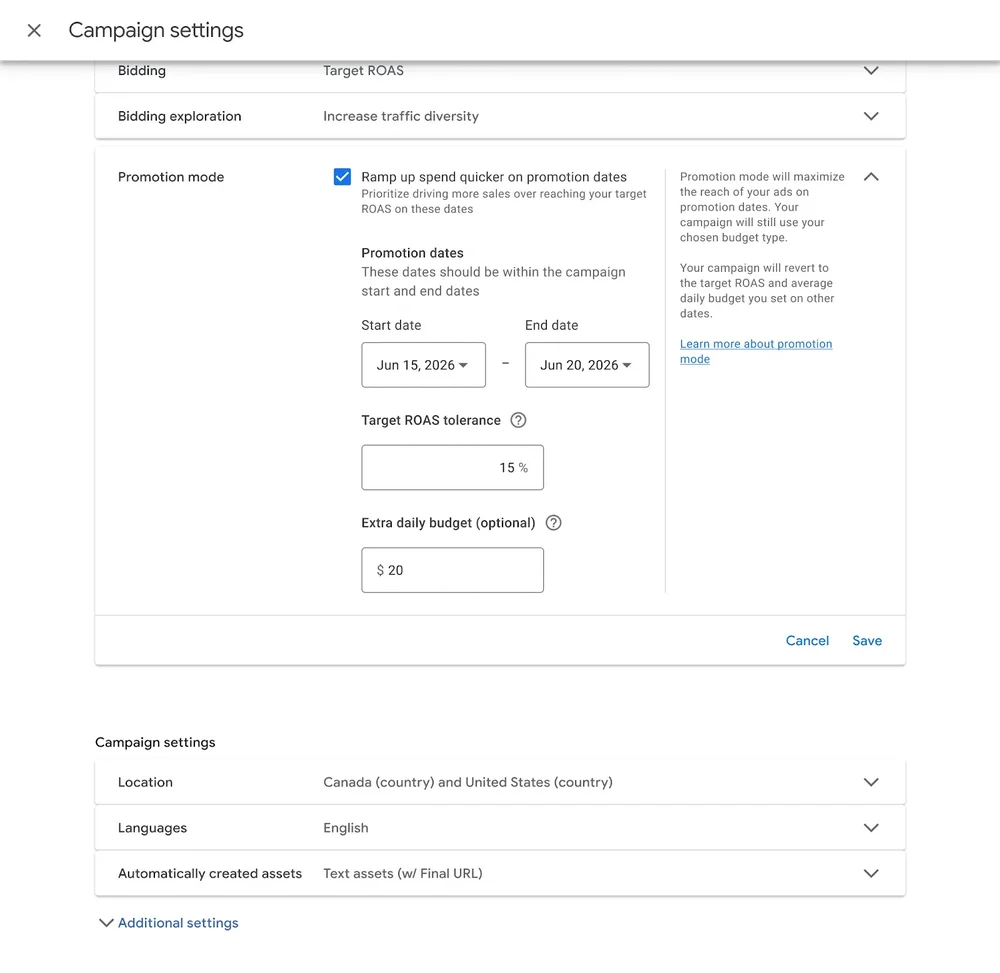
Google's own screenshot shows the setting. The checkbox reads "Ramp up spend quicker on promotion dates" and explains that it prioritizes driving more sales over reaching your target ROAS on those dates. Promotion dates should fall within the campaign's start and end dates, the tolerance field takes a percentage (Google's example shows 15%), and the extra daily budget is an optional dollar amount. The side panel says the campaign reverts to the target ROAS and average daily budget you set for other dates.
How does the tolerance work? With a normal Target ROAS, Smart Bidding skips auctions it does not expect to meet your target, and Google notes that changing your target limits or increases the number of auctions your ads are eligible to enter. A tight target in the middle of a sale can therefore cost you impression share to bid. With Promotion Mode you set a tolerance, and for the window Smart Bidding actively aims for a lower target, so it can win more of those auctions and push more sales through within your budget. Because it really chases that lower target, expect your sale ROAS to land near it, not near your normal target. This is our reading of Google's description.
How do Promotion Mode, seasonality adjustments and seasonal budget adjustments compare?
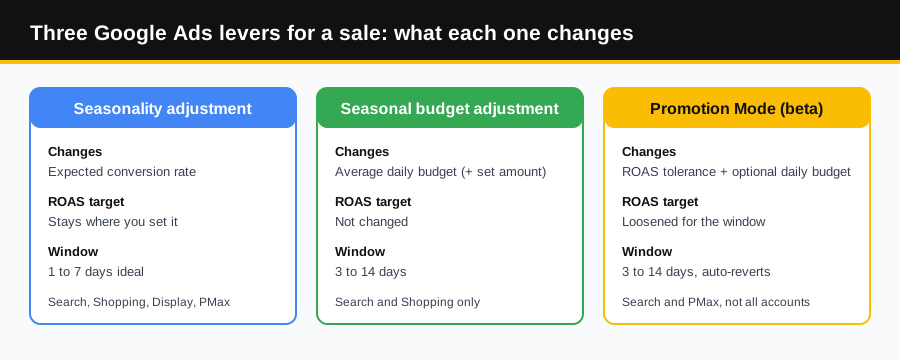
Seasonality adjustment
- What you tell Google
- Conversion rate will change by a set percentage. Your ROAS target does not move.
- Window
- 1 to 7 days is ideal, and over 14 days may not work as well.
- Campaigns
- Search, Shopping and Display on Target ROAS or Target CPA, plus Performance Max and App (beta) on any bid strategy.
Seasonal budget adjustment
- What you tell Google
- Add a set amount to the average daily budget, then restore it.
- Window
- 3 to 14 days.
- Campaigns
- Search and Shopping, excluding shared budgets, drafts, dayparting and flighted campaigns.
Promotion Mode (beta)
- What you tell Google
- Accept a lower return through your ROAS tolerance, and optionally add daily budget.
- Window
- 3 to 14 days.
- Campaigns
- Search and Performance Max, described for Target ROAS campaigns. Not in all accounts.
Where do you set each one, and how far does it reach?
| Setting | Where you set it | How far it reaches |
|---|---|---|
| Promotion Mode (beta) | Inside each campaign's settings, per Google's screenshot. | One campaign at a time, and only Search and Performance Max campaigns. |
| Seasonality adjustment | Tools, then Budgets and bidding, then Adjustments, on the Seasonal tab. | Campaign types or specific campaigns in an account, and a manager account can apply it across linked accounts. Search, Shopping, Display, Performance Max and App. |
| Seasonal budget adjustment | The same Adjustments page and Seasonal tab, with Budget as the type. | Specific eligible Search and Shopping campaigns. |
That is why the two are not rivals. Per Google's Q&A, with Promotion Mode Smart Bidding actively aims to achieve your lowered ROAS target for the specific time period, whereas seasonality adjustments account for conversion rate changes while maintaining your current ROAS target. One is a campaign-level setting for the target. The other is an adjustment you apply from the Tools menu, with a wider scope. See Google's seasonality adjustment steps for how scope works.
Which one should your store use for Black Friday?
Our read: for a planned sale where you want more volume and accept a lower return, Promotion Mode is the more honest tool. You choose how much ROAS you are willing to give up and for how long, and Google puts the settings back on its own.
Seasonality adjustments push the other way. Google says Smart Bidding already manages seasonal events, and Optmyzr's 2022 to 2024 data found accounts that set adjustments at BFCM saw ROAS fall 10% to 17% while accounts without them held steady. The full numbers are in our seasonality adjustments guide.
| Situation | Use | Why |
|---|---|---|
| A planned BFCM sale where you accept a lower ROAS to get volume | Promotion Mode, if your account has it | You set the tolerance and the window, and it reverts on its own. |
| A flash sale or first-time promotion that Google has no history for | Seasonality adjustment | It tells Smart Bidding the conversion rate jump is coming. |
| A sale where the daily budget is the limit | Seasonal budget adjustment, or Promotion Mode's extra daily budget | Both add budget for a set window and then restore it. |
| Normal BFCM with healthy ROAS and no budget cap | Neither | Smart Bidding already handles the seasonal peak. |
| Your account does not show Promotion Mode yet | Seasonal budget adjustment, or scheduled changes | Do not wait on a beta. Plan the sale with the tools you have. |
How do you pick a ROAS tolerance that keeps the sale profitable?
Start from break-even ROAS, which is 1 divided by your profit margin. One operator's Q4 playbook on X (Shaun Eng, October 2026) makes the same point: at a 35% margin, break-even is 2.86, so a 2.7 ROAS loses money even though revenue looks strong.
Then recalculate at sale prices, because a discount raises break-even. Illustration: a $100 product costs $65, so break-even ROAS is about 2.9. At 20% off the price is $80, the cost is still $65, and break-even jumps to about 5.3, before any other costs. Whatever tolerance you give Google has to leave you above the break-even for the discounted price.
How big should the tolerance be? Google's Q&A allows 5% to 90%, and its screenshot shows 15% as an example, not a recommendation. Because Smart Bidding will really aim for the lowered target, set the tolerance so that target still clears break-even at sale prices, and start small. Google's Smart Bidding Exploration help page, the feature Promotion Mode is powered by, gives the arithmetic: a 200% target with a 10% tolerance gives an effective target of 180%. We found no Promotion Mode page repeating it, and that help page says 5% to 30% for Exploration while Google's Q&A says 5% to 90% for Promotion Mode, so check the preview in your account.
What should you not assume about Promotion Mode?
- ▶It is a beta, so availability and behavior can change.
- ▶Caveat (unverified): trade reports say the baseline ROAS target cannot be changed while a promotion is active, and we found no Google page saying so. Context: Promotion Mode is powered by Smart Bidding Exploration, and Google's Exploration best practices say not to adjust your Target ROAS after opting in.
- ▶Ignoring Google's own warning. On its Performance Max travel setup page, the only help page we found that mentions Promotion mode, Google says your return on ad spend may be impacted as your campaign rapidly increases spend to take advantage of your promotion period.
- ▶Google's documentation does not explain how Promotion Mode interacts with seasonality adjustments or with Smart Bidding Exploration when they run together.
- ▶Performance data on it is thin. Test on one campaign before you put the whole account on it.
- ▶Separately, Google said backend updates from August 17, 2026 help budget-limited campaigns see more predictable performance in line with CPA and ROAS targets, especially when budgets increase, and that you may need to adjust your targets. Recheck them before the peak.
What is a sensible Q4 sequence?
- 1.Check your Search and Performance Max campaign settings for Promotion Mode, and ask your Google account team for access if it is missing.
- 2.Recalculate break-even ROAS at your sale prices.
- 3.Decide the tolerance and any extra daily budget now, and settle your normal target first so you know exactly what the window changes.
- 4.Schedule the start and the end together, as in our BFCM Google Ads playbook, and compare CPC, conversion value and ROAS against the same days last year.
What should you ask whoever runs your Google Ads?
- ▶Does our account have Promotion Mode, and if not, have we asked our Google account team for the beta?
- ▶What is our break-even ROAS at sale prices, and how low can the lowered target go before the sale loses money?
- ▶Which campaigns carry the promotion, and for how many days?
- ▶How will we compare the sale to the same days last year?
Frequently Asked Questions
What is Promotion Mode in Google Ads?
A beta campaign setting for Search and Performance Max. You set start and end dates (3 to 14 days), a Target ROAS tolerance (5% to 90% per Google) and optionally extra daily budget, and the campaign returns to its original target and budget when the window ends. It is powered by Smart Bidding Exploration, and Google says to reach out to your account team to get it.
Is Promotion Mode the same as a seasonality adjustment?
No. A seasonality adjustment tells Smart Bidding to expect a conversion rate change and leaves your ROAS target alone. Promotion Mode changes how much return you accept, and can add budget, for a scheduled window.
Which campaigns support Promotion Mode?
It is in beta for Search and Performance Max campaigns, and coverage describes it for campaigns on Target ROAS. Google's announcement lists Search and Performance Max only, and says to reach out to your account team to get the beta. Google's help page was not available when this was written.
Can I use Promotion Mode and seasonality adjustments together?
They work at different layers, and nothing we found from Google makes them mutually exclusive. Promotion Mode is a campaign setting that makes Smart Bidding aim for a lowered ROAS target during the window. A seasonality adjustment is set under Tools and adjusts the conversion rate estimate while keeping your current ROAS target. Google's Smart Bidding Exploration FAQ says Exploration, which Promotion Mode is powered by, is compatible with seasonal adjustments. Google does not spell out the combined behavior for Promotion Mode, so test on one campaign first.
Can I change my Target ROAS during a promotion?
Caveat (unverified): trade reports say the baseline ROAS target cannot be changed while a promotion is active, and we found no Google page saying so. Context: Promotion Mode is powered by Smart Bidding Exploration, and Google's Exploration best practices say not to adjust your Target ROAS after opting in.
Does a sale change my break-even ROAS?
Yes. A discount lowers your revenue per order while your product cost stays the same, so break-even ROAS rises. On a $100 product that costs $65, break-even is about 2.9. At 20% off the price is $80 and break-even is about 5.3, before any other costs.
Want the operator to check this on your account?
The Operator Audit is a full manual review of your account: 10 recommendation sets, a live findings call and a prioritized action plan. The $1,299 comes off your first month if you hire us within 30 days.
Keep reading
Black Friday Cyber Monday (BFCM) Google Ads Playbook for Ecom Brands
How to run Black Friday and Cyber Monday on Google Ads without building new campaigns: promotion assets, Merchant Center promotions, BFCM creative in PMax, Demand Gen and Display, and Search ads on existing ad groups.
ReadGoogle AdsPMax Architecture for DTC Brands: Feed-Only vs Full-Build
Feed-only PMax and full-build PMax are different products with different risk profiles. Here's how to pick the right one for a DTC ecommerce account.
ReadGuideNRF vs Shoptalk vs eTail: Which Ecom Event Is a Must-Attend?
NRF, Shoptalk Spring, eTail Palm Springs and Affiliate World Asia compared on size, price and format, with a blunt pick for ecommerce and DTC brands.
Read