How to Audit a Google Ads Account for Wasted SpendA DTC Checklist

By Santosh Kumar, Founder of Shopiator
A structured, DTC-specific checklist for finding wasted Google Ads spend, from brand cannibalization to keywords burning budget without hitting target ROAS.
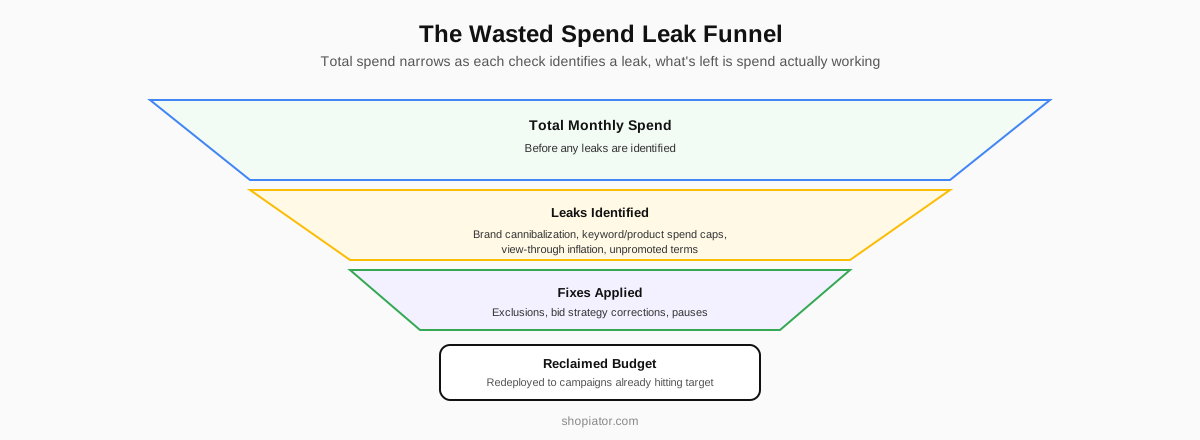
Wasted spend in a Google Ads account almost always comes from a small set of recurring patterns: brand cannibalization, keywords spending without converting, feeder campaigns misconfigured with a ROAS target, and products spending past their own price point without hitting target ROAS. A structured audit checks each of these specifically rather than scanning the dashboard for a general sense of "how it's going."
Most accounts that haven't been audited in three-plus months are leaking budget in at least two or three of these categories simultaneously, and the leaks compound, since a bloated non-brand campaign inflated by brand cannibalization also hides which non-brand keywords are actually working.
This post is a checklist, in order, for finding wasted spend in a DTC Google Ads account, covering what to check, what the failure pattern looks like, and what the fix is once you find it.
| Check | Red flag threshold | Fix |
|---|---|---|
| 1. Brand cannibalization | Own brand name appears in PMax placements or non-brand search terms | Add brand negative lists at the campaign level; re-baseline non-brand ROAS after |
| 2. Feeder on wrong bid strategy | Any feeder campaign running tROAS or Maximize Conversion Value | Switch back to Maximize Clicks with no ROAS target |
| 3. Keyword spend without ROAS | Keyword has spent over $50 with no target ROAS hit at any point | Pause the keyword or move it to a tighter match type |
| 4. Product spend without ROAS | Product spend exceeds its own retail price with no target ROAS hit | Review for exclusion or feed optimization (title, images, price) |
| 5. Demand Gen view-through | View-through conversions counted in a Demand Gen campaign's totals | Disable view-through counting; re-evaluate click-driven performance |
| 6. Impression share loss at target | Campaign hits target ROAS across 7/14/30-day windows but loses IS to budget | Increase budget up to 20% |
| 7. Unpromoted search terms | Converting brand-adjacent or high-intent terms still on broad/phrase match | Add as exact match keywords in the appropriate campaign |
| 8. Feeder/converter judged separately | Feeder cut based on standalone ROAS without checking converter's signal use | Evaluate feeder and converter as one combined funnel |
The 8 checks, in the order they should be run, since later checks depend on earlier ones being clean.
Why This Checklist Exists
Across 26 monitored DTC accounts, two in three had changes made by someone outside the managing team, and 88% of all performance alerts were product-level rather than account-level.
Product-level leaks (88% of performance alerts, across 21 of 26 accounts) outnumbered account-level ROAS and cost alerts (about 8%) by roughly 10 to 1.
A healthy topline ROAS number routinely hides both problems, which is exactly why this checklist runs check by check instead of a general scan of the dashboard. Source: we monitored 26 DTC Google Ads accounts.
Worked example: reclaimable spend found across 3 leaks
- ▶Illustrative figures, not a real client's account. Running the checklist on a $38,000/month DTC account:
- ▶Check 1 (brand cannibalization): $2,100/month in PMax spend landing on branded search terms, effectively double-paying for traffic that would have converted organically.
- ▶Check 3 (keyword spend cap): 6 keywords each spent $50-90 without hitting the account's 3.2x target ROAS, roughly $410/month in dead spend.
- ▶Check 5 (view-through inflation): a Demand Gen campaign reports 3.8x ROAS with view-through conversions included; disabling it drops real click-driven ROAS to an estimated 1.6x on $1,850/month in spend, not reclaimable cash but a budget that needs reallocating, not scaling further.
- ▶Total: roughly $2,510/month in spend to redirect or cut outright, plus a mislabeled $1,850/month that was never performing the way it looked.
Check 1: Is PMax or Non-Brand Search Bidding on Your Own Brand?
Pull search term insights and placement reports for every non-brand and PMax campaign and look for your own brand name showing up as a captured query. If it is, that spend is being misreported as non-brand performance while actually cannibalizing traffic that would have converted for free through organic or direct. Fix: add brand negative lists at the campaign level and re-baseline non-brand ROAS after the exclusion takes effect.
Check 2: Is Any Feeder Campaign Running on a ROAS Target?
Feeder search campaigns should always run on Maximize Clicks with no ROAS target. If you find a feeder campaign with a target ROAS or Maximize Conversion Value bid strategy applied, that's a structural error suppressing the volume the campaign exists to generate. Fix: switch the bid strategy back to Maximize Clicks and let the converter campaign handle efficiency.
Check 3: Are Individual Keywords Spending Without Hitting Target ROAS?
Pull a keyword-level report sorted by spend and check any keyword that has spent more than $50 without hitting the account's target ROAS at any point in that spend. This is a hard limit, not a soft guideline: a keyword given more than $50 of runway with no ROAS signal to show for it should be paused or moved to a tighter match type, not given more budget to "let it learn."
Check 4: Are Individual Products Spending Past Their Own Price?
Cross-reference product-level Shopping/PMax spend against each product's price. A product spending more than its own retail price without hitting target ROAS in any time window is being subsidized past the point of rational return and should be reviewed for exclusion or feed optimization (title, images, pricing competitiveness) before further spend continues. This is the SKU-level version of the product-level leak pattern that made up 88% of performance alerts in our 26-account monitoring data, roughly 10x the volume of account-level ROAS and cost alerts, and it's exactly the kind of leak that hides under a healthy topline number.
Check 5: Is Demand Gen Running With View-Through Conversions Counted?
Check every Demand Gen campaign's conversion settings for view-through conversion inclusion. A Demand Gen campaign showing strong ROAS that's actually driven by view-through counting (someone saw the ad and bought later without clicking) is reporting inflated performance that doesn't reflect real incremental impact. Fix: disable view-through conversion counting and re-evaluate the campaign's real click-driven performance.
Check 6: Is Any Campaign Losing Impression Share While Hitting Target ROAS?
Pull impression share (lost due to budget) for every campaign hitting its target ROAS across 7-day, 14-day, and 30-day windows. A campaign that's efficient and still losing impression share is leaving profitable revenue on the table, and the fix (a budget increase up to 20%) is one of the lowest-risk moves available in an audit, since the campaign has already proven it converts at target.
Check 7: Are Converted Brand-Adjacent Search Terms Sitting Unpromoted?
Review search term reports across brand and feeder campaigns for terms that are converting well but haven't been promoted to exact match keywords. Leaving these on broad or phrase match indefinitely means the account is paying discovery-level costs on terms that have already proven themselves, when they should be locked in at tighter, cheaper control.
Check 8: Cross-Check Feeder and Converter Performance Together, Not Separately
Feeder and converter campaigns for the same product line should be evaluated as a combined funnel, not graded individually. A feeder campaign with a "bad" standalone ROAS can still be doing its job if it's feeding signal that shows up as converter campaign performance. Judging the feeder in isolation and cutting it based on its own ROAS number is a common audit mistake that breaks the funnel it was supporting.
Shopiator is a Google Ads agency for ecommerce brands, run personally by a 16-year PPC specialist with expertise in DTC, supplement/healthcare compliance, PMax architecture, and incrementality testing, and this checklist reflects the same sequence used on every new client account before any bid or budget changes are made: find the leaks first, then optimize, never the other way around.
Do / Don't
- ▶Do: check search term insights and PMax placements for your own brand name before trusting any non-brand ROAS number.
- ▶Don't: let a keyword spend past $50 or a product spend past its own retail price without hitting target ROAS; pause or restructure at that hard limit.
- ▶Do: disable view-through conversion counting on Demand Gen campaigns and re-evaluate performance on click-driven conversions alone.
- ▶Don't: cut a feeder campaign based on its own standalone ROAS; check whether it's feeding signal that shows up in converter performance first.
- ▶Do: increase budget up to 20% on any campaign hitting target ROAS across 7/14/30-day windows that's losing impression share to a budget cap.
- ▶Don't: wait longer than a quarter between audits; leak patterns compound and become harder to isolate the longer they run unchecked.
Frequently Asked Questions
What's the single most common source of wasted spend in a DTC Google Ads account?
Brand cannibalization from non-brand search or PMax campaigns bidding on the account's own brand terms. It's common because it's invisible in blended reporting and requires specifically checking search term insights and placements to catch.
How much should a single keyword be allowed to spend without converting?
No more than $50 without hitting the account's target ROAS at any point during that spend. Beyond that threshold, the keyword should be paused or restructured rather than given more budget to prove itself.
Should a product ever spend more than its own retail price on ads?
No, not without hitting target ROAS at some point in that spend window. A product spending past its own price with no ROAS signal is being subsidized past the point of rational return and needs a feed or exclusion review.
Why does view-through conversion counting matter for Demand Gen specifically?
Because Demand Gen is a visual, awareness-adjacent format prone to attributing purchases to ad exposure the buyer may not have consciously acted on. Counting view-through conversions inflates reported ROAS in a way that doesn't reflect real incremental performance.
Should a campaign hitting target ROAS ever get more budget automatically?
Yes, budgets should increase up to 20% when a campaign is hitting target ROAS across 7-day, 14-day, and 30-day trends and losing impression share due to budget limits. This is one of the lowest-risk actions in an account because the campaign has already proven its efficiency at the current spend level.
How often should this kind of wasted-spend audit be run?
At minimum quarterly, though monthly is better for accounts with frequent catalog or campaign changes. Waiting longer than a quarter typically means multiple leak patterns have compounded and become harder to isolate individually.
Want the operator to check this on your account?
The Operator Audit is a full manual review of your account: 10 recommendation sets, a live findings call and a prioritized action plan. The $1,299 comes off your first month if you hire us within 30 days.
Keep reading
Google Ads Benchmarks for Ecommerce (2026): CPC, CTR, ROAS, CPA
Real Google Ads performance benchmarks from 25 ecommerce accounts across the US, UK, Canada, and Australia, covering January 2025 through Q3 2026: average CPC, CTR, conversion rate, ROAS, CPA, and CPM, broken down by Performance Max, Shopping, Search, Demand Gen, Display, and YouTube, by country and by quarter. First-party data, not a scraped roundup.
ReadGoogle AdsGoogle Ads Scam: It's Not Your Customers Who Get Hit
The most profitable persuasion system in Google Ads doesn't sell products. It sells account management to founders spending $30k-$500k/month who are certain they're too smart to be sold. Here's the mechanism, who profits from it, and the five-minute audit that breaks it.
ReadCreator CommerceWhop for Coaches and Consultants: Masterminds and Access Tiers
Live coaching and paid mastermind groups run differently on Whop than packaged video courses: pricing tiers, drip-gated cohorts, and role-based access for different coaching groups. Here's how coaches and consultants structure it.
Read