Google Ads Channel Prioritization

By Santosh Kumar, Founder of Shopiator
Google Ads channel prioritization and budget allocation explained for ecom brands: High vs Low priority by bid strategy, Shopping and PMax options, and the February 2027 Display change on Search.
Google Ads channel prioritization is a new optional control that lets you decide which inventory gets your budget first: Google Search, Search partners, the Google Display Network, or the Google channels grouping in Performance Max and Demand Gen. It ships with a second control, budget allocation, which puts a percentage cap on any channel you mark as Low priority.
Google announced both on October 14, 2026, in a Google Ads blog post and a thread from Ads Liaison Ginny Marvin. This post sticks to what Google has published and maps it to how ecom brands run Shopping, PMax and Search. Where we give our own recommendation, we say so.
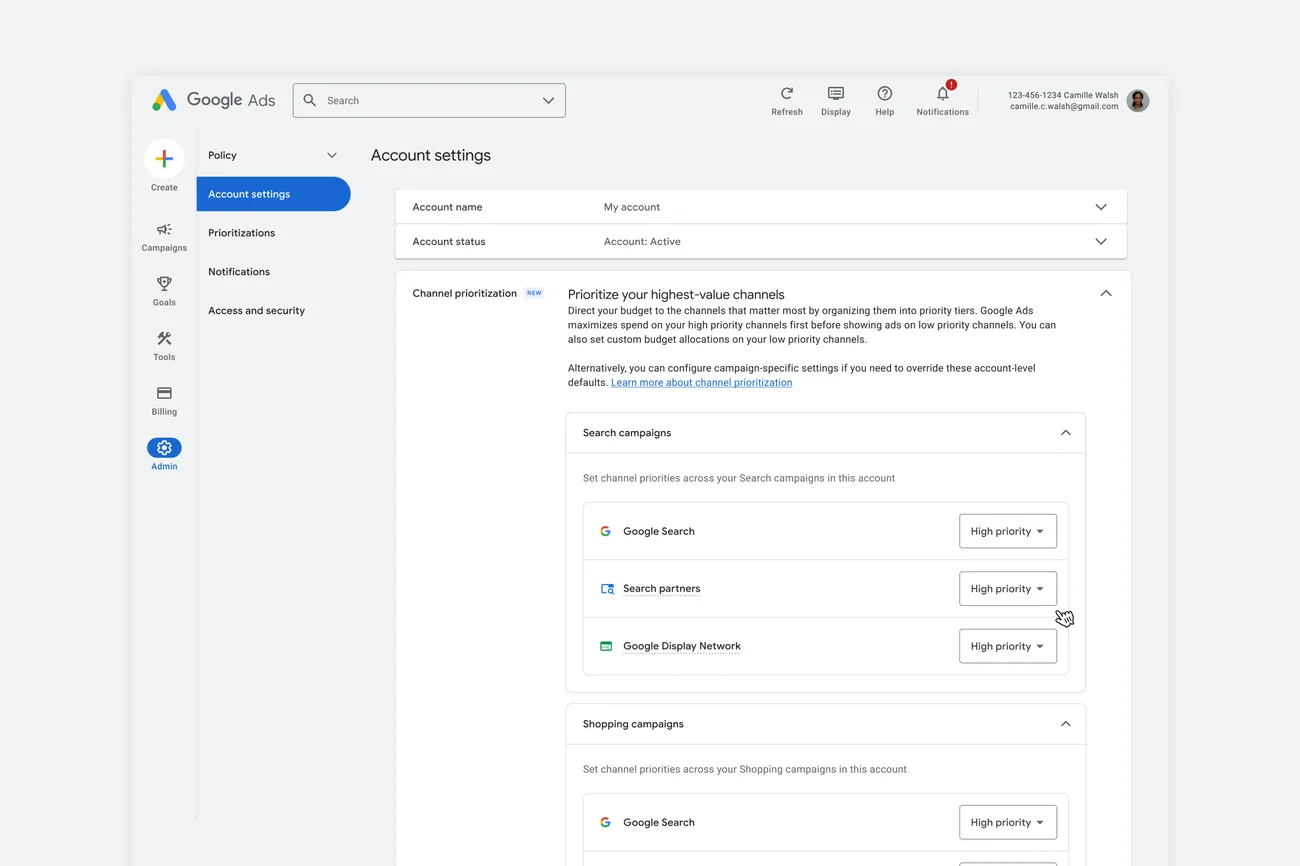
How does Google Ads channel prioritization work?
Every channel gets one of two levels. High priority channels are funded first, within your target if you bid on Target CPA or Target ROAS. Low priority channels get whatever budget is left. By default every channel is High priority, so nothing changes until you set it.
Budget allocation sits on top. For a Low priority channel you can enter a daily percentage, calculated on the campaign's average daily budget, not on actual spend. Google's own example: 5% on a $1,000 average daily budget means it aims to keep that channel at or below $50 a day. Google calls it best effort, so a day can run over, and the allocation resets daily with nothing carried over. Set it to 0% and Google will not spend on that channel.
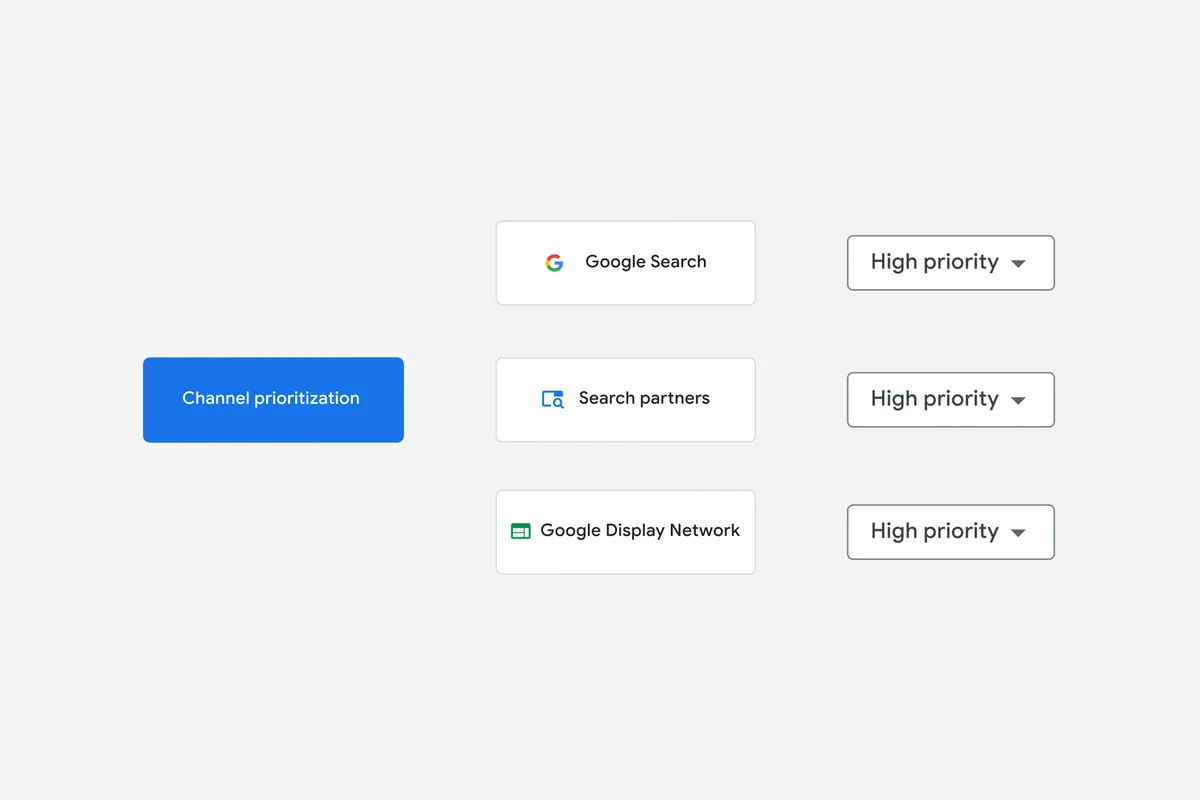
Which channels can you prioritize in each campaign type?
| Campaign type | Channels you can prioritize | Budget allocation |
|---|---|---|
| Search | Google Search, Search partners, Google Display Network | Yes |
| Shopping | Google Search, Search partners | Yes |
| Performance Max | Google channels (Search, YouTube, Gmail, Discover, Maps as one), Search partners, Google Display Network | Yes |
| Demand Gen | Google channels, Google Display Network | No, priority only |
Source: Google Ads Help, About channel prioritization and budget allocation, October 2026.
For PMax this is the important limit: YouTube, Gmail, Discover and Maps cannot be set separately. Google's Help Center says that if you want per-surface control, use Search and Demand Gen campaigns, which allow individual opt-outs. In Demand Gen the existing channel controls are unchanged.
Does channel prioritization work with Target ROAS?
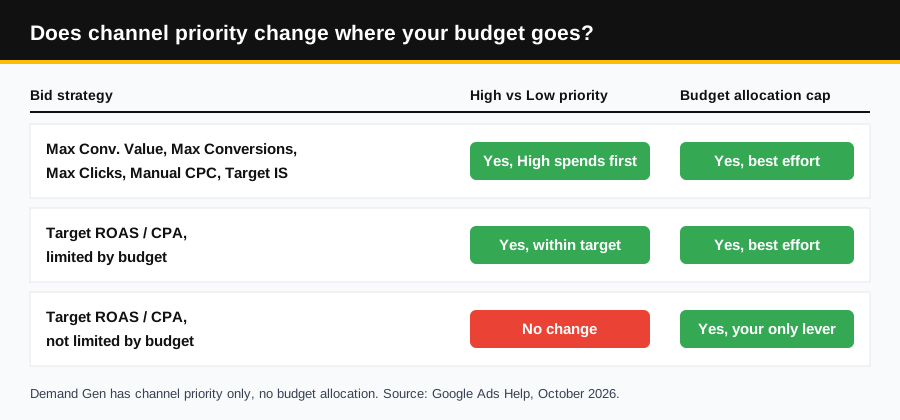
Only when the campaign is limited by budget. Google's Help Center and Marvin's thread say the same thing: when a Target ROAS or Target CPA campaign is not limited by budget, the bidding system already tries to capture every eligible conversion at your target across all opted-in channels, so priority levels generally do not change spend. Budget allocation on Low priority channels still applies, which makes the cap your only lever on those campaigns.
When a target campaign is limited by budget, High priority channels spend first. If more spend there would break your target, budget moves to Low priority channels when they are predicted to convert at or better than target, still within any cap. On Maximize Conversion Value, Maximize Conversions, Maximize Clicks, Manual CPC and Target Impression Share, High priority channels always spend first and Low priority channels only get budget that could not be spent on High.
What changes for Search campaigns with Display in February 2027?
50%
The budget allocation Google says to set on the Display Network, at Low priority, to keep today's Display Expansion setup on Search campaigns after February 2027.
Source: Google Ads Help
- ▶Starting February 2027, all Search campaigns with Display Expansion enabled migrate to channel prioritization and budget allocation, and the current spend allocation setup goes away.
- ▶You may see spend shift between Google Search, Search partners and the Display Network.
- ▶To keep your current configuration, set the Google Display Network to Low priority with a 50% daily budget allocation.
- ▶Display will no longer serve on Search campaigns that use the Target Impression Share bid strategy.
- ▶If you set channel priorities on a Search campaign before February 2027, the new settings apply right away and replace the current Display Expansion behavior.
How should ecom brands set up channel prioritization?
Our read, mapped to the feeder and converter structure we run for ecom brands (see feeder and converter Search campaigns and the Shopping version). These are our recommendations, not Google's.
- 1.Converter campaigns on Target ROAS: if they are not limited by budget, do not expect High and Low to change anything. If you want a ceiling on Search partners or Display, mark them Low priority and set an allocation.
- 2.Feeder Search and Shopping on Maximize Clicks: priority does work here, so Google Search can stay High while Search partners goes Low with a small allocation, instead of a full opt-out. Read Search partners results by conversion time before you raise it.
- 3.Brand Search on Maximize Clicks or Manual CPC: keep Google Search High and decide whether Search partners and Display deserve any spend at all. A 0% allocation stops spend on that channel.
- 4.Performance Max: you can only demote Search partners and Display, not YouTube or Gmail on their own. Feed-only PMax and full-build PMax both keep Google channels as one block.
- 5.Search campaigns with Display on: audit them before February 2027 and decide between the 50% Low priority setting that keeps today's behavior and a lower cap.
- 6.Test before you roll out: use a custom experiment. Google says the controls work in experiments, but multi-campaign shared budgets are not supported there.
With Q4 peak close, also check how this sits with Promotion Mode and seasonality adjustments, and keep the rest of your setup in line with our BFCM Google Ads playbook.
Where do you set channel prioritization in Google Ads?
- 1.Account level: go to Account settings, open the Channel Prioritization card, pick the campaign type, assign High or Low priority to each channel, optionally add a percentage on Low priority channels, and save.
- 2.Campaign level: open the campaign's Settings, expand Channel Prioritization, choose Use campaign-level settings to override the account default, then set priorities and allocations the same way.
- 3.Shared budgets: the settings apply to the shared budget as one pool across every campaign that uses it.
One discrepancy to know about. Marvin's thread says the settings are supported in the Google Ads API at launch with Google Ads Editor coming soon, while the Help Center says the controls can be managed in Google Ads and Search Ads 360, with API and Editor support coming soon. If you manage campaigns by script or API, check before you plan around it.
What are the limitations?
- ▶Campaign total budgets: supported with channel prioritization for Demand Gen only. On other campaign types the settings do not apply to campaigns using total budgets.
- ▶Shared budgets: every campaign on the shared budget must be the same campaign type, for example all Search or all Shopping.
- ▶Manager accounts: you cannot set channel prioritization from an MCC. Set it in each client account or campaign.
- ▶Account defaults: an account-level allocation applies to every eligible campaign of that type, so a campaign spending more than that share on a Low priority channel may shift.
- ▶Rollout: feature availability varies by campaign type and timing, so it may not appear in every account yet.
Sources
Google Ads blog, Guide your campaign spending with new priority and allocation features, October 14, 2026. Google Ads Help, About channel prioritization and budget allocation (answer 18385152). Ads Liaison thread on X, October 14, 2026.
Frequently Asked Questions
What is Google Ads channel prioritization?
An optional setting that lets you mark channels as High or Low priority. Google funds High priority channels first, within your target if you use Target CPA or Target ROAS, and sends any remaining budget to Low priority channels. By default every channel is High priority.
What is budget allocation in Google Ads?
For a channel set to Low priority, you can add an optional daily cap as a percentage of the campaign's average daily budget. Google's example: 5% on a $1,000 average daily budget means it aims to keep that channel at or below $50 a day. It is best effort, resets daily, and 0% means no spend on that channel.
Does channel prioritization work with Target ROAS?
Only when the campaign is limited by budget. When a Target ROAS or Target CPA campaign is not limited by budget, Google says priority levels generally do not change how spend is distributed, and budget allocation on Low priority channels is the lever that still applies.
Which channels can I prioritize in Shopping and Performance Max?
Shopping: Google Search and Search partners. Performance Max: Google channels (Search, YouTube, Gmail, Discover and Maps as one grouping), Search partners and the Google Display Network. Search campaigns get Google Search, Search partners and Display. Demand Gen gets Google channels and Display, with priority only and no budget allocation.
What changes for Search campaigns with Display Expansion in February 2027?
Google says Search campaigns with Display Expansion enabled will migrate to channel prioritization and budget allocation, the current spend allocation setup goes away, and channel spend may shift. To keep the current setup, set the Google Display Network to Low priority with a 50% budget allocation. Display will also stop serving on Search campaigns using Target Impression Share.
When will channel prioritization be in my account?
Google's Help Center says it becomes available progressively from October 15, 2026, rolling out over the coming months, so it may not be in your account yet. It cannot be set from a manager account; set it in each client account or campaign.
Want the operator to check this on your account?
The Operator Audit is a full manual review of your account: 10 recommendation sets, a live findings call and a prioritized action plan. The $1,299 comes off your first month if you hire us within 30 days.
Keep reading
Shopify Payments Holding Your Money? A Q4 Cash Flow Plan
Why Shopify Payments holds payouts or applies a reserve, what Shopify says to do, and how to test a backup processor like Whop before Q4 peak.
ReadGuideNRF vs Shoptalk vs eTail: Which Ecom Event Is a Must-Attend?
NRF, Shoptalk Spring, eTail Palm Springs and Affiliate World Asia compared on size, price and format, with a blunt pick for ecommerce and DTC brands.
ReadCreator CommerceTop Whop Clipping Offers of Oct 2026 - How To Earn Money with Whop Content Rewards
Top Whop clipping offers of October 2026: live Content Rewards campaigns ranked by open budget, with pay per 1,000 views, payout limits and how to earn.
Read