Shopify Payments Holding Your Money?A Q4 Cash Flow Plan

By Santosh Kumar, Founder of Shopiator
Why Shopify Payments holds payouts or applies a reserve, what Shopify says to do, and how to test a backup processor like Whop before Q4 peak.
A payout hold hurts most in Q4, because the cash goes straight back into ads and inventory. If Shopify Payments is holding funds, or you are afraid it will during a Black Friday spike, you need a plan before the hold arrives.
This post explains why Shopify Payments holds payouts or applies a reserve, what Shopify says to do, and how some merchants are testing a second processor, with Whop as one option, including Whop's own reserve rules. Facts come from the Shopify Help Center and Whop's docs. A public thread from one merchant is included and marked self-reported. Shopiator has not moved a store to Whop ourselves.
What is the difference between a payout hold and a reserve?
Shopify's payout timing page says payouts can be held during an account review, for example after chargeback disputes, compliance checks, high-risk orders, fulfillment issues or missing documents. You are notified in Merchant Alerts in your admin or by email to the store owner.
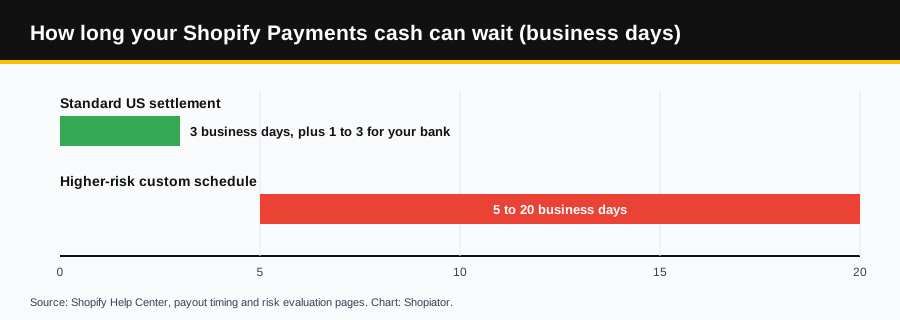
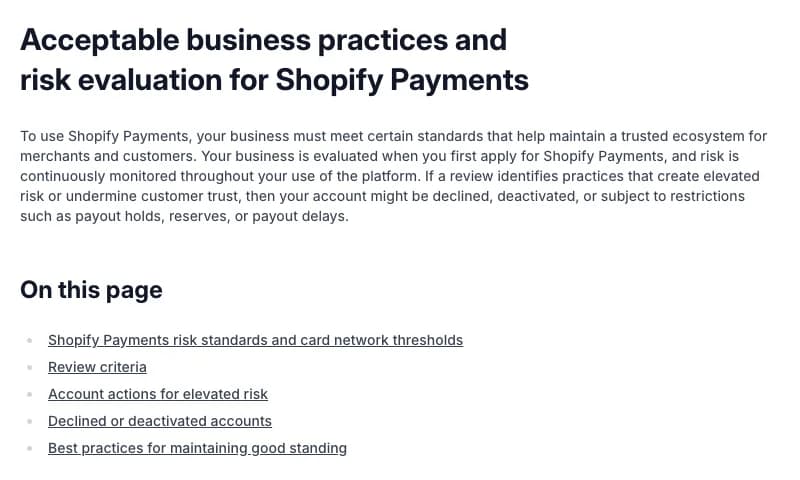
A reserve is different. Per Shopify's risk evaluation page, it is a temporary hold on part of your transaction funds, sometimes all of them, for a set period, as a fixed amount or a percentage of each transaction. Higher-risk businesses may also get a custom schedule, and Shopify says payouts might take from 5 to 20 business days.
Why does Shopify Payments hold payouts?
Shopify says risk is monitored continuously, that it evaluates hundreds of signals, and that it may act before card network thresholds are reached. The signals it names include:
- ▶Chargeback rates and trends, and refund or dispute practices.
- ▶Product listings that do not match what is delivered, and missed delivery promises.
- ▶Subscription terms that are unclear or hard to cancel.
- ▶Fake reviews or misrepresented credentials.
- ▶Invalid tax information, address mismatches or unverified ownership.
- ▶Rapid sales spikes, or problems at other businesses you operate.
What should you do now to protect Q4 payouts?
- 1.Check Merchant Alerts and the store owner's email today, including spam, because holds and reserve terms are communicated there.
- 2.Have your documents ready. If Shopify asks for them, upload complete and legible files quickly.
- 3.Do not change your payout bank account at peak. Shopify says adding or switching to a new external bank account pauses payouts for 3 to 5 business days. Switching to Shopify Balance does not trigger the pause.
- 4.Ship what you sell, on the timeline you promise. Unreliable fulfillment is one of Shopify's signals.
- 5.Answer disputes and customer concerns promptly, and keep product descriptions accurate.
- 6.Plan cash with the real timing in mind: 3 business days to settle, then 1 to 3 more for your bank. Our read: do not schedule ad spend against funds that are still in transit.
Can you keep selling if Shopify Payments pauses?
Shopify's risk page says you can activate a third-party payment provider to keep processing payments. Check the cost first, because a third-party gateway changes your fees. We cover the math in Whop vs Stripe vs Shopify Payments.
What did one merchant do? A self-reported example
On October 10, 2026, ecommerce operator Sohaib Gouaalla posted that he had moved his store's payments from Shopify Payments to Whop three days earlier, set up a custom checkout in a day, started ads the same night and reached $10k a day with no disputes. He also wrote that a 5% reserve on a brand-new account was the one thing holding him back, with a goal of $1M a month in Q4.
3 days ago I moved my ecom store's payments to @whop.
— Sohaib Gouaalla (@sohaibgou) October 10, 2026
I was tired of Shopify Payments holding my money while I'm trying to scale.
Set up a custom checkout on Whop in a day.
Running ads the same night.
Today we're at $10k/day with 0 disputes and clean payments.
Goal is… pic.twitter.com/Q0MeLNUoVk
A Whop referrer, Dylan, then amplified it and added that the businesses he has referred have processed $20M+ on Whop:
if shopify payments is holding your money, that's on you now
— Dylan (@dsullyyy) October 11, 2026
this guy moved his store's payments to whop 3 days ago
set it up in a day, had ads running the same night, and he's at $10k a day with 0 disputes
whop runs full ecom stores now:
- the whole store hosted free
-… https://t.co/nWGrEzUafj
We cannot verify any of those numbers, and both posts promote Whop. The photo attached to the first post is a Whop mobile balance screen showing a total of US$19,930.59, up US$5,415.99 that day. A balance screen does not show revenue, disputes or how much is held in reserve. We include the thread for one reason: it shows that a new processor account can come with its own reserve, which is the part to plan for.
Does Whop hold money too?
Yes, it can. Per Whop's reserve docs, a reserve is a portion of your balance held back from payout for a period of time. It still counts toward your balance and is never a fee. Whop lists these reasons:
- ▶Your account is new or has little sales history.
- ▶Refunds or disputes are high compared with sales, or your dispute rate is nearing card network thresholds.
- ▶You have many unresolved cases in Whop's Resolution Center.
- ▶You deliver long after payment, such as pre-orders or bookings.
- ▶Your sales patterns change suddenly.
A rolling reserve holds a percentage of each sale for a number of days, and Whop's example is 10% for 90 days. A fixed reserve holds a dollar amount from your balance until a release date. Whop's Seller Terms list new account status as a reason, say reserves can reach up to 100% of funds, and cap holds at 180 days. We found no published default percentage for a new account. Your Balances page shows the percentage, hold period and release dates, and lower rates apply to new sales while money already held keeps its original release date.
How do you test a backup processor without risking Q4?
- 1.Keep Shopify Payments live and send only a slice of traffic to the second processor, for example one product or one offer.
- 2.Read the reserve terms before you scale. On Whop, open the Balances page and check the percentage, hold period and release dates.
- 3.Test a refund and a small dispute flow, and confirm payout timing against your cash plan.
- 4.Check that purchases still fire your ad conversion tracking and product feed events. Our read: if the checkout moves and tracking does not, your bidding loses its signal.
- 5.Do not switch in Black Friday week. Run the test now, with enough days to see a payout.
Whop describes an embedded checkout that can sit on your own website. Whop's blog also lists local methods such as Pix for Brazil and OXXO for Mexico, though its docs overview does not, so confirm in your dashboard which methods you get. For the wider picture, see Whop Ecommerce Stores vs Shopify and Should Your Ecommerce Brand Switch to Whop?.
Who should not switch mid-quarter?
If you rely on Shopify's built-in shipping rates, tax tools or app ecosystem, moving checkout in Q4 adds risk, because Whop's store announcement did not show them, as we covered in Whop Ecommerce Stores vs Shopify. In that case, treat a second processor as a backup, not a replacement, and keep it small until you have seen a full payout cycle.
Open an account now and read your reserve terms before Q4 peak.
Start Your Whop StoreFrequently Asked Questions
Why is Shopify Payments holding my payouts?
Shopify says payouts can be held during an account review. Signals it lists include chargeback rates and trends, listings that do not match what is delivered, unclear subscription terms, unreliable fulfillment, invalid tax or business information, and rapid sales spikes. Check Merchant Alerts in your admin and the store owner's email for the notice.
How long does a Shopify Payments hold last?
Shopify's help pages give no fixed end date for most reviews. For higher-risk accounts it says a custom payout schedule can mean waits of 5 to 20 business days, against a standard US settlement time of 3 business days.
What is a reserve?
Per Shopify, a reserve is a temporary hold on part of your transaction funds, sometimes all of them, for a set period. It can be a fixed amount or a percentage of each transaction, and it covers potential chargebacks and refunds.
Can I keep selling if Shopify Payments pauses?
Shopify's page says you can activate a third-party payment provider to keep processing payments. Check the extra transaction fee that applies to third-party gateways before you rely on one.
Does Whop hold money too?
It can. Whop's docs say a reserve is a portion of your balance held back for a period, that it is never a fee, and that it can apply when an account is new or has little sales history, when disputes run high, or when sales patterns change suddenly. Whop's Seller Terms list new account status as a reason and say reserves can reach up to 100% of funds for no longer than 180 days.
Is there a published Whop reserve percentage for a new account?
We found none. Whop's docs give examples such as 10% held for 90 days, but say the percentage depends on your account. The Balances page in your dashboard shows your actual reserve, hold period and release dates.
P.S. The Operator Audit is a full manual review of your account: 10 recommendation sets, a live findings call and a prioritized action plan. The $1,299 comes off your first month if you hire us within 30 days. Get the Operator Audit
Disclosure: Shopiator has a Whop referral link and may earn a commission if you sign up through it, at no extra cost to you. We do not operate, control or guarantee any provider or tool mentioned here, so do your own due diligence.
Keep reading
NRF vs Shoptalk vs eTail: Which Ecom Event Is a Must-Attend?
NRF, Shoptalk Spring, eTail Palm Springs and Affiliate World Asia compared on size, price and format, with a blunt pick for ecommerce and DTC brands.
ReadGuideHow to Lower Your Chargeback Rate: A Prevention System for Ecom Brands
A four-layer system to stop chargebacks before they happen: clear subscription consent and descriptors at checkout, rebill reminders and easy cancels after the order, RDR, Ethoca and CE 3.0 before the dispute, and the Shopify, Visa and Mastercard lines to monitor.
ReadCreator CommerceHow to Migrate to Whop From Stripe, Kajabi or Skool: Step by Step
A step-by-step order for moving a paying business to Whop: what to inventory, what to build first, how Stripe subscribers move, and what to check after.
Read