How to Migrate to WhopFrom Stripe, Kajabi or Skool: Step by Step

By Santosh Kumar, Founder of Shopiator
A step-by-step order for moving a paying business to Whop: what to inventory, what to build first, how Stripe subscribers move, and what to check after.
Moving a paying business to a new platform feels risky because the business already makes money and nobody wants to break it. The way to cut that risk is the order you move things in, not how fast you move.
This runbook covers what to inventory first, the order to build in, how paying subscribers cross over from Stripe, what changes if you come from Kajabi, Skool or Discord, switch day, and the first 30 days. Facts about Whop come from Whop's own migration post and its docs. The sequencing is adapted from a published playbook on X by a Whop migration agency, restated in our own words. Shopiator has not migrated a business to Whop ourselves.
About 30 seconds
is how long Whop says it takes to move subscriptions and payment tokens once you start a Stripe migration. The preparation around it takes far longer.
Source: Whop Migrations, June 17, 2026
What should you list before you move anything?
Write down everything the business runs on today. Skip this and something gets forgotten, usually the thing customers notice first. Cover these eight:
- ▶Products and prices
- ▶Active subscribers
- ▶Course content
- ▶Community and chats
- ▶Email lists and automations
- ▶Team logins
- ▶Affiliates
- ▶Tracking links
Next to each item, note the tool it lives in, what that tool costs per month and what fee it takes per sale. That list is your map for the whole move, and it shows what you pay today, which matters when you cancel the old tools at the end.
Then buy your own product. Go through the business as a customer from the sales page to the first lesson, and write down every step, every email you get and every wait. That is the journey you are rebuilding, and it shows where it already leaks.
In what order should you move a business to Whop?
Order matters more than anything else. If subscribers move first, they arrive at a half-built store: the course is missing, the community role never shows up, and refund requests start. Moving them last means they land in a finished setup that already works.
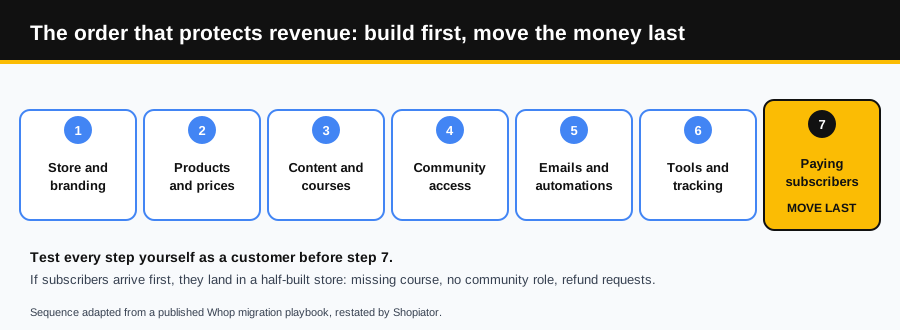
- 1.Store and branding: set up the Whop store to match your site, logos and offers.
- 2.Products and prices: enter each product at the price it has today, so nothing changes for the customer.
- 3.Content and courses: rebuild them in Whop's Courses app, which uses modules, chapters and lessons.
- 4.Community access: connect Discord or use Whop's own chat and forums, so buying gives access and cancelling removes it.
- 5.Emails and automations: connect the welcome, failed payment and win-back messages.
- 6.Tools and tracking: reconnect analytics, support and affiliate tracking, and confirm each integration.
- 7.Paying subscribers: move them last, once steps 1 to 6 are built and tested.
One thing to start early: identity verification. Whop's docs say a user must complete identity verification (KYC) before receiving payouts, and businesses complete KYB. See Whop's payout setup so it does not hold up your first payout.
How does Whop move your paying subscribers from Stripe?
Whop Migrations is built for Stripe. You connect Stripe under Settings, then Migrations, and Whop scans the account and shows a preview of the subscriptions that qualify before anything changes. Nothing is final until you confirm, and you can exclude any subscriber by email or Stripe subscription ID and handle them by hand.
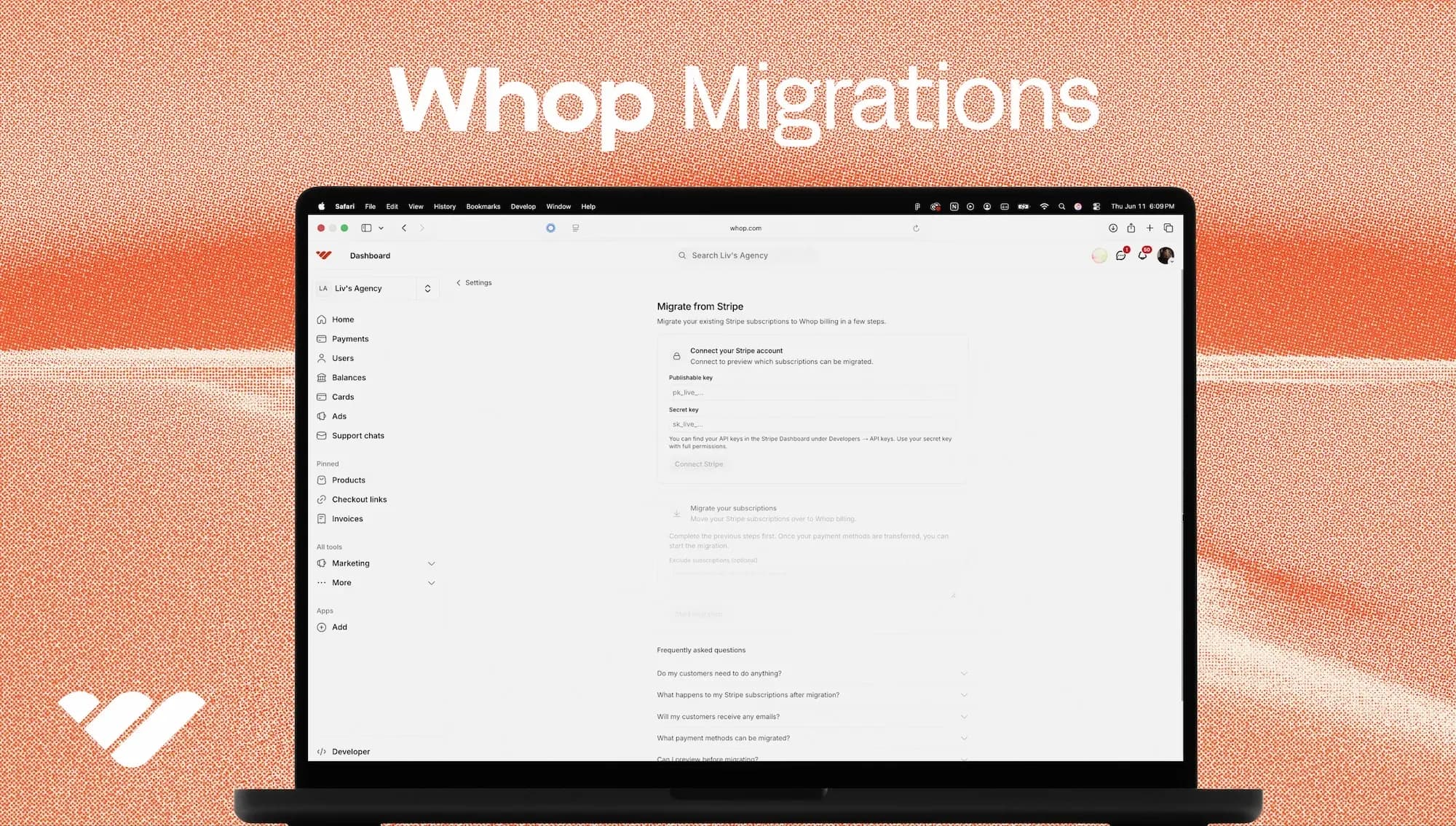
What moves, per Whop: active and trialing subscriptions paid by card, together with the payment token, so members keep paying without re-entering details. What does not move:
- ▶Past due, canceled and expired subscriptions.
- ▶Non-card payments such as Stripe Link, ACH and SEPA.
- ▶Customers with no email on their Stripe record.
- ▶Subscriptions under $1.
- ▶Payment method updates made after the transfer starts.
Whop says each migrated Stripe subscription is scheduled to cancel at the end of its current billing period and Whop takes over the next charge. Stripe sends its standard cancellation notice, and Whop recommends telling customers beforehand by email, push or SMS. When the move finishes, download the CSV report: it lists every subscription that migrated, every one that failed and why. Each failed row is a paying member who needs a personal message, so treat the report as your to-do list. You can also run the migration again, and Whop skips subscriptions it already moved.
What changes if you are coming from Kajabi, Skool or Discord?
Whop's migration post names Stripe only and says support for other platforms is on the way, so for everything else you rebuild and re-invite.
- ▶From Stripe: the cleanest case, because the tool moves subscriptions and cards. Most of your work is content and access.
- ▶From Kajabi or Teachable: rebuild the content in the Courses app and email members a new login with a clear reason the switch helps them. Ask your platform whether it can export subscribers.
- ▶From Skool: the community side moves to Whop's own chat and forums, or to a Discord connected to Whop. We compare the two in Whop vs Skool.
- ▶From Discord bots or Patreon: payment and access can live in one place on Whop. For Discord, set the cancellation action you want, because Whop lists options such as removing roles, kicking the member or taking no action, and the Whop bot's role must sit at the top of your server's role hierarchy.
- ▶From five tools taped together: map each tool to its replacement on your list, and cancel what Whop covers after the switch.
What should you do on switch day?
Switch day is when billing moves to Whop and the old checkout comes down. Run it from a checklist, because small misses become support tickets.
- ▶The night before: test every checkout and every access link yourself, and make sure the welcome email fires.
- ▶The night before: update links in bios, pinned posts, old emails and ads.
- ▶The day of: send members a short email, before Stripe's cancellation notice reaches them.
- ▶After the move: download the report, message every failed subscriber, and point the old checkout at Whop.
- ▶Keep the old tools on for one more billing cycle, to catch anyone who slipped through.
Keep the member email to a few lines. They need three things: their access is safe, their price is the same, and the next bill has a new name on it. For example: "We have moved [business] to a new billing system. Your access and price stay the same, and your next bill will come from Whop. You may get a cancellation notice from Stripe for the old subscription, and that is expected. Reply here if anything looks off."
Should you set up the emails during the move?
Yes, because the moment subscribers move is the moment failed payments start to matter. The agency behind the playbook reports that a membership community with no emails after the sale connected welcome, failed payment and win-back flows and saw churn go from 38.65% to 23.07%. That is self-reported and we could not verify it, so treat it as an illustration of why to do the emails during the move, not as a promise.
What should you watch in the first 30 days?
- ▶Revenue against the month before.
- ▶Members who failed to move, and whether each has been contacted.
- ▶Failed payments recovered.
- ▶Refund requests.
- ▶Support questions about access. If they rise, something in the setup needs fixing.
Cancel the old tools only after a full billing cycle has passed and every subscriber is accounted for. That is when the savings show on your bank statement. For the cost comparison, see Whop vs Skool and Whop vs Stripe and Shopify Payments.
Should you do it yourself or hand it off?
| Option | What you get | The catch |
|---|---|---|
| Do it yourself | Full control and no agency fee. | Weeks of your time, learning Whop while you build, and it is easy to miss the failed subscribers. |
| A general freelancer | Lower upfront cost. | They may be learning Whop on your business, and emails and tracking are the parts that tend to get left out. |
| A Whop migration agency | A repeatable process and someone who has done it before. | A fee, and you should ask for their audit and scope before any price is set. |
| Stay where you are | No work today. | The fees and manual steps keep costing you every month. |
Set up your store and build steps 1 to 6 before you move a single subscriber.
Start Your Whop StoreRelated reading: Why Whop, Whop for course creators and Should your ecommerce brand switch to Whop.
Frequently Asked Questions
Can Whop move my Stripe subscriptions automatically?
Yes, for active and trialing subscriptions paid by credit or debit card. Whop Migrations moves the subscription and the payment token together so customers do not re-enter card details, and Whop says the transfer takes about 30 seconds once you start it.
What does Whop's migration tool not move?
Past due, canceled and expired subscriptions, non-card payments such as ACH, SEPA and Stripe Link, customers with no email on their Stripe record, subscriptions under $1, and any payment method updates made after the transfer starts.
Will my customers be charged twice?
Whop says migrated Stripe subscriptions are scheduled to cancel at the end of their current billing period and Whop takes over billing from there, so customers should not be double charged. Stripe sends its standard cancellation notice, so tell your members before you run the move.
Can I migrate from Kajabi or Skool with the same tool?
Whop's migration post names Stripe only and says support for other platforms is on the way. For subscribers billed inside Kajabi, Skool or Patreon, plan a rejoin email with a link, and ask your current platform what it can export.
Do I need identity verification before I get paid?
Whop's docs say a user must complete identity verification (KYC) before receiving payouts, and businesses complete KYB. Start it early so it does not hold up your first payout.
What happens to Discord roles when a member cancels?
It is a setting. Whop's Discord guidance lists cancellation actions such as removing roles, kicking the member from the server or taking no action. The Whop bot's role needs to sit at the top of your server's role hierarchy to manage roles.
Can I run the Stripe migration more than once?
Yes. Whop says previously migrated subscriptions are detected and skipped, so a second run does not create duplicates.
Disclosure: Shopiator has a Whop referral link and may earn a commission if you sign up through it, at no extra cost to you. We do not operate, control or guarantee any provider or tool mentioned here, so do your own due diligence.
Keep reading
How to Earn From Ecom Without Owning Stores
Owning a store means carrying inventory, ad spend and chargebacks. Here are four ways to earn from ecom brands without that risk: refer them to Whop for payments, stores and ads, refer them to Google Ads services for 20%, resell Google Ads under your brand, or recommend playbooks.
ReadCreator CommerceIs Whop Becoming the Shopify of Online Business?
Whop raised $200M at a $1.6B valuation, reports $2.67B in lifetime volume, and pays partners up to 30% of its cut of fees. Here is how its partner program compares with Shopify's early ecosystem.
ReadGoogle AdsGoogle Ads Promotion Mode for Ecom Brands in Q4: A Playbook
A Q4 playbook for ecommerce stores on Google Ads Promotion Mode: how to get it, set it up, time it around Black Friday and keep the sale profitable.
Read