Should Your Ecommerce Brand Switch to Whop?7 Reasons to Consider It, With the Real Math

By Santosh Kumar, Founder of Shopiator
Why ecommerce brands are looking at Whop: no monthly plan, built-in affiliates, BNPL, retries, and subscription migration. Real cost math vs Shopify.
Most Shopify stores pay twice before they sell a single unit: once for the plan, and again for the stack of apps that fill the gaps, such as subscriptions, affiliates, payment retries, and buy now pay later. On October 1, 2026, Whop announced it now supports ecommerce stores end to end, and plenty of operators are asking whether it is time to move.
This post makes the case for switching, with the real numbers from Shopify's and Whop's own pricing pages. Where Shopify still wins, we say so, because a switch that breaks your ads is not a saving.
2.7% + $0.30
Whop's per-transaction rate for domestic cards, with no monthly platform fee listed. International cards add 1.5%.
Source: Whop fees page
Reason 1: You Stop Paying a Monthly Plan Fee
Shopify's published plans are $29 (Basic), $79 (Grow), and $299 (Advanced) a month on yearly billing, and Plus starts at $2,300 a month. Whop's fee page lists no monthly platform charge: you pay when you get paid. For a new brand or a store testing a product line, that removes a fixed cost from every month you are still finding product-market fit.
Reason 2: Card Processing Costs About the Same
This is the part most switch pitches skip. Whop charges 2.7% plus 30 cents per domestic card transaction, plus $0.03 for 3D Secure and $0.07 for Radar fraud screening. Shopify Payments charges 2.9% on Basic, 2.7% on Grow, and 2.5% on Advanced, each plus 30 cents. Stores that use a third-party processor on Shopify also pay Shopify's 2% third-party transaction fee on Basic.
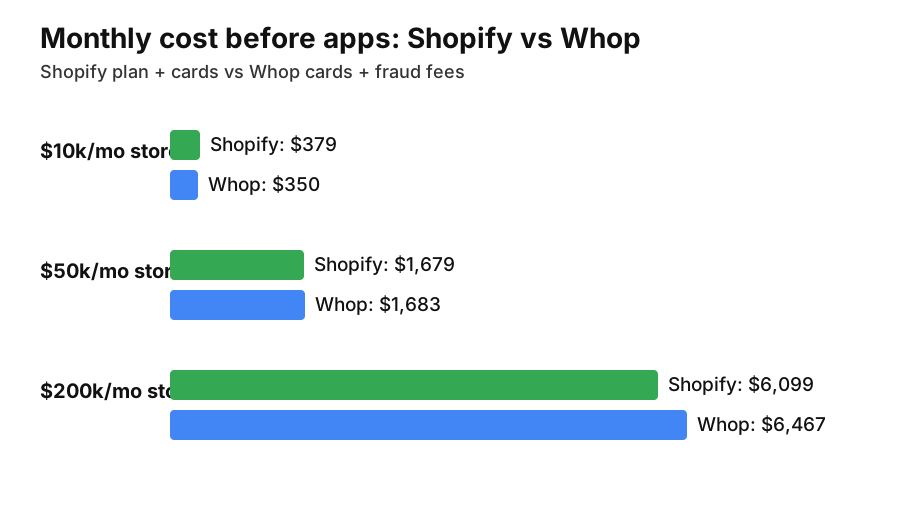
| Store size | Shopify (plan + cards) | Whop (cards + fraud fees) | Before apps |
|---|---|---|---|
| $10k/mo, $50 AOV | $379 (Basic) | $350 | Whop $29 cheaper |
| $50k/mo, $60 AOV | $1,679 (Grow) | $1,683 | About even |
| $200k/mo, $75 AOV | $6,099 (Advanced) | $6,467 | Shopify $368 cheaper |
Domestic cards, yearly Shopify billing. Add your monthly app spend to the Shopify column to see your real gap.
So the honest pitch is not cheaper processing. It is this: every dollar you spend on the Shopify plan and on apps Whop already includes is the saving. Add up your app bills and put them next to the table. For most stores under $100k a month, that number decides it.
Reason 3: Affiliates, Retries, and BNPL Are Built In
- ▶Affiliate program: Whop pays affiliates instantly through Whop Payments for a 1.25% processing fee, with no separate affiliate app subscription.
- ▶Failed payment recovery: Whop's billing layer (0.5% when enabled) handles invoices, real-time retries, and automatically updated cards, which matters for any subscription or refill product.
- ▶Buy now, pay later: Klarna, Afterpay, and other financing partners are available at checkout, and you get paid upfront (15% per financed transaction, so use it where AOV justifies it).
- ▶ACH payments: 1.5% capped at $5 per US bank debit, useful for high-ticket orders.
- ▶Sales tax and VAT: Whop Tax Service can calculate, collect, and remit in the US, UK, and EU (2% when enabled and tax is collected).
Reason 4: Subscriptions Move Without Re-Asking for Cards
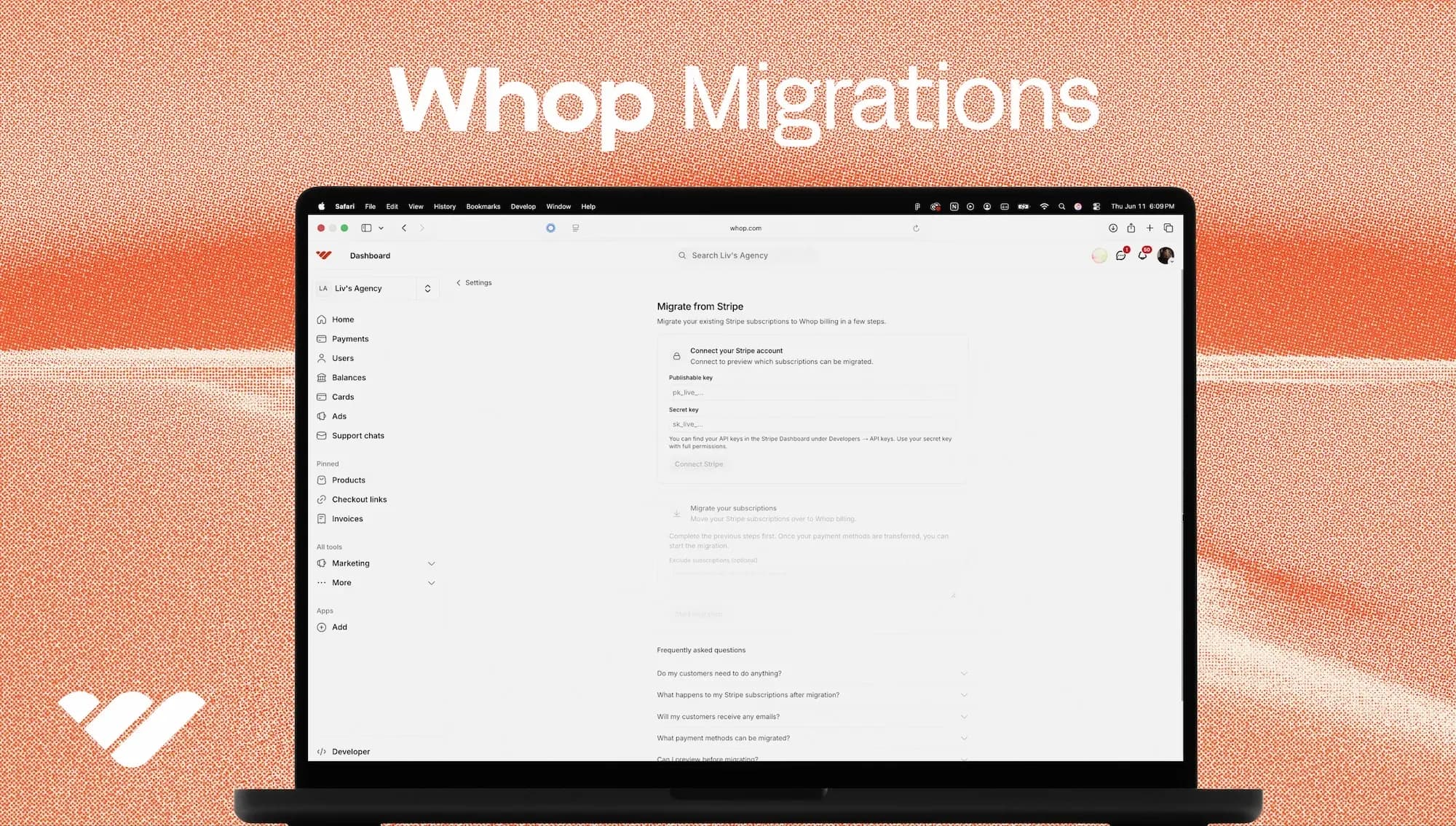
The scariest part of leaving a platform is losing recurring revenue. Whop Migrations moves Stripe subscriptions and payment tokens together, runs a preview scan first, lets you exclude subscriptions, and produces a CSV report. For supplement, coffee, and refill brands, that is the difference between a clean move and a churn spike.
Reason 5: A Store Builder That Starts From Your Existing Site
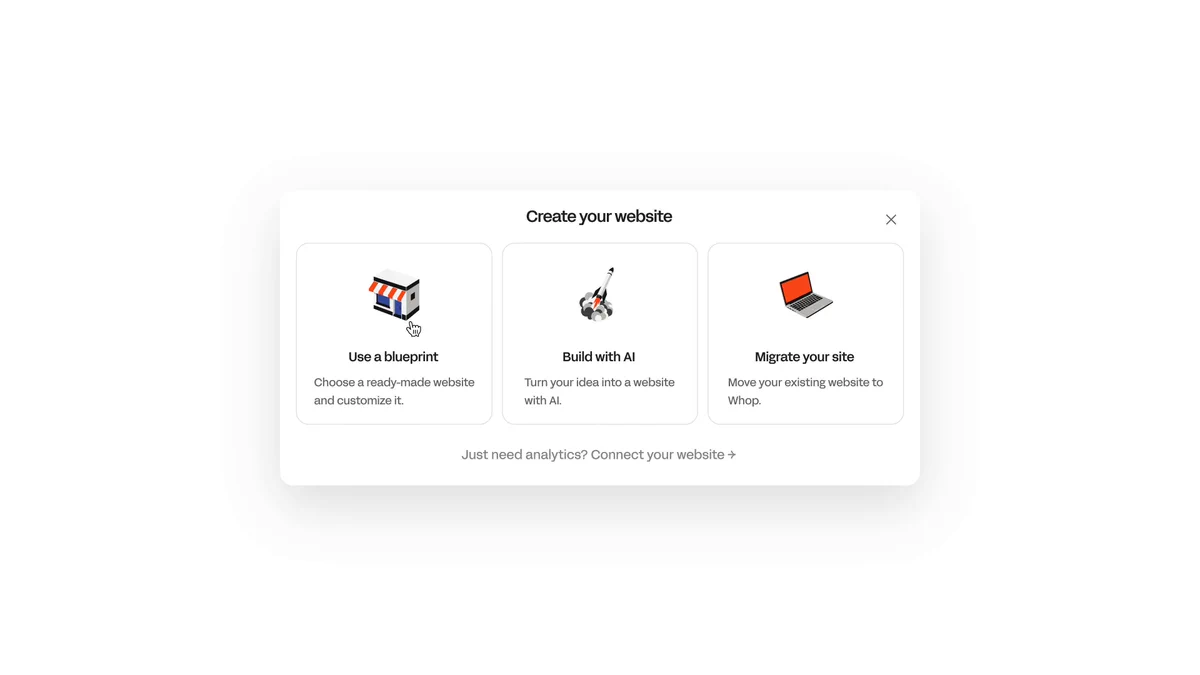
Whop's website setup offers three starting points: a ready-made blueprint, building with AI from a description, or migrating your existing website. Its demo store at store.whop.site shows categories, size selectors, product pages, and a cart, so a small catalog can go live without a theme and app hunt.
Reason 6: Digital Add-Ons and Community Sit Next to Physical Products
Whop started as a platform for memberships, courses, and communities. A physical brand can sell a VIP club, a training program, or a private chat alongside its products from the same checkout, and give buyers access automatically. Our guide to selling digital add-ons beside a physical store shows how brands use that to lift lifetime value.
Reason 7: Global Payments and Payouts in One Place
Whop lists 195 countries, 135+ currencies, and 100+ payment methods, with payouts to 200+ countries by next-day ACH ($2.50), instant bank deposit, wire, and local bank transfer. For founders outside the US, that pairs with Whop's LLC formation service covered in Whop for ecommerce brands.
When You Should Not Switch Yet
- ▶Google Shopping or Performance Max drives most of your revenue. Whop has not published Merchant Center feed support. Without a feed, you lose the channel.
- ▶You are on Shopify Advanced above roughly $150k a month and your app bill is smaller than the processing gap in the table above.
- ▶Large catalogs and complex shipping. Whop's docs still describe fulfillment through Zapier webhooks and say physical product support is improving.
Check these before you move any revenue
- ▶Conversion tracking: Google Ads and Meta purchase events fire on a Whop test order.
- ▶Product feed: you can supply a Merchant Center feed, or you accept losing Shopping.
- ▶Redirects: every Shopify product URL 301s to its new page, so SEO and ad links survive.
- ▶Subscriptions: run the Whop Migrations preview and read the CSV report.
- ▶Fees at your AOV: confirm the current rates on Whop's fee page, including any add-ons you enable.
How to Switch Without Risk
- 1.Create your Whop account and build a store from a blueprint or your existing site.
- 2.Launch one product line or a new drop on Whop while Shopify stays live.
- 3.Place real orders: checkout, tax, fulfillment, a refund, and a customer email.
- 4.Send a slice of paid traffic and compare cost per purchase and conversion rate for 30 days.
- 5.Move the rest only when the numbers and tracking hold up.
Set up a Whop store free and test one product line beside Shopify.
Start Your Whop StoreWant the move handled by people who protect tracking, feeds, and ad history for a living? Apply to work with Shopiator. For the feature-by-feature comparison, see Whop ecommerce stores vs Shopify, and for payments detail, ecom payment processing on Whop.
New to Whop or still deciding? Start with why Whop: what it does, what it costs, and who should skip it.
No monthly plan fee. Keep Shopify live while you test.
Start Your Whop StoreFrequently Asked Questions
Is Whop cheaper than Shopify for an ecommerce store?
Card processing is about the same: Whop charges 2.7% plus 30 cents on domestic cards, and Shopify charges 2.5% to 2.9% plus 30 cents depending on plan. Whop has no monthly plan fee, so the saving comes from the Shopify plan and the apps Whop's built-in tools can replace.
Does Whop charge a monthly fee?
Whop's published fee page lists per-transaction fees only, with optional add-ons such as billing at 0.5% and tax collection at 2% when you enable them. Shopify plans start at $29 a month billed yearly.
Can I move my Shopify subscriptions to Whop?
Whop Migrations moves Stripe subscriptions and saved payment tokens so customers do not re-enter cards. Check how your current subscription app stores payment methods before planning a move.
Will my Google Shopping and Meta ads keep working on Whop?
Verify first. Whop has not published product feed support for Google Merchant Center, and conversion tracking needs to be confirmed before you send paid traffic to a Whop store.
Should a big Shopify store switch to Whop?
Usually not all at once. On Shopify Advanced, the 2.5% card rate beats Whop's 2.7%, so above roughly $150,000 a month the case rests on app savings. Launch a product line on Whop first and compare.
P.S. The Operator Audit is a full manual review of your account: 10 recommendation sets, a live findings call and a prioritized action plan. The $1,299 comes off your first month if you hire us within 30 days. Get the Operator Audit
Disclosure: Shopiator has a Whop referral link and may earn a commission if you sign up through it, at no extra cost to you. We do not operate, control or guarantee any provider or tool mentioned here, so do your own due diligence.
Keep reading
Slash for Ecommerce: Banking, Cards, and Card Payments (2026)
What Slash offers ecommerce brands: business banking, cashback cards, working capital, global USD accounts, and card payment processing.
ReadGuideSlash Payment Processing for Startups: Cards, Yield, Invoices
What Slash offers startups: cashback cards, treasury yield, perks, and new card payment processing through invoices and an SDK.
ReadStrategyOne Ad Account or Many? Meta and Google Ads for Ecommerce Brands
Should ecommerce product lines share one Meta or Google ad account and pixel? A decision framework with platform documentation, trade-offs, and a checklist.
Read