One Ad Account or Many for Ecommerce Brands?Meta Ads and Google Ads: When to Share a Pixel and When to Split

By Santosh Kumar, Founder of Shopiator
Should ecommerce product lines share one Meta or Google ad account and pixel? A decision framework with platform documentation, trade-offs, and a checklist.
An ecommerce operator asked in a group: is anyone running different product lines under the same Meta ad account and pixel? They had read advice to separate them when buyers and average order values differ, because mixing could hurt optimization for the existing products. The honest answer is that it depends, and the deciding factors are not the same on Meta and Google Ads. We went through Meta's and Google's own documentation, plus operator guidance, to build a framework you can apply to your own store.
The Four Questions That Decide It
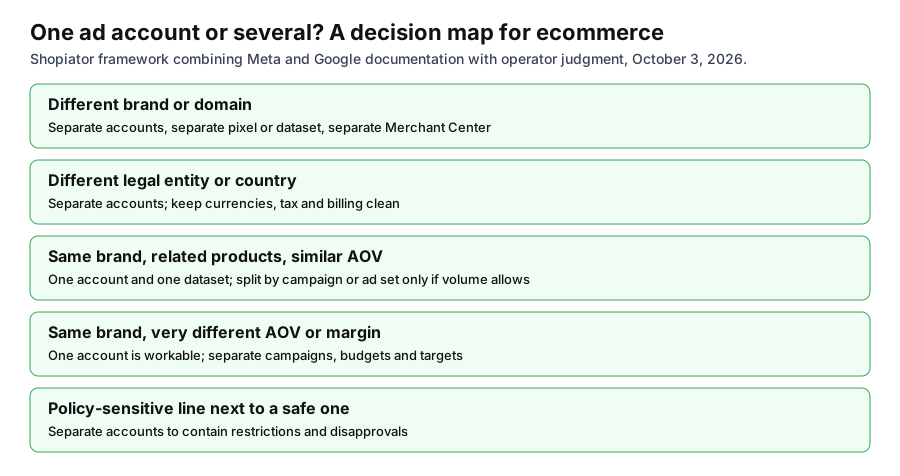
- ▶Is it the same brand and domain? Different brands, storefronts, or legal entities almost always belong in separate accounts and pixels. Mixing them blends conversions, audiences, billing, and reputation.
- ▶Are the economics similar? If AOV or margin differs a lot, you cannot hold one CPA or ROAS target for both. That calls for separate campaigns or ad sets with their own targets, not automatically separate accounts.
- ▶Is there enough volume? Splitting divides conversions. If each line cannot give its ad sets enough results per week, one combined structure will learn faster.
- ▶What is the risk? A policy-sensitive line, such as supplements, health, or finance, can bring restrictions or disapprovals that you would rather not share with your core line.
The Meta Side: What Meta Actually Says
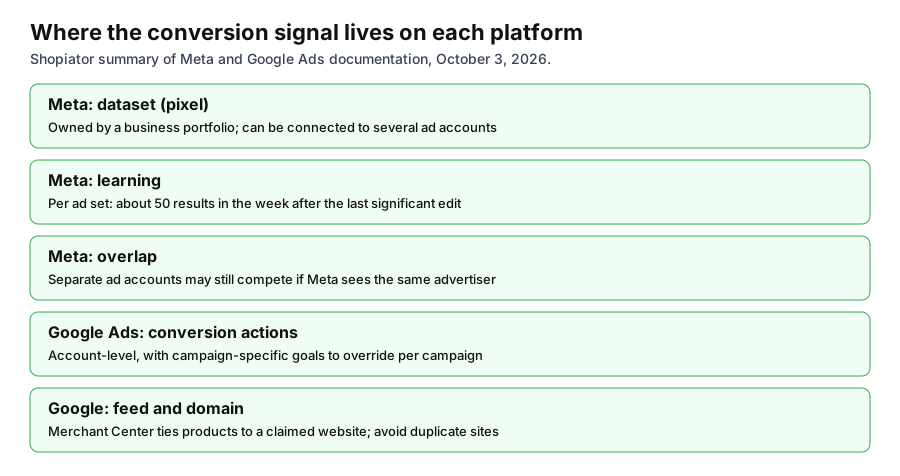
Meta does not publish a rule saying one pixel should map to one product line. What it does publish points in a specific direction. Its learning phase documentation says ad sets usually exit learning after about 50 results in the week after the last significant edit, and recommends avoiding high ad volumes, noting that by combining similar ad sets you also combine learnings. Its guidance on audience fragmentation says splitting ad sets across segments can reduce performance because the audience is divided, and suggests combining and using reporting breakdowns instead.
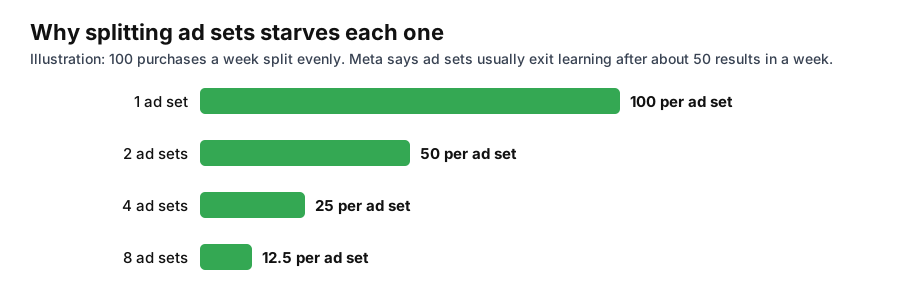
Two points matter for the account question. First, Meta's auction overlap page says that running ads from separate ad accounts may not help you avoid overlap, because the delivery system may identify multiple accounts as belonging to the same advertiser, and it suggests consolidating campaigns into fewer accounts to manage overlap. Second, restrictions are tied to accounts and business portfolios, so a problem on one account can matter for the others in the same portfolio. Meta also limits one person to managing up to 25 ad accounts, and a new business can only create one ad account until it makes a confirmed payment.
The idea that a pixel trained on cheap items will struggle to find high-ticket buyers is common advice in operator groups, but we could not find it stated in Meta's documentation. Treat it as a risk to test, not a rule. A practical way to test is to keep the lines in one account, give each its own campaign and budget, and compare cost per purchase and AOV by line over a few weeks.
The Google Ads Side: Account, Goals, and Feed
Google works differently. Conversion actions are defined at the account level, but Google lets you override account-default goals for a specific campaign. Its documentation says the campaign-specific goals setting lets you choose which goals are used for reporting and bidding in a campaign, for example only shoe purchases in a shoe campaign. Google also recommends account-level goals where possible, and says that if conversion actions deliver different values you should report on all of them at the account level and use Target ROAS or Maximize Conversion Value with different values assigned to each action.
Product lines with different AOV and margin on Google Ads are usually handled by separate campaigns with their own budgets and ROAS targets, and by splitting the Merchant Center feed into groups with custom labels. That keeps the lines in one account and one conversion setup, which is why the Google answer tends to lean toward keeping lines together unless brand or domain differs.
Domains, Brands, and Merchant Center
A different domain is the clearest reason to split. Google Merchant Center ties your products to a verified and claimed website, and Google's guidance says to avoid multiple websites with similar content, which can lead to account disapproval. Google's Unfair advantage policy also does not allow trying to show more than one ad for your business, app, or site in a single ad location. Running the same brand's same products through two accounts for the same search can run into that, so two accounts should serve genuinely different brands or sites, not a workaround for more impressions.
Meta and Google Side by Side
| Scenario | Meta Ads | Google Ads |
|---|---|---|
| Different brands and domains | Separate ad accounts and datasets; separate portfolios if different entities | Separate Google Ads accounts and Merchant Center accounts under one manager account |
| Same brand, related products, similar AOV | One account and dataset; combine ad sets where volume is thin | One account; campaigns by category with shared conversion actions |
| Same brand, very different AOV or margin | One account; separate campaigns and budgets; compare by line | One account; separate campaigns, ROAS targets, and feed custom labels |
| Unrelated categories, one domain | Test one account first; split if costs or restrictions diverge | One account with campaign-specific goals; split if policy risk differs |
| Policy-sensitive line | Separate account to contain restrictions | Separate account and feed to contain disapprovals and suspensions |
| Low volume per line | Consolidate to reach about 50 results a week per ad set | Consolidate or use value-based bidding across lines |
Shopiator framework based on Meta Business Help Centre and Google Ads and Merchant Center help pages, October 3, 2026.
What Separating Costs You
- ▶Split learning: each account and dataset starts from zero, and conversion volume is divided.
- ▶Lost cross-selling audiences: customer lists and lookalikes built on a unified buyer pool are not shared.
- ▶More overhead: billing, access, reporting, and creative production multiply.
- ▶Limits to manage: Meta caps ad accounts per person and limits new businesses until a payment is confirmed.
- ▶Tracking risk: a second domain needs its own pixel or dataset install, events, and checks, and a mix-up can send events to the wrong place.
What Combining Costs You
- ▶Blurred reporting: blended ROAS can hide a weak line behind a strong one, so report by line.
- ▶Shared risk: one policy problem can restrict the whole account, and Meta ties statuses to accounts and portfolios.
- ▶One target for different economics: a single CPA or ROAS target will starve one line or overspend on another.
- ▶Budget drift: the platform can funnel most spend to the easiest line.
A Simple Way to Decide
- ▶Write down each line's AOV, margin, break-even ROAS, and weekly purchase volume.
- ▶If they are different brands or domains, split and stop here.
- ▶If volume is under about 50 purchases a week per line on Meta, keep them together and split by campaign.
- ▶If margins differ by a wide gap, give each line its own campaign, budget, and target on both platforms.
- ▶If one line is policy-sensitive, isolate it in its own account and domain if possible.
- ▶Review after 4 to 6 weeks by line, not blended, and only then consider splitting accounts.
For the account-level side, see our guides on ad account structure for ecommerce brands, agency ad accounts by platform, what to do when a Meta ad account is restricted, and Google Ads versus Meta Ads for ecommerce. For Shopping structure, see feeder and converter Shopping architecture.
A Note on Sources
Meta's learning phase, auction overlap, ad volume, and account limit statements come from Meta's Business Help Centre. Google's campaign-specific goals, Unfair advantage, and Merchant Center statements come from Google's help pages. Operator guidance, including claims about pixel signals and margin spread, is practitioner opinion and not published by either platform. We could not read some forum threads that sit behind bot checks, so we did not rely on them. Platform behavior changes, so confirm in your own accounts.
Get a second opinion on your account structure for Google Ads and Merchant Center.
Book a Google Ads Consulting CallFrequently Asked Questions
Should I use one Meta ad account for multiple product lines?
If the lines share a brand, domain, and similar buyers, one account and pixel works and gives the algorithm more data. Split into separate accounts for different brands or domains, different legal entities, or policy-sensitive categories.
Will different AOVs confuse the Meta pixel?
Meta's documentation does not say so. The risk is practitioner opinion. A safer approach is to keep one account, separate campaigns and budgets by line, and compare cost per purchase and AOV by line.
Do separate Meta ad accounts avoid auction overlap?
Not necessarily. Meta says running ads from separate ad accounts may not help avoid overlap, because its delivery system may identify the accounts as the same advertiser.
How many conversions does a Meta ad set need?
Meta says ad sets usually exit the learning phase after about 50 results in the week after the last significant edit, so splitting low volume across many ad sets can keep them learning.
How do I handle different product lines on Google Ads?
Use separate campaigns with their own budgets and ROAS targets, split the Merchant Center feed with custom labels, and use campaign-specific conversion goals or value-based bidding. Separate accounts are mainly for different brands or domains.
When should I use separate Google Ads accounts?
When the lines are different brands, domains, legal entities, or policy-sensitive categories. Do not use separate accounts to show more than one ad for the same business in the same ad location, which Google's Unfair advantage policy does not allow.
P.S. The Operator Audit is a full manual review of your account: 10 recommendation sets, a live findings call and a prioritized action plan. The $1,299 comes off your first month if you hire us within 30 days. Get the Operator Audit
Keep reading
Abandoned Cart Flows for Ecommerce DTC Brands: Sequence and Timing
70% of carts are abandoned and 42% of those shoppers were only browsing. Here is the abandoned cart flow built for the rest: two triggers, a three-email core, an escalating store credit branch for first-time buyers only, the margin math on discounts, and a holdout so you know what the flow really earns.
ReadStrategyWhy DTC Brands Can't Hire a Great In-House Media Buyer
"Full-time in-house Meta Media Buyer, no other projects" sounds like a job requirement. It's actually a pay cut that filters out every good Media Buyer. Here's the math.
ReadComparison3PL for Ecommerce: Commercive vs AutoDS vs Zendrop (2026)
What a 3PL does for ecommerce, and how Commercive compares with AutoDS and Zendrop on price, speed, reviews, and fit by order volume.
Read