The Ideal Ad Account Structure for Scaling EcommerceHow to Architect It So a Restriction Never Takes Your Whole Account Down

By Santosh Kumar, Founder of Shopiator
ExiScale, AdRevival, and UpROAS each sell agency ad account infrastructure, but underneath the pricing tiers they're all describing the same structural problem: brands that scale on a single ad account, with their pixel and spend in the same place, go down completely when Meta restricts something. Here's the account structure that prevents that, regardless of which provider you use.
Read enough of ExiScale's, AdRevival's, and UpROAS's own marketing and a pattern shows up underneath the pricing tiers. AdRevival's own homepage lists its onboarding as four explicit steps: AI Compliance Check, Page & Account Structure Setup, Ad Account Structure Setup, then Scale, structure gets named twice before a single ad ever runs. All three providers are describing the same underlying problem: a brand running its entire ad spend through one account, with its pixel living inside that same account, goes down completely the moment Meta restricts something. The infrastructure they sell exists to prevent exactly that failure mode.
What none of the three spell out clearly on their own pricing pages is the actual structure that makes their infrastructure work as intended. Buying more ad accounts doesn't automatically protect you if they're all still structured like one account split into pieces. Here's what the structure needs to look like, independent of which provider's infrastructure it's running on. For the campaign layer that sits on top of the account, see our Google Ads scaling structure for ecom brands.
Why Structure Matters More Than Which Provider You Use
A common assumption is that buying a premium or whitelisted agency account solves the downtime problem by itself. It doesn't, not on its own. A whitelisted account with a higher trust tier still gets restricted sometimes, just less often than a fresh personal account. What actually determines whether a restriction takes your whole operation down, or just one piece of it, is how the accounts, Business Managers, and pixel are structured relative to each other, not the trust tier alone.
This is the part the provider comparison guides skip, because it's the same regardless of which infrastructure you buy. Our replacement speed comparison across ExiScale, AdRevival, and UpROAS covers what happens after a restriction; this post covers how to structure things so a restriction costs you hours instead of weeks, no matter which provider's infrastructure you're running it on.
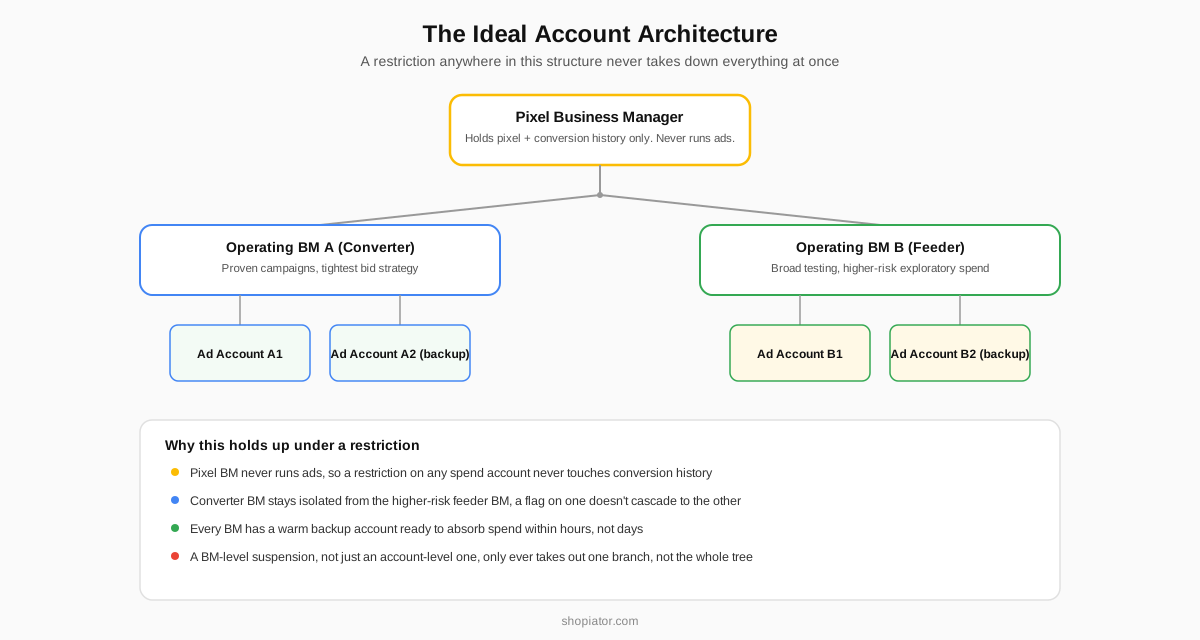
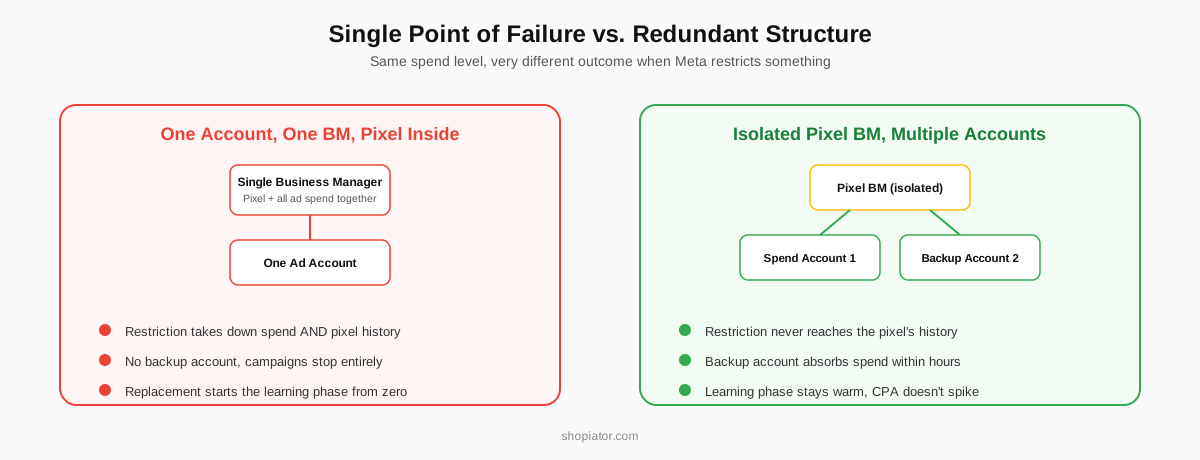
The Structural Mistake: Pixel and Spend Living in the Same Place
If your pixel sits inside the same Business Manager as the ad account currently spending, a restriction on that account takes both down at once. A replacement account starts with zero conversion history, which means the learning phase resets from scratch exactly when you need it working: CPMs climb, CPA spikes, and the algorithm relearns your audience from nothing while relying on a brand-new signal set.
The fix is a dedicated host Business Manager that exists for one job: holding your pixel. It never runs ads directly. It's shared into whichever spend account is currently active, and when that account gets restricted and replaced, the pixel's conversion history survives because it was never inside the account that got taken down.
What Each Provider's Infrastructure Actually Offers for This
- Dedicated pixel Business Manager
- Yes, on Scale ($3,000/mo). Not on Launch ($1,000/mo)
- Ad accounts per plan
- 3 (Launch) or 12 (Scale)
- Business Managers per plan
- 1 (Launch) or 4 (Scale)
- Dedicated pixel Business Manager
- Not on standard tiers, structure it yourself
- Ad accounts per plan
- 1 included, additional at $50/mo each
- Business Managers per plan
- Not specified as a separate line item
- Dedicated pixel Business Manager
- Yes, on Titanium ($1,995/mo)
- Ad accounts per plan
- Unlimited on every tier
- Business Managers per plan
- Not specified as a separate line item
Structural specifics as listed by each provider, September 2026. Only ExiScale's Scale plan and UpROAS's Titanium tier include a dedicated pixel Business Manager as a named feature.
The practical read: if pixel continuity through a replacement matters to you, and for any brand spending meaningfully on Meta it should, ExiScale's Scale plan or UpROAS's Titanium tier are the only two options here with it built in. On every other tier from any provider, building that separation is on you, and it's worth doing before your first restriction, not after.
The Scale plan includes a dedicated host Business Manager for pixels, built for exactly this structure.
Get Started With ExiScaleFeeder vs. Converter: Splitting Accounts by Role, Not Just by Number
Adding a second ad account only helps if the two accounts are doing structurally different jobs. A feeder account runs broader, more exploratory top-of-funnel campaigns, the kind more likely to trip a compliance flag simply because they're testing new audiences and angles. A converter account runs the proven, bottom-of-funnel campaigns that are actually driving revenue, kept as clean and stable as possible.
- ▶Feeder account: broader targeting, new creative tests, Maximize Clicks or similar low-commitment bidding, the account most likely to get flagged
- ▶Converter account: proven campaigns only, tighter bid strategy against real conversion value, kept isolated from the experimental spend
- ▶The split means a restriction on the feeder account, the higher-risk one, never touches the converter account carrying the bulk of your revenue
How Many Accounts You Actually Need, by Spend Level
- ▶Under $10-15K/month: usually one well-structured account is enough, but build the separate pixel Business Manager habit now, it's harder to retrofit after a restriction than to start with
- ▶$15K-$50K/month: two accounts minimum, one primary and one warm backup ready to absorb spend immediately if the primary is restricted
- ▶$50K-$200K/month: three or more, typically split feeder and converter, on infrastructure with multiple Business Managers so a restriction doesn't cascade
- ▶$200K+/month: the structure ExiScale's Scale plan and UpROAS's higher tiers are built for, multiple Business Managers, a dedicated pixel BM, and enough spend accounts that no single restriction meaningfully dents total output
The Redundancy Test
Ask yourself one question: if your primary ad account got restricted right now, how long before you're spending again at the same volume? If the honest answer is more than a few hours, your structure has a single point of failure somewhere, usually the pixel, sometimes the account count, sometimes both. Fix that before you need it, not during an active restriction.
Buying Aged Accounts: What You're Actually Paying For
"Aged" is the word every provider's pricing page leans on, ExiScale advertises accounts aged 10+ years, and the pitch is straightforward: an older account has more trust signal built up with Meta, so it absorbs more spend and more testing before something trips a flag. That part is real. What the pricing pages don't spell out is that age alone isn't the same thing as clean history.
An aged account has usually run someone else's campaigns before it reached you, campaigns you have no visibility into. If a prior tenant ran anything borderline, weight-loss claims, crypto, a grey-hat vertical, that account is carrying risk you didn't create and can't see. This is the structural argument for redundancy again, not a reason to avoid aged accounts: age reduces how often a restriction happens, it doesn't reduce what happens when one does. Treat an aged account exactly like a fresh one for structure purposes, pixel isolated, backup ready, and let the age do its job of buying you more runway before you need that backup.
- ▶Ask what the account ran before you, a provider that can't or won't answer is a signal, not a dealbreaker on its own
- ▶Age helps trust tier and spend ceiling, it does not exempt an account from needing the pixel-isolation structure above
- ▶An aged account inside a badly structured setup still takes your pixel history down with it when it's restricted, the same as a fresh one would
Multiple Business Managers: Why the Suspension Unit Matters More Than the Account Count
Most operators think in terms of ad accounts and stop there. The more important unit is the Business Manager, because Meta's enforcement often acts at the BM level, not just the account level. A Business Manager can get restricted or disabled as a whole, which takes every ad account, every asset, and every admin attached to it down at the same time, regardless of how many separate ad accounts you'd carefully set up inside it.
This is why two ad accounts sitting inside one Business Manager is a weaker structure than it looks. It solves the single-account failure mode but not the single-BM failure mode; a BM-level suspension still takes both accounts out together. Real redundancy needs accounts spread across separate Business Managers, not just separate accounts inside the same one. ExiScale's Scale plan ships 4 Business Managers for exactly this reason, and it's the structural feature worth checking for on any tier, not just the account count on the label.
Why High CPMs Are a Structural Symptom, Not Bad Luck
Operators tend to treat a CPM spike as a market condition, more competition, a seasonal auction shift, and sometimes that's exactly what it is. But a CPM that jumps hard right after an account swap, a BM change, or a pixel move is usually telling you something structural broke, not that the auction got more expensive.
- ▶A fresh replacement account with no conversion history runs the learning phase from zero, Meta shows ads to a less-qualified audience while it relearns, and CPMs climb until it re-stabilizes
- ▶A low trust tier account gets less favorable delivery in the auction generally, which shows up as CPM inflation across every campaign in it, not just the new ones
- ▶Audience overlap between a feeder and converter account running in the same BM competes against itself in the same auction, pushing CPMs up on both
- ▶A pixel that just got separated from its history, moved into a new BM without the conversion signal carrying over cleanly, produces the same symptom as a brand-new pixel: expensive, unqualified delivery until it relearns
The fix isn't a bidding tweak, it's the structure above: keep the pixel's history intact through account swaps, and CPM spikes from a swap shrink from weeks to hours because the signal never actually reset.
Buying Facebook Pages: The Risk Nobody Puts on the Pricing Page
Some cheaper account bundles come with a Facebook Page included, sometimes marketed as a shortcut past the review Meta gives brand-new pages. The risk is the same shape as an aged account's risk, just less discussed: a page with prior history carries whatever that history was, and you generally can't see it before you're running ads through it.
- ▶A page that's been reported, restricted, or associated with a policy violation under a previous owner can carry that reputation into your campaigns even after the name and content change
- ▶A page's follower base and engagement history from a prior niche can actively work against you, Meta's systems use page-level signal too, not just account and pixel signal
- ▶If a purchased page turns out to have a compliance issue in its history, you typically find out when a campaign gets flagged, not before
The safer default is building your own Page from scratch alongside your ad account structure rather than accepting one bundled in. It's slower to build initial trust, but it means every signal attached to it is one you actually created.
Cheap Agency Accounts and Why They Go Down Together During Ban Waves
Meta doesn't enforce evenly across time, it runs periodic sweeps, ban waves, where enforcement tightens across a whole category of account behavior at once rather than trickling out account by account. This is where the cheapest agency account offers tend to fail hardest, and it's a structural reason, not a quality-of-service one.
A discount provider running dozens or hundreds of client accounts through a small number of shared Business Managers is concentrating exactly the kind of pattern a ban wave is built to catch: similar account behavior, similar setup signatures, clustered together. When enforcement tightens, accounts sharing that infrastructure tend to go down in the same window, sometimes the same day, because the thing that got flagged wasn't any one client's campaign, it was the shared pattern underneath all of them.
- ▶Shared, high-density Business Managers concentrate risk, if the BM gets swept, every client inside it goes down together regardless of their individual campaign quality
- ▶Isolated or lower-density infrastructure, fewer clients per BM, dedicated structures on higher tiers, doesn't avoid ban waves entirely but doesn't cluster the same failure signature either
- ▶This is the practical argument for paying more for dedicated structure over the cheapest per-account price, the price difference is largely a bet on not going down with everyone else sharing your infrastructure
What Infrastructure Does and Doesn't Do For You
All three providers we track give you the raw materials for this structure: multiple ad accounts, multiple Business Managers on higher tiers, and a replacement policy when something gets restricted. None of them build the campaign-level structure for you. Which campaigns run in which account, how creative is split between feeder and converter, and whether your pixel is actually isolated the way it should be, that's still on you or whoever's running your media buying, regardless of which provider's infrastructure it's sitting on top of.
This is also where creative volume matters more than most operators plan for. A feeder/converter split with genuine redundancy needs enough fresh creative to keep the feeder account testing without recycling the same angles that already triggered a flag once. Our AI UGC video generator guide covers how to keep that pipeline running without the cost of traditional UGC production.
Frequently Asked Questions
How many Meta ad accounts does an ecommerce brand actually need to scale safely?
It depends on spend, but the structural minimum for redundancy is two: one primary spend account and one warm backup that can absorb traffic immediately if the primary is restricted. Past roughly $50,000 a month, most operators run three or more, split across feeder (broad, top-of-funnel) and converter (proven, bottom-of-funnel) roles rather than one account doing everything. ExiScale's Scale plan ships 12 accounts across 4 Business Managers for exactly this reason; the number itself matters less than not having all your spend in one account.
Should my pixel live in the same Business Manager as my ad spend?
No, and this is the single most common structural mistake. If your pixel sits inside the same Business Manager as the ad account that gets restricted, a replacement account starts with zero conversion history and the learning phase resets from scratch, which is exactly when CPMs and CPA spike. A dedicated host Business Manager that only holds your pixel, never runs ads directly, and gets shared into whichever spend account is currently active protects that history through a replacement. ExiScale includes this on its Scale plan; UpROAS includes it on Titanium; on entry tiers from any provider, you need to build this yourself.
What's the difference between a feeder and a converter ad account structure?
A feeder account runs broader, top-of-funnel campaigns designed to find and qualify new audiences, usually on Maximize Clicks or a similar low-commitment bid strategy. A converter account runs the proven, bottom-of-funnel campaigns that actually drive revenue, on a tighter bid strategy tied to real conversion value. Splitting them means a restriction on the higher-risk, more exploratory feeder account never takes down the converter account that's actually generating the bulk of your revenue.
Do I need multiple ad accounts if I'm only spending $5,000 a month?
Usually not yet. Below roughly $10,000 to $15,000 a month, a single well-structured account with a separate pixel Business Manager is normally enough; the operational overhead of running multiple accounts isn't worth it until restrictions actually start happening or spend outgrows what a single account's trust tier can support. Build the pixel-separation habit early regardless, since retrofitting it after your first restriction is harder than starting with it.
Does an agency ad account provider set this structure up for me?
Partially. All three providers we track (ExiScale, AdRevival, UpROAS) give you the raw infrastructure, multiple accounts, multiple Business Managers on higher tiers, and a replacement policy, but the actual campaign-level structure (feeder vs. converter, which campaigns run where, how creative is split) is still something you or your media buyer has to build. The infrastructure makes good structure possible; it doesn't build it for you.
Is buying an aged Meta ad account actually safer than a fresh one?
Aged accounts generally carry more trust signal with Meta, so they absorb more spend and testing before triggering a review, which does lower how often you hit a restriction. But an aged account also carries whatever campaigns ran through it before you had it, history you usually can't see. Treat an aged account with the same pixel-isolation and backup structure as a fresh one; the age buys runway, it doesn't remove the need for redundancy.
If I have two ad accounts, do I still need multiple Business Managers?
Yes, if both accounts sit inside the same Business Manager. Meta's enforcement frequently acts at the BM level, a suspended Business Manager takes every ad account inside it down at once, regardless of how many separate accounts you'd set up. Real redundancy means spreading accounts across separate Business Managers, not just having multiple accounts in one.
Why did my CPMs spike right after switching to a replacement ad account?
This is almost always the learning phase resetting, not the auction getting more expensive. A replacement account with no conversion history, or a pixel that lost continuity during the swap, gets less qualified delivery from Meta until it relearns your audience, which shows up as higher CPMs and CPA for one to two weeks. Keeping the pixel isolated in its own Business Manager through account swaps is what prevents this reset in the first place.
Why do cheap agency ad accounts seem to go down together during Meta ban waves?
Meta enforces in periodic sweeps rather than evenly account by account. Discount providers running many client accounts through a small number of shared, high-density Business Managers concentrate a similar setup pattern across all of them, which is exactly what a ban wave is built to catch. When it hits, accounts sharing that infrastructure tend to get restricted in the same window. Lower-density or dedicated infrastructure doesn't avoid ban waves outright, but it doesn't cluster the same failure signature either.
P.S. We build Google Ads into an independent scaling channel for ecom brands spending $50K+/month on ads, in an account that stays in your name. Apply for a Fit Call
Disclosure: Shopiator is a referral partner for ExiScale and UpROAS; links to them on this page are referral links and we may earn a commission at no cost to you. We don't operate, resell, or control their infrastructure, so do your own due diligence before paying.
Keep reading
Google Ads Agency Accounts: Rent or Own? What Ecom Brands Need
Google Ads agency accounts: should ecom brands rent or own one? Why Google suspensions are a verification and policy problem an agency account doesn't fix, where to rent a Google Ads agency account if you still need one, the five questions to ask, and what actually protects a Google Ads account.
ReadGuideIndependent Google Ads Audits for Ecommerce: A Second Opinion
If your Google Ads dashboard looks fine but revenue isn't moving, the numbers are probably real and still misleading. Here's why blended ROAS hides the truth, why we don't run the free-audit-as-sales-pitch playbook, and five real US providers, ours included, offering an independent second opinion for $49 to $1,299 without requiring you to switch agencies.
ReadCase StudyWe Monitored 26 DTC Google Ads Accounts for 6 Months. Here's What Actually Breaks.
Six months of daily monitoring data from 26 DTC and ecommerce Google Ads accounts, March to September 2026. Product-level problems outnumber account-level ROAS problems roughly 10 to 1, 18% of Shopping and PMax product spend goes to products that don't convert or convert at under half of target, and two in three accounts had changes made by someone outside the managing team. First-party data, anonymized, rates and percentages only.
Read