Preventing ChargebacksLessons From Shopify and Netflix

By Santosh Kumar, Founder of Shopiator
Preventing chargebacks with billing help pages: what ecom brands can learn from Shopify and Netflix, how each explains an unrecognized charge, the seven pages to publish and how to measure them.
Nobody calls their bank over a charge they understand. That is the idea behind preventing chargebacks with billing help pages: when a customer sees a line on their statement they do not recognize, the first thing they do is search for it. If the first result explains it, you keep the sale. If it does not, the bank gets the call.
Shopify built a page for the exact moment a stranger finds SHOPIFY on their statement. Netflix gives every surprise charge its own page. Most ecom brands, subscription brands included, do neither, and a thread by Dylan (@dsullyyy) on X, praising how Netflix's billing help is built, is what prompted us to compare the two properly.
This guide breaks down what Shopify and Netflix each do, what each one leaves out, and the seven billing help pages an ecom brand can publish this week. For the wider prevention system (descriptors, rebill reminders, dispute alerts and thresholds), see our guide to lowering your chargeback rate.
Why billing help pages stop chargebacks
Shopify's Help Center lists eight chargeback reasons. Four of them are questions a help page can answer before the customer ever contacts the bank:
- ▶Unrecognized: the customer does not recognize the merchant name or location on their statement.
- ▶Duplicate: the customer believes they were charged twice for the same product or service.
- ▶Subscription canceled: the customer believes they were charged after canceling, or did not get an expected reminder before a recurring charge.
- ▶Credit not processed: the customer says they returned the product or canceled, and no refund or credit has appeared.
Stripe makes the same point about the statement itself: it says clear and accurate statement descriptors can reduce chargebacks and disputes, and that most banks show the descriptor consistently but some may display it incorrectly or not at all. You cannot fully control what a bank prints, which is why the explanation has to live on a page you do control.
1.5%
Visa's Excessive threshold for merchants in the US, Canada, EU and Asia-Pacific, lowered from 2.2% on April 1, 2026, according to a footnote in Visa's VAMP fact sheet. Every dispute you prevent protects that ratio.
A billing help page also works as a search result. People type the confusing statement line, or the problem, straight into Google. The brands that rank for those searches with a clear answer catch customers before they pick up the phone.
What Shopify does well
Shopify bills store owners on a recurring basis, so it has the same problem as any subscription brand: a recurring charge on a card statement that the cardholder may not connect to the product. Its answer is two pages, and the first one is written the way a confused person searches.
A page titled the way the customer thinks
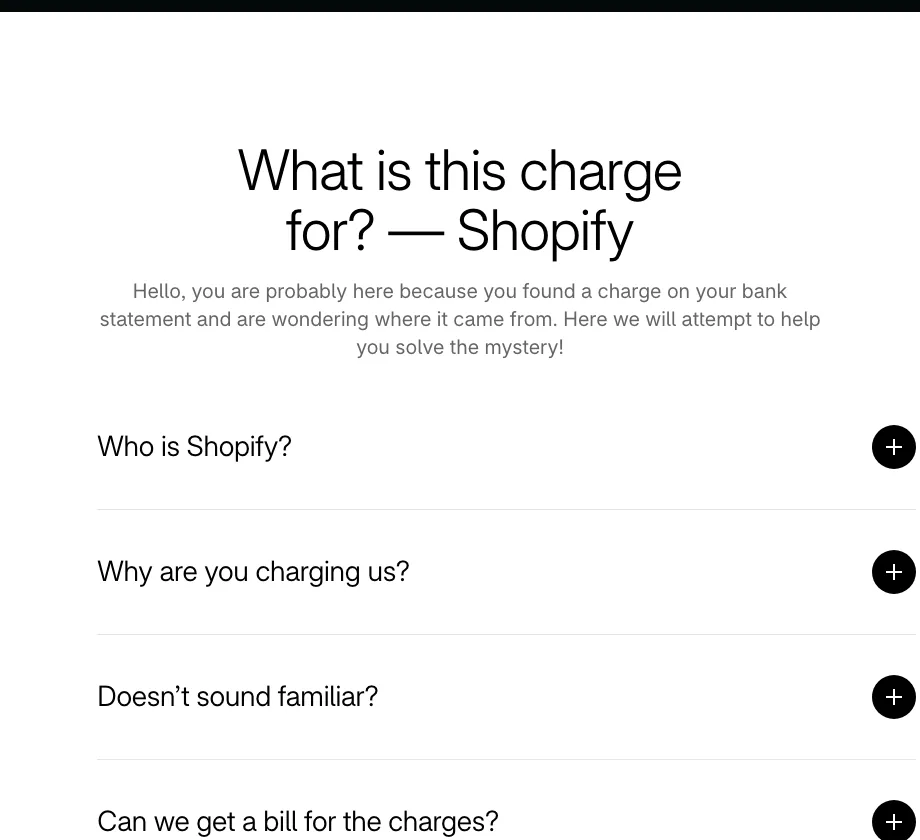
The page at shopify.com/charge is titled "What is this charge for?" and is built as a short list of questions: who is Shopify, why are you charging us, doesn't sound familiar, and can we get a bill for the charges. Each opens into a short answer. There is no policy language and no login wall.
It shows exactly what the charge looks like
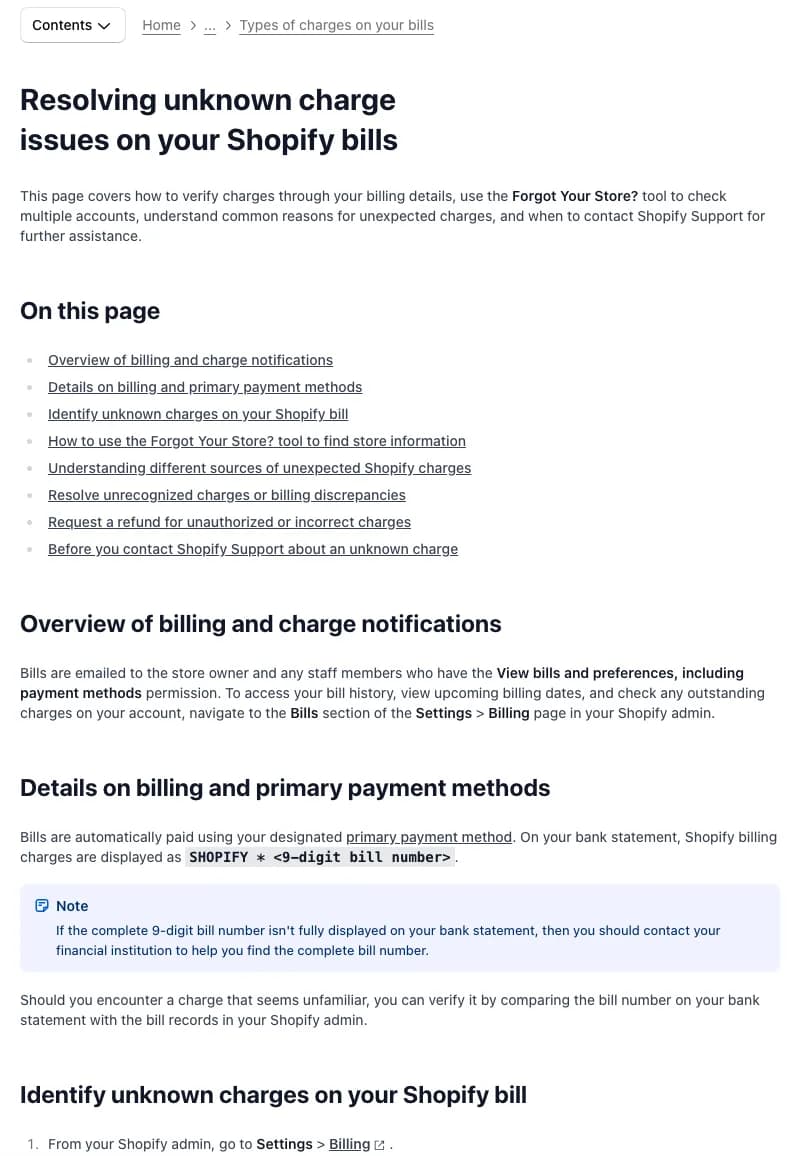
Shopify's Help Center page on unknown charges states the format outright: Shopify bills appear on a bank statement as SHOPIFY * followed by a 9-digit bill number. It also says what to do if the number is cut off (ask the bank for the full number) and separates a Shopify bill from a purchase at someone else's store, which appears as SP * followed by the store name when that store uses Shopify Payments.
It tells the customer how to match the charge themselves
The steps are concrete: open Settings > Billing, find the bill under Past Bills, and compare the bill number and amount with the bank statement. For people with more than one store or email address, the page points to a Forgot Your Store? tool, so the customer can solve the mystery without contacting anyone.
It lists the other places an unexpected charge comes from
A customer who does not recognize a charge is often looking at something else entirely. Shopify names the usual suspects so the customer can rule each one out:
- ▶third-party app charges, which are refunded by the app developer
- ▶international transaction fees added by the customer's bank
- ▶negative Shopify Payments balances
- ▶Shopify Capital repayments
- ▶shared payment methods and client account charges
It sets out the refund route and what to prepare
The page has a section for unauthorized or incorrect charges and a checklist for before contacting support. The shopify.com/charge page adds that stores can be deactivated from the admin to stop further charges, and that past charges are not refundable. Being clear about what will not happen is part of preventing a dispute.
What to copy from Shopify
- ▶A page titled the way a confused customer would search.
- ▶The exact statement line, plus what to do if the bank cuts it off.
- ▶A way to find the charge in the customer's own account.
- ▶A list of other causes, so the customer can self-diagnose.
- ▶A plain statement of what is and is not refundable.
One thing Shopify does not do is split the help-center page by problem. It is one long page with sections, and its title ("Resolving unknown charge issues on your Shopify bills") is not how a customer would phrase the question. That is where Netflix is stronger.
What Netflix does well
Netflix treats each kind of surprise as its own topic. Its "Unrecognized or unauthorized charges from Netflix" page opens with one line (charges on your statement that you were not expecting) and then splits into five sections, each one a situation the customer is actually in.
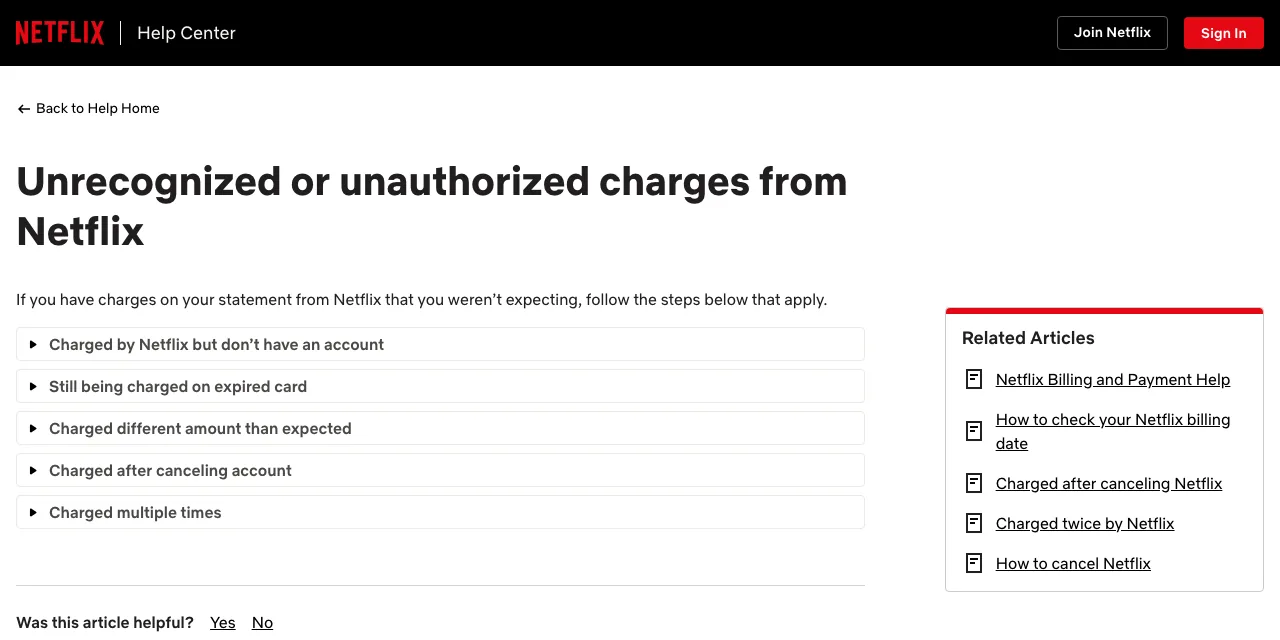
- ▶Charged by Netflix but don't have an account: someone may have opened an account using your payment method, and the page tells you to contact Netflix right away. The first call goes to Netflix, not the bank.
- ▶Still being charged on an expired card: the bank may have issued a new card number, which lets charges continue after the old card expires. The customer can update or remove payment details on their Account page.
- ▶Charged different amount than expected: a linked article explains why the price changed.
- ▶Charged after canceling account: a linked article covers it.
- ▶Charged multiple times: a linked article covers duplicates.
The related-articles box on the page links to separate pages for being charged after canceling, being charged twice, checking your billing date and how to cancel. Every surprise has its own address, and each one points to the next most likely answer.
Charged after canceling is fixed in two steps
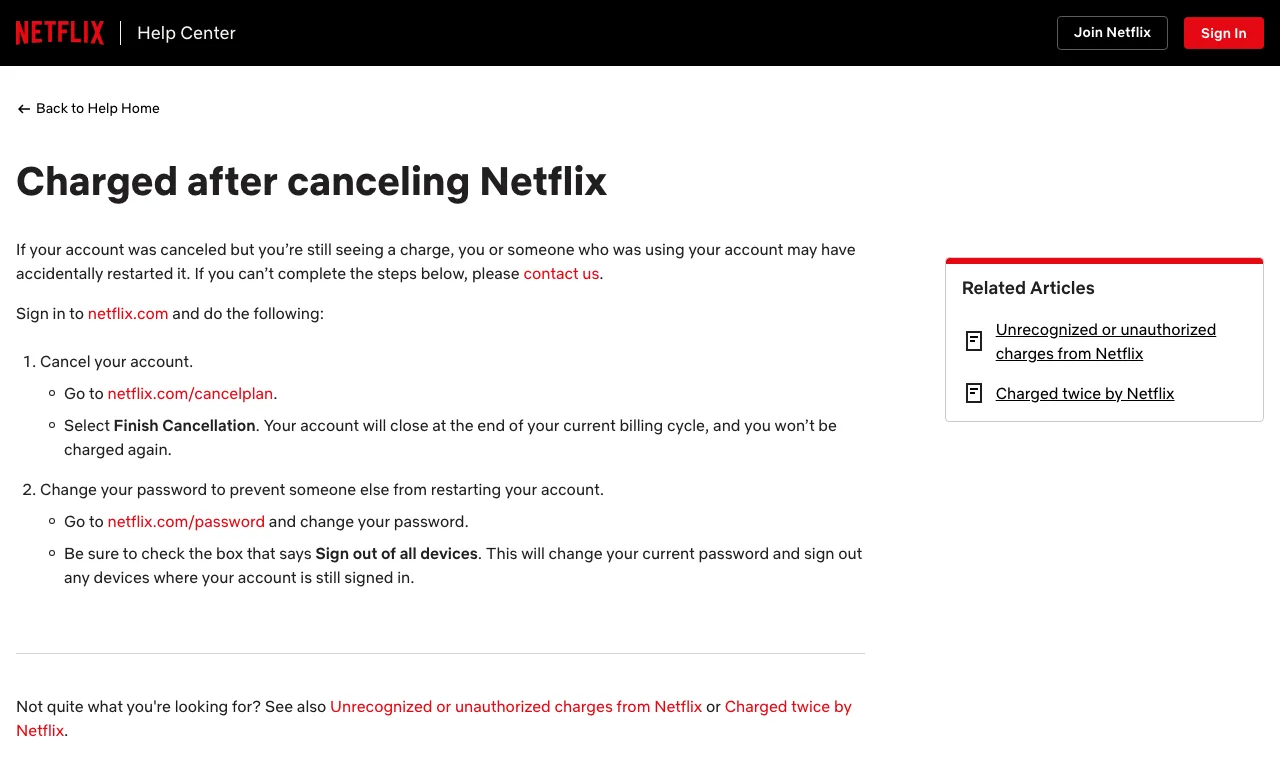
This is the cleanest page of the set. It says the account may have been restarted by you or someone using it, then gives two steps: cancel at the cancel-plan address and choose Finish Cancellation (the account closes at the end of the billing cycle and you are not charged again), then change the password and tick Sign out of all devices so nobody can restart it.
The gap in Netflix's pages is the one Dylan pointed out: the unrecognized charges page does not show what a Netflix charge looks like on a bank statement, which is the first thing someone searches when they do not recognize it. That is the part to take from Shopify.
What to copy from Netflix
- ▶One page, or one clearly labelled section, per surprise.
- ▶A short explanation of the most common cause before the customer gets angry.
- ▶A fix in two steps instead of a paragraph of policy.
- ▶A first call that goes to you, not the bank, when someone else may be using the card.
- ▶Related-article links between the pages.
Shopify vs Netflix: what each page answers
Here is how the pages compare on the questions a confused customer asks, based on the pages we read in November 2026.
| Customer question | Shopify | Netflix |
|---|---|---|
| What will this look like on my statement? | Yes: SHOPIFY * plus a 9-digit bill number, and SP * plus the store name for store purchases | Not covered on these pages |
| How do I find the charge in my account? | Yes: Settings > Billing > Past Bills, then compare bill number and amount | Account page for payment details, plus a linked page on checking your billing date |
| Why am I charged after canceling? | Deactivate the store in the admin to stop further charges; past charges are not refundable | Its own page: cancel, then secure the account |
| Why am I still charged on an expired card? | Not covered on these pages | Yes: the bank may have issued a new card number; update or remove the card |
| Is someone else using my payment method? | Lists co-workers and shared payment methods as possible causes | Contact Netflix right away |
| Was I charged twice? | Not a dedicated page in the help center article | Its own linked article |
| Can I get a refund? | Yes: a refund section and a checklist before contacting support | Not covered on these pages |
Neither page does everything. Shopify wins on showing the statement and helping the customer match it. Netflix wins on splitting each surprise into its own page and fixing it in two steps. The playbook below combines them.
Where most subscription ecom brands stop
Subscription-first ecom brands have the biggest need for these pages and often the thinnest help centers. Take ButcherBox, a subscription meat box. In November 2026, the My Account section of its help center listed 15 articles covering login, pausing or canceling, bill dates, billing information, order history and when you will be billed. None was about an unrecognized, duplicate or after-cancellation charge.
ButcherBox's terms of use also warn that a payment card statement may show Shopify or Stripe rather than the brand name. That is exactly the situation where a customer sees a charge from a company they have never heard of and a page showing what the statement looks like would help. This is a common pattern, not a criticism of one brand: most help centers explain how to manage an account, not how to understand a charge.
The 7 billing help pages every ecom brand should publish
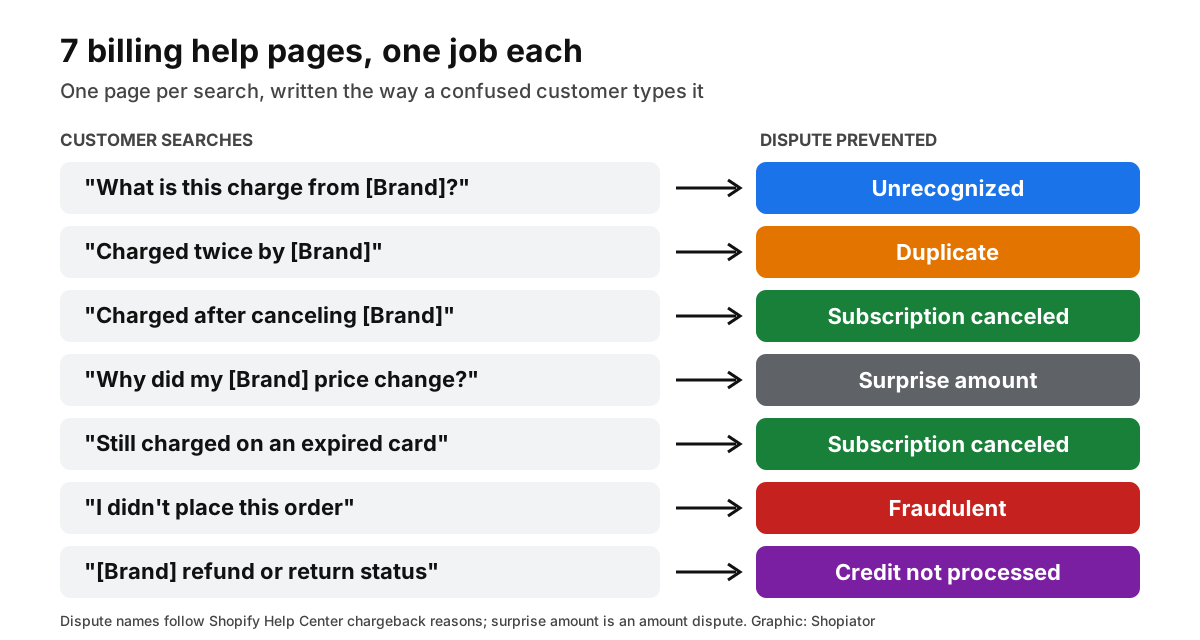
Put one page per problem, with the title written the way a customer would type it. Replace the bracket with your brand name.
| Page title, written like a search | What it must say | Dispute it prevents |
|---|---|---|
| What is this charge from [Brand]? | The exact statement line, your legal and brand name, how to find the order by amount and date, and a phone number and email | Unrecognized |
| Charged twice by [Brand] | How a pending authorization differs from a settled charge, split shipments, and a one-time order next to a subscription renewal in the same week | Duplicate |
| Charged after canceling [Brand] | The exact cancel steps, the cutoff before the bill date, skip vs pause vs cancel, a check for a second subscription, and how to secure the account | Subscription canceled |
| Why did my [Brand] price change? | Intro offer ending, shipping or tax changes, a bundle swap or plan change | Surprise amount |
| Still charged on an expired card | Banks can issue a new card number, and how to update or remove the card on file | Subscription canceled |
| I didn't place this order | Contact us first, how to secure the account, what you do next and what you need from the customer | Fraudulent |
| [Brand] refund or return status | How long credits take, where to see the status and who to email | Credit not processed |
Pair them with a working order tracking page so item-not-received disputes are covered too. Our ecommerce purchase flows guide shows how to test the whole sequence with one real order.
Write each page the way customers search
- ▶Title it as the problem. "Charged twice by [Brand]" beats "Billing FAQ". It is the search, word for word.
- ▶Answer in the first sentence. The most common cause goes first, before the exceptions.
- ▶Give one fix per page. If a page needs three different fixes, it needs three pages.
- ▶Write plain steps. Numbered, short, with the exact menu path or link.
- ▶Show an example. A real statement line, and where to find the order, beats a description.
- ▶Link the pages to each other. Netflix points each page at the next most likely answer.
- ▶End with a human. A phone number or chat link, so the next step is you, not the bank.
Fix the statement descriptor, then show it on the page
The page cannot help if the statement line is a mystery, so set the descriptor first. The rules differ by processor:
- ▶Stripe: a full descriptor is 5 to 22 characters, must contain at least one letter and must reflect your business name. For card charges you can use a short prefix with a dynamic suffix. Stripe subscriptions create charges automatically, so you set the descriptor on the invoice or the product instead of the payment.
- ▶Shopify Payments: go to Settings > Payments > Shopify Payments > Manage and find Customer billing statement. The name is 2 to 19 characters, must include your shop, legal or store name or URL, and requires a phone number so customers can call you.
- ▶Banks decide the final text. Both Stripe and Shopify note that the issuer may show it differently, so write "may appear as" on your page and list the variants you see in your own transactions.
Make the pages findable, and keep them out of paid brand clicks
A billing help page only works if customers can find it. Keep it public and indexable, put the problem in the page title, and link it from the places a worried customer looks:
- ▶the order confirmation and rebill reminder emails
- ▶the account page, next to the cancel button
- ▶the site footer, under Help
- ▶your support auto-reply
If you run Google Ads, add terms like charge, billing, refund and statement as negative keywords on your brand search campaigns. Those searchers want an answer, not an ad, and a click on your ad costs you money for a customer who is already paying. It is the same idea as the login, cancel and skip negatives in our guide to scaling subscription ecom brands on Google Ads. In Search Console, watch the queries that include your brand and charge to see what customers really type.
How to measure whether the pages work
We have not benchmarked what these pages do to dispute rates, and anyone quoting a precise percentage without data is guessing. Measure your own:
- ▶Disputes by reason, monthly. Track unrecognized, duplicate, subscription canceled and credit not processed separately, since those are the ones the pages target.
- ▶Dispute rate against your processor's lines. See the thresholds in our chargeback rate guide.
- ▶Page views and Search Console queries. Rising traffic on "charge" queries means customers are finding the answer.
- ▶Support tickets that mention a charge. The pages should shift them from the inbox to the page.
- ▶A test order. Place a real order, then try to find, understand and cancel the charge as a customer would.
Mistakes to avoid
- ▶Hiding the page behind a login. The customer who cannot place the charge is the one who cannot log in.
- ▶One page for everything. A single billing FAQ is hard to find and harder to read.
- ▶Legal language. Terms and conditions are not an explanation.
- ▶No statement example. Describing the charge without showing its text leaves the main question open.
- ▶Letting it go stale. If you change processors or descriptors, update the page the same day.
Sources
- ▶Shopify: What is this charge for?
- ▶Shopify Help Center: Resolving unknown charge issues on your Shopify bills
- ▶Shopify Help Center: chargeback reasons
- ▶Shopify Help Center: configuring Shopify Payments
- ▶Netflix Help Center: Unrecognized or unauthorized charges from Netflix
- ▶Netflix Help Center: Charged after canceling Netflix
- ▶Stripe: statement descriptors
- ▶Visa: Acquirer Monitoring Program fact sheet
- ▶ButcherBox: Terms of Use and Help Center: My Account
- ▶Dylan (@dsullyyy) on X, November 4, 2026
Frequently Asked Questions
What is a billing help page?
A public page that explains one kind of surprise charge: what it is, what it looks like on a bank statement, how to find it in the customer's account and what to do next. Shopify and Netflix both publish them, and each page is written to answer the question a confused customer types into Google.
Do billing help pages really reduce chargebacks?
They answer the questions behind four of the dispute reasons Shopify lists: unrecognized, duplicate, subscription canceled and credit not processed. Stripe also says clear and accurate statement descriptors can reduce chargebacks and disputes. We have not benchmarked the size of the effect, so track disputes by reason before and after you publish.
What does a Shopify charge look like on a bank statement?
Shopify says its bills appear as SHOPIFY * followed by a 9-digit bill number. A purchase from a store that uses Shopify Payments appears as SP * followed by the store name. If the full number is cut off, Shopify tells customers to ask their bank for it.
What should an unrecognized charge page include?
The exact statement line your customers see, your legal and brand name, where to find the order by amount and date, a support phone number and email, and the next step for each cause: duplicate, canceled, price change or someone else using the card. End with a way to reach a human.
How long can a statement descriptor be?
On Stripe a full descriptor is 5 to 22 characters and must reflect your business name. On Shopify Payments the customer billing statement name is 2 to 19 characters, must include your shop, legal or store name or URL, and needs a phone number. Banks decide what they finally display, so say may appear as on your page.
Should a billing help page be public or behind a login?
Public. A customer who cannot place a charge often cannot or will not log in, and they search for the charge instead. A public page that matches those searches is the first thing they find.
Do billing help pages replace chargeback alerts like Verifi RDR or Ethoca?
No. They work earlier: they stop the customer from disputing in the first place. Alerts and Compelling Evidence 3.0 catch the disputes that still get filed. Our chargeback rate guide covers how the layers fit together.
How should a subscription brand handle a customer charged after canceling?
Copy Netflix's two-step fix: show the exact cancel steps and when the account closes, then give a short way to secure the account in case someone restarted it. Add the cutoff before your next bill date and the difference between skip, pause and cancel.
Want the operator to check this on your account?
The Operator Audit is a full manual review of your account: 10 recommendation sets, a live findings call and a prioritized action plan. The $1,299 comes off your first month if you hire us within 30 days.
Keep reading
How to Scale Subscription Ecom Brands on Google Ads
How to scale subscription ecom brands on Google Ads: why chasing a high ROAS to cover Meta losses caps your growth, how to set a lower target ROAS from 90-day payback, and how to structure the account to capture Meta demand and Google prospecting.
ReadGuideEcommerce Purchase Flows: Test Your Store Like a Customer
Ecommerce purchase flows every founder should test on their own store: the 10 steps from ad click to second order, how to run a real test order on your phone, a pass/fail scorecard, and the 7 email flows that fire around them.
ReadRankingPrime Circle Agency Review: Pricing, Trustpilot and Alternatives
Prime Circle Agency review for 2026: its BM 8000+ Meta agency ad accounts, six spend tiers from $199 to $1,599 a month plus 3.5% above $40,000, the SHOPIATOR code for 10% off, a 4.4 Trustpilot score from 21 reviews, and how it compares to ExiScale and UpROAS.
Read