Slash vs Stripe vs Shopify PaymentsWhere the Money Sits, How You Reconcile, and What Fits a DTC Store

By Santosh Kumar, Founder of Shopiator
Slash now processes cards with Whop. How it compares with Stripe and Shopify Payments for DTC brands on fund flow, store fit, and cost.
Slash's new card payment processing puts accepting payments inside a business bank account, with Whop running the payments underneath. Stripe and Shopify Payments work the other way: you collect into a processor balance, then pay out to your bank. For a DTC brand the real differences are not only the rate, they are where the money sits, how you reconcile, how your store connects, and who handles disputes. We compared the three on the points a store owner should check.
The Comparison
| Question | Slash payment processing | Stripe or Shopify Payments |
|---|---|---|
| Where do funds land? | Directly in your Slash business account, per Slash | In a processor balance, then paid out to your bank |
| How do payments reach your books? | Payments, fees, and receivables in one dashboard | Payout and fee reports, plus accounting integrations |
| How does your store connect? | Invoices and an SDK for custom checkouts | Native checkout and plugins for most store platforms |
| Payment methods | Visa, Mastercard, Amex, Apple Pay, Google Pay; more being confirmed | Broad, varies by provider and country |
| Rate | Not published by Slash; Whop base is 2.7% plus $0.30 domestic | Published by each provider; check your plan and country |
| Spend side | Corporate cards, cashback, treasury in the same account | Separate banking and card providers |
| Who runs the processing? | Whop underneath, Slash on top | The provider itself |
Shopiator comparison from Slash's product page, launch coverage, and Whop's fee docs, October 2, 2026. Confirm current terms with each provider.
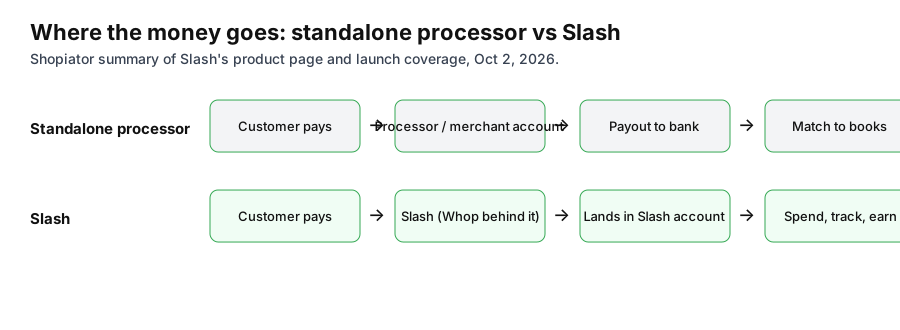
Where Money Sits Matters More Than It Sounds
With a standalone processor, card revenue sits in a processor balance before it is paid out, so your bank shows a lump payout you have to match to orders, fees, and refunds. Slash's pitch is that the payment, its fee, and the receivable sit together and then the cash is already in the account that funds your cards and ad spend. If you pay for Meta and Google ads on a corporate card, that is a real cash flow benefit. We have not tested payout speed or reserves, so ask about both.
The Shopify Question
This is the biggest unknown. Slash's materials talk about invoices and an SDK for your own web checkout. They do not show a Shopify payment gateway. A Shopify store that wants to use Slash would need a supported way to connect, and we have not seen one. Until Slash confirms it, treat Slash as an option for invoicing, wholesale, pre-orders, custom stores, and headless builds, and keep Shopify Payments or Stripe on your main checkout.
Cost: Compare on Your Own Order Mix
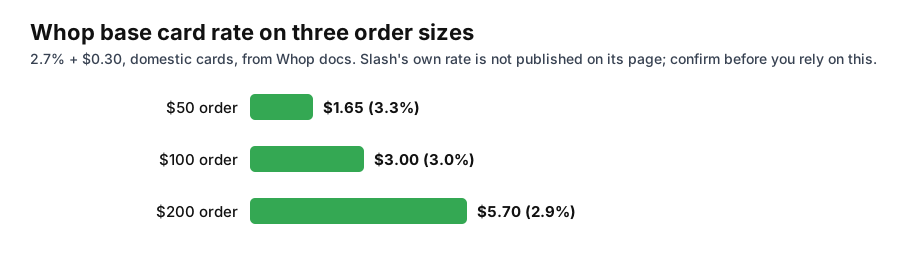
Do not compare headline percentages. Take your last 90 days of orders and model average order value, share of international cards, share needing currency conversion, refunds, and dispute count. A fixed fee per order weighs more on a low average order value, and international and conversion add-ons weigh more for stores that sell abroad. Whop's published add-ons are 1.5% for international cards and 1% for currency conversion, with a $15 dispute fee.
Who Should Use Which
- ▶Shopify store with Shopify Payments or Stripe working well: keep it. Test Slash on invoices or a second channel first.
- ▶Brand that already banks and spends through Slash: worth requesting a quote, because the account-level view of payments, cards, and cashback is the point.
- ▶Wholesale or B2B seller invoicing buyers: invoice payments inside the account fit well.
- ▶Custom or headless store with developers: the SDK is the way in, so compare it with Stripe's API on features and fees.
- ▶High-risk products: confirm approval first, since Slash says the service is for approved merchants.
To compare banks themselves, see our best business banks for ecommerce founders. To go to the processor directly, see Whop for Ecommerce Brands, and the Whop fraud rules guide for how its dispute controls work. Whop payments and Slash are both options to test.
New to Whop or still deciding? Start with why Whop: what it does, what it costs, and who should skip it.
Business banking, cards, and card payment processing in one account.
Open a Slash AccountFrequently Asked Questions
Is Slash cheaper than Stripe or Shopify Payments?
We cannot say. Slash has not published its own card rate. Whop's base rate underneath is 2.7% plus $0.30 per domestic card payment, so get quotes from each provider and model them on your own order mix.
Can Slash replace Shopify Payments?
Not on the evidence published so far. Slash offers card payments on invoices and an SDK for custom checkouts, and does not show a Shopify checkout integration.
Where do funds go with Slash payment processing?
Directly into your Slash business account, according to Slash, instead of a separate processor balance that pays out to your bank.
Who actually processes Slash payments?
Whop provides merchant onboarding, payment execution, and settlement. Slash provides the dashboard, refunds, and payouts.
P.S. The Operator Audit is a full manual review of your account: 10 recommendation sets, a live findings call and a prioritized action plan. The $1,299 comes off your first month if you hire us within 30 days. Get the Operator Audit
Disclosure: Shopiator has affiliate links for Slash and Whop and may earn a commission if you sign up through them, at no extra cost to you. We do not operate, control or guarantee any provider or tool mentioned here, so do your own due diligence.
Keep reading
Best Cheap Dropshipping Courses (2026): $50 a Month or Less
Eight dropshipping programs on Whop at $50 a month or less, with public ratings, review counts, and downsides: from $9 a month to Rippy Club's free tier.
ReadRankingBest Dropshipping Courses (2026): 46 Whop Listings Compared
We pulled live Whop data on 46 dropshipping and ecommerce courses and communities: price, members, rating, and review count. See the nine we feature, what each costs per month, the one-star reviews, and why only 6 of 46 have 100 or more reviews.
ReadGuideSlash Payment Processing for Ecommerce: Fees, Features, Review
Slash now accepts card payments with Whop behind it. What ecommerce brands get, what it costs, and the questions to ask before switching.
Read