Google Ads Scaling Structure for Ecom BrandsHigh-Level Operator SOP

By Santosh Kumar, Founder of Shopiator
A high-level Google Ads scaling structure for ecom brands, stage by stage by monthly spend, with the brand split and feeder-converter setup. An operator's SOP.
Most Google Ads accounts break when they scale because the structure was built for last quarter's spend, or for spend the brand does not have yet.
Too much structure too early starves every campaign of data. Too little structure later hides which campaign makes money and where the next dollar should go.
This is the Google Ads scaling structure we start from for ecom brands, stage by stage by monthly spend, from a first brand campaign to the point where the plan needs a strategy call.
High-level strategy only
This is a high-level strategy only. The operator at Shopiator takes the liberty of slicing and dicing the plan for each ecom brand, based on its go-to-market strategy, product-market fit, unit economics, wins and performance trends. Treat the stages below as the default map, not a template to copy line for line.
The Rule Behind Every Stage
A campaign needs enough budget and conversion data to learn. Split before that point and every piece starves. Stay consolidated after it and you cannot see what works.
- ▶Add a layer only when spend and conversion data can feed it.
- ▶Nothing is removed as you climb: each stage keeps the one before it.
- ▶A split needs a real reason: country, product, funnel stage, margin or bidding target.
- ▶Judge every campaign on ROAS by conversion time over 7, 14 and 30 days, never one window.
The Brand Split That Holds at Every Level
Brand traffic converts far above the account average. Mixed into prospecting, it makes every number look better than it is and hides what prospecting is really doing.
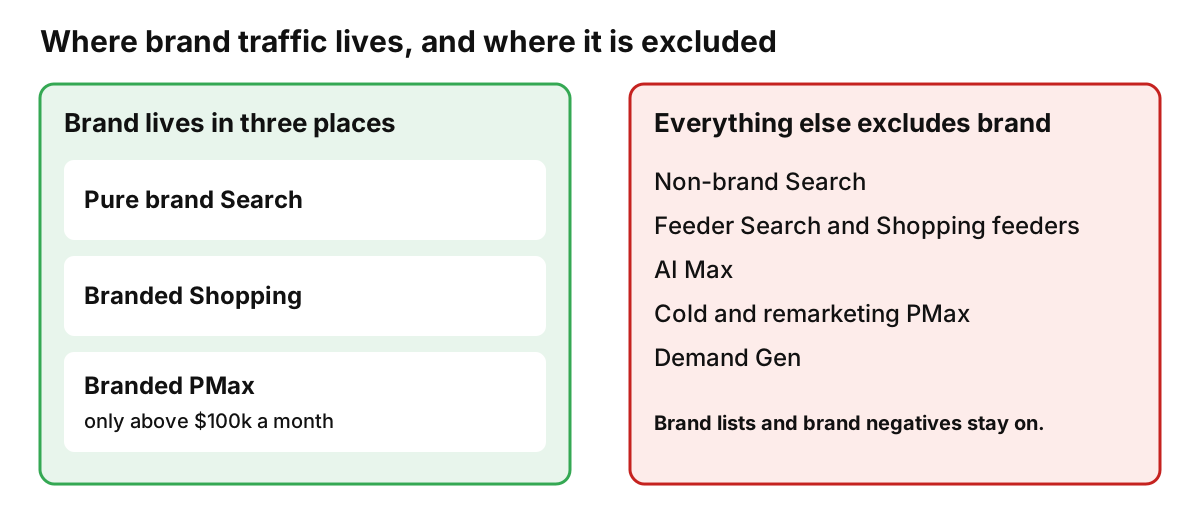
So brand lives in three places only, and every other campaign excludes it:
- ▶Pure brand Search
- ▶Branded Shopping
- ▶Branded PMax, only once the account passes $100k a month
Pure brand Search runs on Maximize Clicks with a bid cap, on portfolio target ROAS with a max CPC cap, or on Manual CPC. Never target impression share, which inflates CPC for no reason. Never target ROAS or target CPA without a cap, because that lets Google charge whatever CPC it wants on your own brand name.
Branded Shopping is the opposite. It runs on a high target ROAS, at least double the account's target. If PMax is already eating your brand traffic, read how to stop Performance Max cannibalizing brand traffic.
Feeders Find, Converters Scale
Feeders are cheap, controlled campaigns that discover which search terms and products convert. Converters take those winners and scale them against a ROAS target.
| Campaign | Job | How it runs |
|---|---|---|
| Feeder Search | Finds converting search terms | Exact match, Maximize Clicks |
| Feeder Shopping | Finds converting products | Max clicks, starting at a $1 bid |
| Feed-only PMax (converter) | Scales the product feed | Target ROAS around 3x |
| Full-build PMax (converter) | Scales the feed plus assets | Target ROAS around 3.5x |
| AI Max (converter) | Scales proven search themes | Exact match keywords, 300% target ROAS, themes with 5+ converted terms |
Default feeder and converter setups. Targets are starting points, set per brand.
Feeders never run on target ROAS, because they starve. And a feeder is never judged alone: read feeder and converter results together. For the detail, see Google Shopping feeder strategy and PMax architecture for DTC brands.
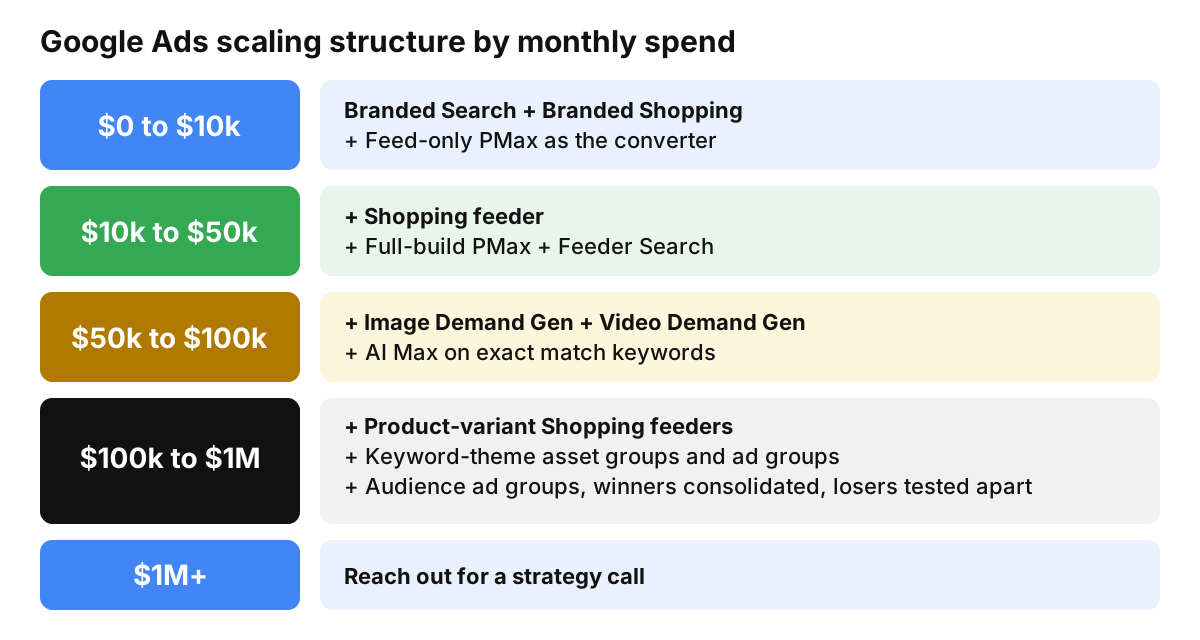
Stage 1: $0 to $10k a Month
Keep it small. The goal at this stage is clean data, not coverage.
- ▶Branded Search: protects your own name for pennies.
- ▶Branded Shopping: keeps your products showing on brand searches.
- ▶Feed-only PMax as the converter: sells the feed with the brand excluded and a target ROAS around 3x.
A brand-new account has no conversions yet, so start branded Shopping on manual CPC and move it to a high target ROAS once it has data.
Stage 2: $10k to $50k a Month
- ▶Shopping feeder: max clicks from a $1 bid, to find the products that convert.
- ▶Full-build PMax: adds assets and creative to the feed, with a target ROAS around 3.5x.
- ▶Feeder Search: exact match on Maximize Clicks, to harvest converting search terms.
The feeders now fill the pipeline the converters scale. Move winners across. Do not turn a feeder into a converter by changing its bidding.
Stage 3: $50k to $100k a Month
- ▶Image Demand Gen and Video Demand Gen: the cold-traffic layer, tested one audience and one channel at a time.
- ▶AI Max: exact match keywords built from the feeder's converted terms, with a 300% target ROAS.
AI Max only gets a theme once that theme has at least five converted search terms behind it. Thinner themes wait.
Stage 4: $100k to $1M a Month
- ▶Product-variant Shopping feeders: a feeder for each variant that earns its own data.
- ▶Keyword-theme asset groups and ad groups: each theme gets its own copy and landing page.
- ▶Audience-segment ad groups: each audience is tested on its own.
- ▶Winners consolidated, losers tested apart: leave what works alone and move the laggards into separate campaigns.
- ▶Branded PMax: now allowed, on a high target ROAS.
This is where an account has the budget to run many tests. It is also where structure without discipline turns into a mess.
Stage 5: $1M+ a Month
Above this level the plan is built around the brand, not a map. Reach out for a strategy call.
How We Judge and Fund Each Stage
- ▶Every ROAS figure uses conversion time, because click-date numbers understate recent days.
- ▶Judge 7, 14 and 30 days together before any bid or budget move.
- ▶A result within 20% of target counts as on target.
- ▶Raise budgets by up to 20% when all three windows hit target. Cut by 20% when they miss by more than that margin.
- ▶No keyword spends $50 without hitting the target ROAS, and no product spends more than its own price without hitting it.
- ▶A campaign that hits its target never loses impression share. Raise its budget instead.
What an Operator Changes for Your Brand
The map above is the default. A Shopiator operator slices and dices it for each brand, based on:
- ▶Go-to-market strategy: which channels, countries and launches drive growth.
- ▶Product-market fit: how fast a product earns its own campaign.
- ▶Unit economics: margin sets how aggressive targets and budgets can be.
- ▶Wins: proven winners get consolidated, scaled or protected.
- ▶Performance trends: the 7, 14 and 30 day reads decide every budget move.
A high-margin brand with a hero product can earn its own campaign earlier than the map says. A thin-margin brand may need tighter targets and a slower climb. Two brands at the same spend should rarely run the same account.
High-Level Strategy Only
This SOP is a high-level strategy only. The operator at Shopiator takes the liberty of slicing and dicing the plan for specific ecom brands, based on their go-to-market strategy, product-market fit, unit economics, wins and performance trends. Use it as a map for the conversation, not a copy-paste build.
Frequently Asked Questions
What is the best Google Ads structure for an ecom brand?
There is no single structure. The default we start from follows monthly spend and adds a layer only when your data can feed it: branded Search, branded Shopping and a feed-only PMax under $10k, then feeders and a full-build PMax, then Demand Gen and AI Max, then splits by product, keyword theme and audience. Brand and non-brand stay in separate campaigns at every stage.
How should I structure Google Ads under $10k a month?
Run three campaigns: branded Search, branded Shopping and a feed-only PMax as your converter with brand excluded. Keep it small so each campaign gets enough data to learn. A brand-new account with no conversions should start branded Shopping on manual CPC and move to a high target ROAS once it has conversions.
When should an ecom brand add Demand Gen?
In this map, image and video Demand Gen arrive between $50k and $100k a month, together with AI Max. A brand's own data can move that earlier or later, which is why an operator adjusts the plan per brand.
Should brand and non-brand campaigns be separate?
Yes. Brand traffic converts far above the account average, so mixing it with prospecting inflates every number and hides what prospecting really does. Brand lives in pure brand Search, branded Shopping and, above $100k a month, a branded PMax. Every other campaign excludes the brand.
What is a feeder campaign in Google Ads?
A feeder is a cheap, controlled campaign that discovers which search terms or products convert. Feeder Search runs exact match on Maximize Clicks, and a Shopping feeder runs max clicks from a $1 bid. The winners are then scaled in converter campaigns that run against a ROAS target. Feeders never run on target ROAS.
How should a brand Search campaign bid?
On Maximize Clicks with a bid cap, on portfolio bidding with target ROAS and a max CPC cap, or on Manual CPC. Never target impression share, which inflates CPC for no reason. Never target ROAS or target CPA without a cap, because that lets Google charge whatever CPC it wants on your own brand name.
Can I copy this structure into my own account?
Use it as a map, not a template. This is a high-level strategy only. A Shopiator operator slices and dices the plan for each brand based on its go-to-market strategy, product-market fit, unit economics, wins and performance trends.
Want the operator to check this on your account?
The Operator Audit is a full manual review of your account: 10 recommendation sets, a live findings call and a prioritized action plan. The $1,299 comes off your first month if you hire us within 30 days.
Keep reading
Preventing Chargebacks: Lessons From Shopify and Netflix
Preventing chargebacks with billing help pages: what ecom brands can learn from Shopify and Netflix, how each explains an unrecognized charge, the seven pages to publish and how to measure them.
ReadGuideHow to Scale Subscription Ecom Brands on Google Ads
How to scale subscription ecom brands on Google Ads: why chasing a high ROAS to cover Meta losses caps your growth, how to set a lower target ROAS from 90-day payback, and how to structure the account to capture Meta demand and Google prospecting.
ReadGuideEcommerce Purchase Flows: Test Your Store Like a Customer
Ecommerce purchase flows every founder should test on their own store: the 10 steps from ad click to second order, how to run a real test order on your phone, a pass/fail scorecard, and the 7 email flows that fire around them.
Read